
Govity – Municipal & Government Elementor Template Kit
- Updated on May 2, 2026
- 100% Original Product & Well Documented
- Unlimited Domain Usage
*Important Note:
The image should not be Part of the template kit. You need to use your own reliable Source.


Original price was: ₹999.00.₹299.00Current price is: ₹299.00.
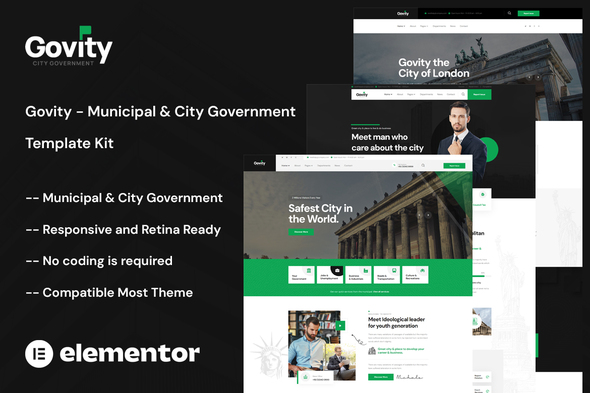
Build a professional municipal website in minutes with Govity — the ready-to-use Elementor template kit designed for government agencies and public offices. Get instant access with commercial license included.
- Secured & Scanned by Virus total & McAfee.
- Access to Free updates for Lifetime
- All products are Under GPL License (Unlimited Domain Usage)
- We Not Provide any Support For this Product

Lifetime Membership
Access 6700+ Premium WordPress Themes & Plugins, Elementor Templates, Mobile Apps, PHP scripts with Lifetime Updates.
Join Premium MembershipRecently Viewed
Govity – Municipal & Government Elementor Template Kit
Building a government website shouldn’t take months or drain your budget. Govity gives municipalities, city councils, and public agencies a complete, professional website foundation built specifically for the public sector — ready to customize and launch in hours, not weeks.
Every element in this template kit speaks the language of trust and transparency that residents expect from local government. No generic designs. No outdated aesthetics. Just clean, accessible, professional pages that make information easy to find.
What Govity Includes
This Elementor template kit comes packed with 15+ pre-built pages covering every municipal need:
- Homepage variants designed for different municipal sizes
- Services portal for utility payments, permits, and resident requests
- Public meetings section with agenda and minutes templates
- Emergency alerts and announcements system
- Department directory with staff profiles
- News and updates section for community communications
- Contact forms designed for accessibility compliance
Built for Government Accessibility
Public websites must serve everyone — seniors navigating on tablets, parents on phones, residents using screen readers. Govity follows WCAG accessibility guidelines with high-contrast text options, clear navigation, readable font sizes, and mobile-responsive layouts that work on any device. Your entire community can access important information without frustration.
Who It’s Built For
Govity works perfectly for:
- City and county municipalities of any size
- Townships, boroughs, and special districts
- Mayor’s offices and council chambers
- Public works and utility departments
- Parks, recreation, and community services
- Permitting offices and planning departments
Simple Setup, No Coding Required
Import Govity directly into your existing Elementor installation. Every section, header, and footer is fully editable — swap in your logo, update your colors to match existing branding, add your content, and publish. The drag-and-drop builder means your communications team can make updates without touching code or waiting on developers.
Why Government Agencies Choose Govity
Custom municipal websites cost tens of thousands and take months to build. You get a polished, professional result without the development overhead. The one-time purchase includes a commercial license, so you’re covered for all government use — no recurring fees, no surprises. Your team gets lifetime updates as web standards evolve, keeping your site current without additional investment.
This template kit handles the structure so your staff can focus on what matters — serving your residents.
Ready to Get Started?
Download Govity today and have a professional municipal website live this week. One-time payment, lifetime access, commercial license included. No subscriptions. No hidden costs. Just a government website that works for everyone in your community.
Only logged in customers who have purchased this product may leave a review.
How to use Kit:
Install and activate the “Template Kit – Import” plugin from Plugins > Add New in WordPress.
Do not unzip.
Go to Template Kit – Import > Upload Template Kit Zip File button.
Before importing a template, ensure the Install Requirements button is clicked to activate required plugins.
For best results, do not import more than one template at a time.
RELATED PRODUCTS

DIVI – Original License | One Time Payment – Exclusive Deal

Elementor Pro 4.2.3 + Elementorism Landing Pages WordPress Plugin

907 5.3.6 – Responsive Multi-Purpose WordPress Theme

Element Pack Pro 9.1.0 – Addon For Elementor






 Mobile Apps
 php script
 How to
Reviews
There are no reviews yet