
Griyo – Real Estate Elementor Template Kit
- Updated on May 1, 2026
- 100% Original Product & Well Documented
- Unlimited Domain Usage
*Important Note:
The image should not be Part of the template kit. You need to use your own reliable Source.


Original price was: ₹999.00.₹299.00Current price is: ₹299.00.
Build a real estate website that actually looks like you hired a pro — without the freelancer bill. 10+ pages, drag-and-drop setup, and your listings could be live by tonight.
- Secured & Scanned by Virus total & McAfee.
- Access to Free updates for Lifetime
- All products are Under GPL License (Unlimited Domain Usage)
- We Not Provide any Support For this Product

Lifetime Membership
Access 6700+ Premium WordPress Themes & Plugins, Elementor Templates, Mobile Apps, PHP scripts with Lifetime Updates.
Join Premium MembershipRecently Viewed
Griyo – Real Estate Elementor Template Kit: Your Complete Property Website Solution
You could spend weeks building a real estate site from scratch. Or you could spend 30 minutes importing Griyo and watching your property listings look incredible.
That’s really what this kit boils down to. Griyo gives you 10+ pages designed specifically for property businesses — property grids, agent profiles, lead forms, neighborhood pages. All the sections you need, none of the ones you don’t.
No coding. No design degree. Just Elementor, WordPress, and a few hours of your time.
What It Is
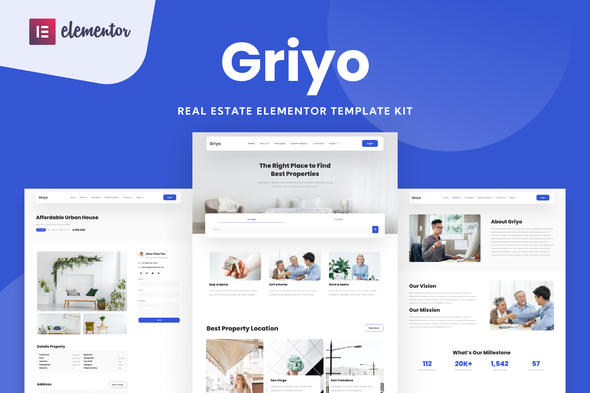
Griyo is a pre-made website package built for the free Elementor page builder. It includes everything a real estate agent, agency, or developer needs to launch fast: hero sections with property carousels, listing grids with filtering, agent directories, contact forms, and more.
All designs are mobile-responsive. All pages are SEO-friendly. Import into WordPress, swap the placeholder content with your own, and publish.
Key Features
- 10+ pre-built pages: home, listings, single property, agents, about, contact, and more
- Drag-and-drop editing in Elementor — no code, no problem
- Property cards with image galleries, price tags, location badges, and inquiry buttons
- Agent profile sections: photo, credentials, listing count, direct contact info
- Lead capture forms built for real estate inquiries and tour requests
- Looks sharp on phones, tablets, and desktops
- Commercial license — use it for your own business or client projects
- One payment. Lifetime access. Free updates.
Who It’s For
Independent agents building their personal brand. Small agencies that need a professional look without agency-sized budgets. Developers showcasing new projects. WordPress designers who want to deliver faster.
List residential, commercial, or luxury — Griyo adapts. And if you’re a freelancer who builds sites for clients, the commercial license means you can reskin this for multiple real estate businesses. One purchase, multiple paychecks.
How To Use It
Simple. Install Elementor on your WordPress site, upload the Griyo kit file, and import the pages you want. Replace the demo listings with your properties. Swap the agent photos with your team. Update the contact info.
Most users are up and running in under an hour. You won’t dig through confusing settings — everything’s organized logically, labeled clearly, and ready to customize.
Why Buy This
A custom real estate website from a developer? Easily $3,000–$8,000 and 4–8 weeks of waiting. Generic WordPress themes often miss what property businesses actually need — clean listing displays, agent profiles, inquiry forms that convert.
Griyo fills that gap. Purpose-built for real estate at a price that makes sense. You customize every detail yourself, so it matches your brand exactly. Updates are free forever. Support is included if you get stuck.
Think of it as hiring a designer for the price of a coffee subscription.
Ready to Get Started?
Stop delaying your online presence. Buy Griyo, follow the simple import steps, and have a professional real estate site live today. Instant download. No recurring fees. Yours forever.
Only logged in customers who have purchased this product may leave a review.
How to use Kit:
Install and activate the “Template Kit – Import” plugin from Plugins > Add New in WordPress.
Do not unzip.
Go to Template Kit – Import > Upload Template Kit Zip File button.
Before importing a template, ensure the Install Requirements button is clicked to activate required plugins.
For best results, do not import more than one template at a time.
RELATED PRODUCTS

DIVI – Original License | One Time Payment – Exclusive Deal

Elementor Pro 4.2.3 + Elementorism Landing Pages WordPress Plugin

907 5.3.6 – Responsive Multi-Purpose WordPress Theme

Element Pack Pro 9.1.0 – Addon For Elementor






 Mobile Apps
 php script
 How to
Reviews
There are no reviews yet