
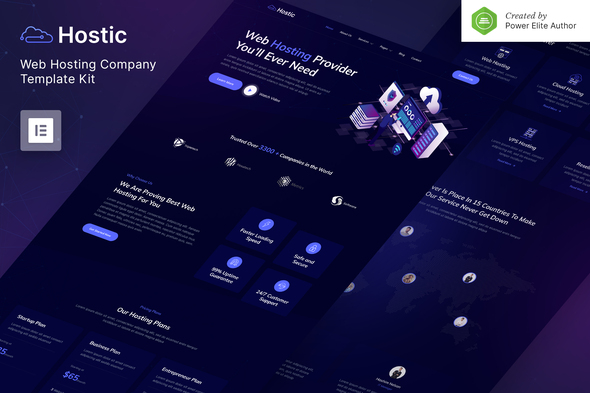
Hostic – Web Hosting Company Elementor Template Kit
- Updated on May 2, 2026
- 100% Original Product & Well Documented
- Unlimited Domain Usage
*Important Note:
The image should not be Part of the template kit. You need to use your own reliable Source.


Original price was: ₹999.00.₹299.00Current price is: ₹299.00.
Launch a hosting site that actually stands out. 15+ pages built for web hosts — drag-and-drop, no code, ready in hours. Skip the agency. Download now.
- Secured & Scanned by Virus total & McAfee.
- Access to Free updates for Lifetime
- All products are Under GPL License (Unlimited Domain Usage)
- We Not Provide any Support For this Product

Lifetime Membership
Access 6700+ Premium WordPress Themes & Plugins, Elementor Templates, Mobile Apps, PHP scripts with Lifetime Updates.
Join Premium MembershipRecently Viewed
Hostic – Web Hosting Company Elementor Template Kit
Most hosting company websites look identical. Same layouts. Same stock photos of servers. Same boring pricing tables. If you’re building a hosting business, you don’t want to blend in with every other provider using the same generic WordPress theme.
Hostic is different. It’s a complete Elementor template kit built specifically for web hosts, VPS providers, and cloud services. 15+ pages. Drag-and-drop editing. No developers required. Your site could be live by dinner time.
What Is Hostic?
A professional template kit for the hosting industry. Not a generic website builder — every section, layout, and design choice is optimized for how hosting customers research and buy. You get trust signals in the right places. Service showcases that actually convert. Pricing tables that make comparison shopping easy. Data center pages that prove you’re legitimate.
Import the homepage, pricing plans, service layouts, data center showcases, support portals, about pages, contact forms, and blog — all built to work together as one cohesive website.
Key Features of Hostic
Everything a hosting company website needs, nothing it doesn’t:
- 15+ pages ready to import and customize
- Hero sections, feature highlights, and pricing teasers on the homepage
- Detailed hosting plan pages with side-by-side comparison tables
- Data center showcase with location maps and infrastructure details
- FAQ and support sections built for customer service workflows
- Blog layouts, contact forms, and about pages
- Mobile-responsive — looks sharp on phones, tablets, and desktops
Clean, tech-forward design. Nothing dated. Nothing generic.
Who Is This Template Kit For?
- New hosting companies that need a professional site without agency fees
- VPS and dedicated server providers refreshing their online presence
- Cloud platforms and SaaS startups ready to launch
- Domain registrars and agencies offering hosting services
- Small hosting businesses that want enterprise-level presentation
No technical skills required. WordPress + Elementor. That’s it.
How to Use Hostic
Five steps:
1. Set up WordPress. 2. Install the free Elementor plugin. 3. Upload the Hostic kit file. 4. Import the pages you want. 5. Swap the placeholder content with your own.
Change fonts, adjust colors, move sections around. Everything happens inside Elementor. The kit adapts to your specific services — no custom development needed.
Why Buy This Template Kit?
Commercial license included. Build client websites or your own. Use it once or a hundred times. No restrictions.
One payment. Lifetime access. Future page additions and updates come free — no subscription required. And if you get stuck on anything, lifetime support has you covered.
This kit pays for itself on your first client project. Or save months of time building your own hosting site from scratch. Either way, it’s a one-time investment that keeps paying dividends.
Ready to Get Started?
Skip the agency quotes. Download Hostic now and start building your hosting website tonight.
Only logged in customers who have purchased this product may leave a review.
How to use Kit:
Install and activate the “Template Kit – Import” plugin from Plugins > Add New in WordPress.
Do not unzip.
Go to Template Kit – Import > Upload Template Kit Zip File button.
Before importing a template, ensure the Install Requirements button is clicked to activate required plugins.
For best results, do not import more than one template at a time.
RELATED PRODUCTS

DIVI – Original License | One Time Payment – Exclusive Deal

Elementor Pro 4.2.3 + Elementorism Landing Pages WordPress Plugin

907 5.3.6 – Responsive Multi-Purpose WordPress Theme

Element Pack Pro 9.1.0 – Addon For Elementor






 Mobile Apps
 php script
 How to

Reviews
There are no reviews yet