
Langkah – Shoes Store eCommerce Elementor Template Kit
- Updated on May 3, 2026
- 100% Original Product & Well Documented
- Unlimited Domain Usage
*Important Note:
The image should not be Part of the template kit. You need to use your own reliable Source.


Original price was: ₹999.00.₹299.00Current price is: ₹299.00.
Your shoe store, live today. 15+ Elementor pages: product grids, galleries, cart, checkout — no coding needed, commercial license included.
- Secured & Scanned by Virus total & McAfee.
- Access to Free updates for Lifetime
- All products are Under GPL License (Unlimited Domain Usage)
- We Not Provide any Support For this Product

Lifetime Membership
Access 6700+ Premium WordPress Themes & Plugins, Elementor Templates, Mobile Apps, PHP scripts with Lifetime Updates.
Join Premium MembershipRecently Viewed
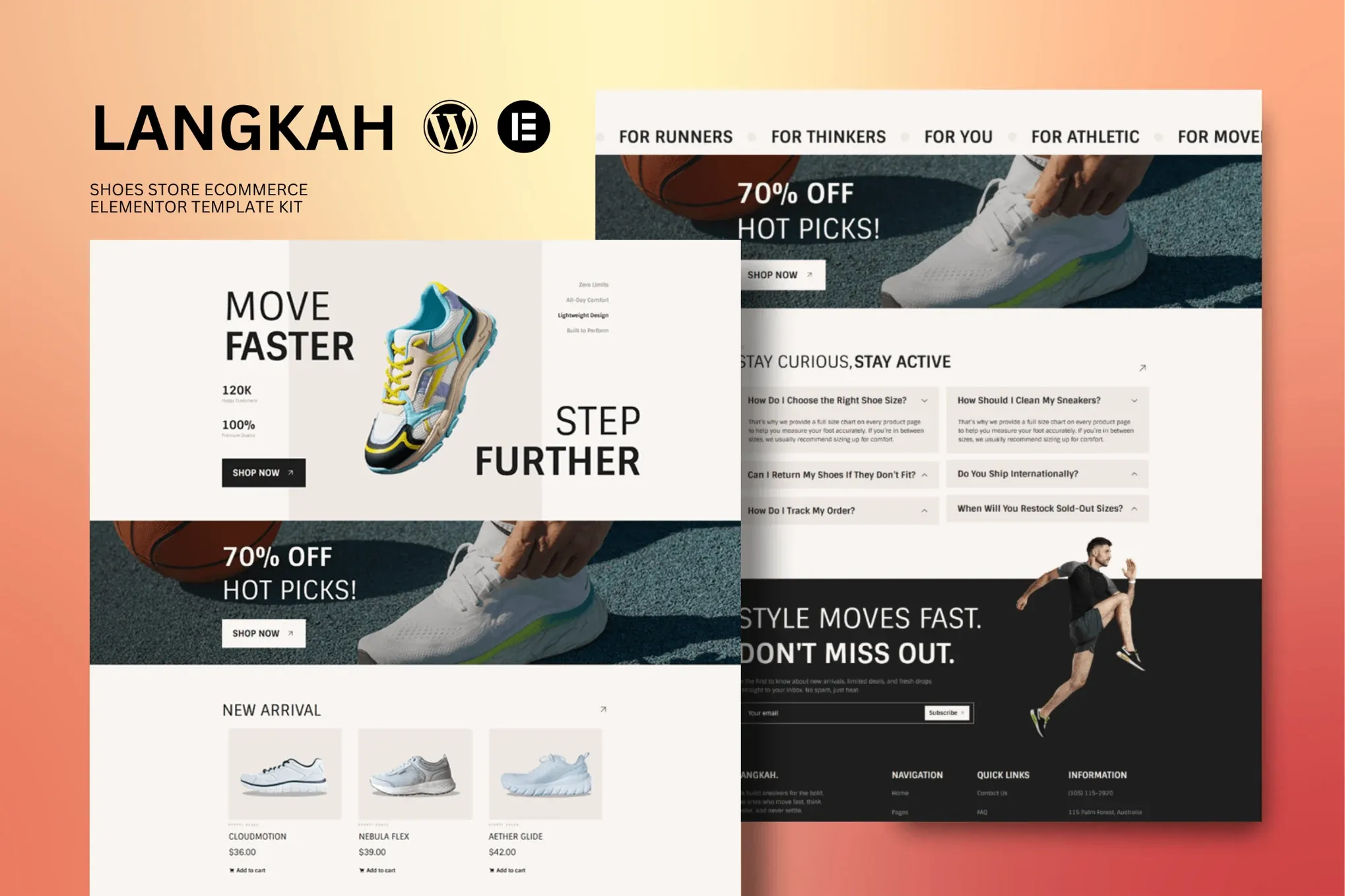
Langkah Shoes Store eCommerce Template Kit for Elementor
Building a shoe store website from scratch eats up weeks of your time and hundreds in development costs. Langkah changes that. This template kit gives you 15+ pages built specifically for footwear shops — you can often have something live the same day you download it.
If you’ve used Elementor before, you can work with this. Drag, drop, done.
What You Get with Langkah
Everything you need to launch and run a shoe store:
- Homepage with hero section, collection showcases, and email signup
- Shop page with product grid, filtering options, and quick-view popups
- Single product pages featuring image galleries, size guides, and related items
- Cart and checkout flows built to convert browsers into buyers
- About, contact, and blog page templates
- Headers and footers that look solid on phones, tablets, and desktops
Every page renders smoothly in Elementor with clean, semantic markup. The layouts shift automatically for mobile screens — important when most shoe shoppers are browsing on their phones.
Built for How Footwear Actually Sells
Langkah isn’t a generic shop template with “shoes” slapped into the title. The design reflects how sneaker and boot brands actually move product:
- Big image zones so your product photos carry the conversation
- Size guide blocks built into product pages
- Collection navigation that handles seasonal drops and new arrivals cleanly
- Sale and promo banner sections
- Testimonial layouts that reinforce trust
The color scheme stays minimal and neutral — makes colorful sneakers and boots catch the eye. Your brand colors swap in with a few clicks in Elementor’s style settings.
Who Is This For?
Langkah fits:
- First-time store owners who want a professional look without hiring a developer
- Freelancers handling client projects on tight deadlines
- Agencies needing a solid shoe store starting point to build from
- WordPress devs who are tired of recreating the same pages for every project
Comfortable with WordPress? Even one session with Elementor is enough to jump in. Import the kit, swap the placeholder content with your actual products, hit publish.
Getting Started Takes About Three Hours
Here’s the process:
- Install Elementor (the free version works) and set up WooCommerce
- Download Langkah and import the kit through Elementor
- Swap placeholder text and images for your own
- Add your products and connect a payment gateway
- Publish
Most people finish steps 1-4 in under three hours. If you run into issues, lifetime support is there.
Why Skip the Agency Route
Custom shoe store builds typically run $2,000-$5,000 and take 4-8 weeks. Langkah delivers the same polished result for a fraction of that — and you own it completely after purchase.
No recurring fees either. Pay once, download immediately, use it forever. Updates come at no extra cost, keeping your store compatible as WordPress and Elementor evolve.
The commercial license covers client work too. You can hand off sites built with Langkah without worrying about extended licensing costs.
Ready to Launch?
Get Langkah now. Replace the demo content with your products, go live, and start selling. One payment, lifetime access, support when you need it.
Only logged in customers who have purchased this product may leave a review.
How to use Kit:
Install and activate the “Template Kit – Import” plugin from Plugins > Add New in WordPress.
Do not unzip.
Go to Template Kit – Import > Upload Template Kit Zip File button.
Before importing a template, ensure the Install Requirements button is clicked to activate required plugins.
For best results, do not import more than one template at a time.
RELATED PRODUCTS

DIVI – Original License | One Time Payment – Exclusive Deal

Elementor Pro 4.2.3 + Elementorism Landing Pages WordPress Plugin

907 5.3.6 – Responsive Multi-Purpose WordPress Theme

Element Pack Pro 9.1.0 – Addon For Elementor






 Mobile Apps
 php script
 How to
Reviews
There are no reviews yet