
Maquin – Construction Equipment Rentals Elementor Pro Template Kit
- Updated on May 3, 2026
- 100% Original Product & Well Documented
- Unlimited Domain Usage
*Important Note:
The image should not be Part of the template kit. You need to use your own reliable Source.


Original price was: ₹999.00.₹299.00Current price is: ₹299.00.
Launch a professional construction equipment rental website in hours — not weeks. Maquin gives you 10+ ready-to-use pages with rental listings, service details, and quote forms built right in. Get instant access and start building today.
- Secured & Scanned by Virus total & McAfee.
- Access to Free updates for Lifetime
- All products are Under GPL License (Unlimited Domain Usage)
- We Not Provide any Support For this Product

Lifetime Membership
Access 6700+ Premium WordPress Themes & Plugins, Elementor Templates, Mobile Apps, PHP scripts with Lifetime Updates.
Join Premium MembershipRecently Viewed
Construction Equipment Rental Website Template Kit for Elementor Pro
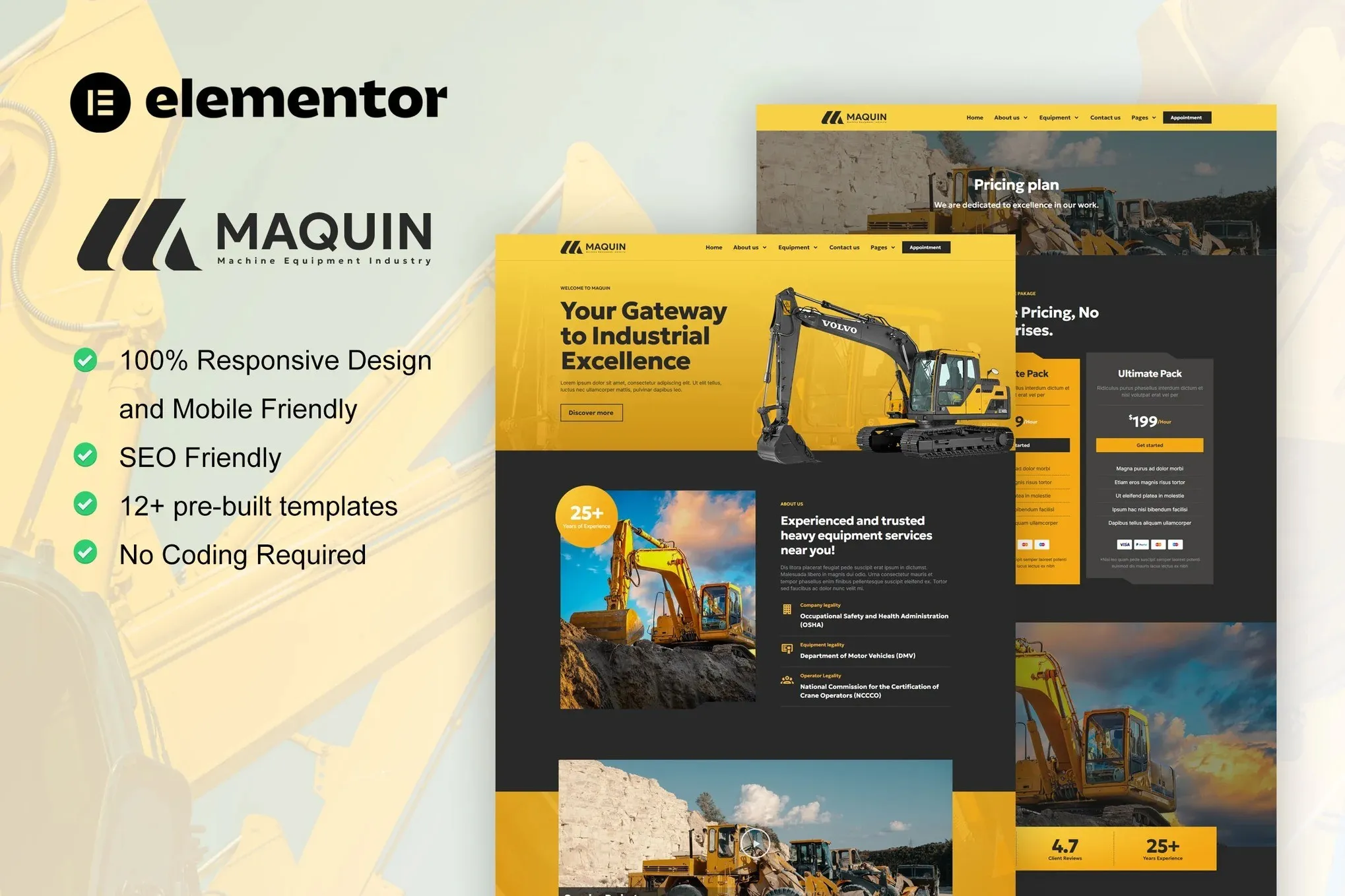
You need a website that shows off heavy machinery without looking heavy. Maquin is a purpose-built Elementor Pro template kit designed specifically for construction equipment rental businesses, equipment dealers, and machinery service companies. It ships with 10+ pre-designed pages that cover every section your site needs — from a dynamic equipment catalog to a functional quote request form. No coding required. Just import, customize, and go live.
Traditional web development for rental businesses eats up weeks and thousands in agency fees. Maquin changes that equation entirely. This kit works inside the free Elementor page builder — you’ll just need Elementor Pro to unlock the full template set. Once installed, you get a polished, mobile-responsive site that looks like it took a professional team months to build.
What Is Maquin?
Maquin is a ready-to-use Elementor Template Kit tailored for the construction and heavy equipment rental industry. It includes homepage layouts, individual equipment rental pages, service showcases, about and team sections, contact forms with quote request functionality, and a full pricing structure. Every template is built with clean, semantic HTML and fully responsive design so your site looks sharp on every device — from desktop monitors in the office to smartphones on the job site.
Key Features of Maquin
This template kit covers the complete structure a rental business website needs, including:
- 10+ pre-built pages covering homepage, rentals, services, pricing, team, and contact
- Equipment catalog layouts with image placeholders, specs sections, and rental rate displays
- Built-in quote request and inquiry forms — clients can ask about availability without picking up the phone
- Mobile-first responsive design that adapts cleanly to tablets and smartphones
- Clean, organized file structure — import individual pages or the full kit at once
- Compatible with Elementor Free and Elementor Pro widgets — no extra plugins required
The design aesthetic leans industrial-professional: bold headings, high-contrast layouts, and plenty of white space to let equipment photos breathe. It’s the kind of site that tells a contractor you mean business.
Who Is This For?
Maquin is a smart buy if you fall into any of these categories:
- Construction equipment rental companies that want a professional web presence without a custom build
- Freelance web designers and agencies building client sites on tight timelines and budgets
- Small machinery dealers looking to list inventory, display hourly and daily rates, and capture leads online
- Independent operators in excavation, lifting, or earthmoving who need a polished quote-ready website fast
If you’ve been putting off your website because the process feels overwhelming, Maquin removes that friction. The templates are structured, labeled, and ready to customize — swap your logo, update your equipment photos, adjust your rates, and publish.
How to Use This Template Kit
Getting started takes about 15 minutes. Install Elementor and Elementor Pro on your WordPress site, then import the Maquin kit from the Templates section. Browse the page library, choose the layouts that match your needs, and start editing. Every text block, image, and button is editable directly in Elementor’s visual builder. You can rearrange sections, swap colors to match your brand, and publish changes in real time. No FTP. No code. No agency back-and-forth.
Why Buy Maquin Instead of Starting From Scratch?
Custom builds for rental businesses often run $3,000–$8,000 when you factor in design time, development, and revisions. Maquin delivers a professionally structured foundation at a fraction of that cost. You get a complete page structure, a coherent visual design, and working layout components that would take days to build from scratch — all available for immediate download the moment you purchase.
This is a straightforward, no-nonsense template kit for a specific industry. It does the heavy lifting so you can focus on running your business.
Ready to Get Started?
Maquin is available for instant download with a commercial license included. Use it for your own business site or client projects — no restrictions. One payment, lifetime access to the files. If you’re ready to get a professional equipment rental website live without the custom development timeline, this kit is built for you. Download now and have your site structure in place today.
Only logged in customers who have purchased this product may leave a review.
How to use Kit:
Install and activate the “Template Kit – Import” plugin from Plugins > Add New in WordPress.
Do not unzip.
Go to Template Kit – Import > Upload Template Kit Zip File button.
Before importing a template, ensure the Install Requirements button is clicked to activate required plugins.
For best results, do not import more than one template at a time.
RELATED PRODUCTS

DIVI – Original License | One Time Payment – Exclusive Deal

Elementor Pro 4.2.3 + Elementorism Landing Pages WordPress Plugin

907 5.3.6 – Responsive Multi-Purpose WordPress Theme

Element Pack Pro 9.1.0 – Addon For Elementor






 Mobile Apps
 php script
 How to
Reviews
There are no reviews yet