
Mascoolin – Fashion Store Elementor Template Kit
- Updated on May 2, 2026
- 100% Original Product & Well Documented
- Unlimited Domain Usage
*Important Note:
The image should not be Part of the template kit. You need to use your own reliable Source.


Original price was: ₹999.00.₹299.00Current price is: ₹299.00.
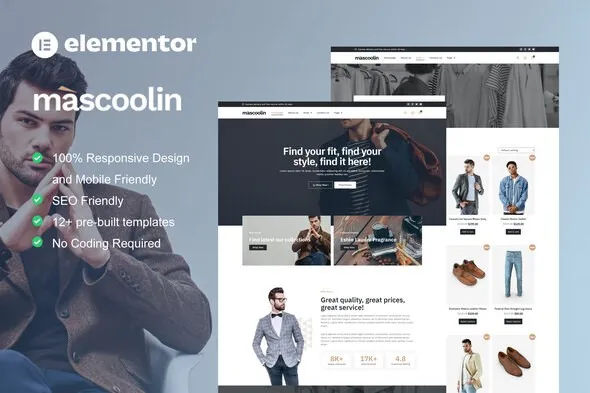
Mascoolin gives your men’s fashion brand a professional storefront that actually looks expensive. 15+ pages built for clothing brands, drag-and-drop editing in Elementor, and your store goes live today — no developer needed.
- Secured & Scanned by Virus total & McAfee.
- Access to Free updates for Lifetime
- All products are Under GPL License (Unlimited Domain Usage)
- We Not Provide any Support For this Product

Lifetime Membership
Access 6700+ Premium WordPress Themes & Plugins, Elementor Templates, Mobile Apps, PHP scripts with Lifetime Updates.
Join Premium MembershipRecently Viewed
Mascoolin – Elementor Template Kit for Men’s Fashion Stores
Most men’s fashion brands spend months and thousands of dollars on custom sites that still look like every other WordPress install. Mascoolin flips that. You get a complete storefront that looks like you paid a designer — except you set it up over your lunch break.
What It Is
Mascoolin is a pre-built website template built specifically for men’s clothing and accessories stores. It runs on the free Elementor page builder and hooks into WooCommerce for your shop functionality. The kit comes with complete pages and modular sections you can mix together, rearrange, or swap out entirely — all through drag and drop. No code. No developer. Just your browser and about 10 minutes.
Key Features
Fifteen pages ready to go, covering everything your store needs:
- Homepage with hero section, featured products, and email signup
- Collection and category pages with clean grid layouts
- Product pages with image galleries, size guides, and smooth add-to-cart flows
- Cart, checkout, and customer account pages
- About and contact pages that actually build credibility
The design aesthetic leans masculine — dark accents, bold type, layouts that put your product photos front and center. Everything’s responsive out of the box, loads quickly, and includes promo sections for sales and new drops.
Who It’s For
Mascoolin works well for:
- New men’s fashion brands launching their first online store without a design budget
- Freelancers building client sites who need a polished foundation they can customize fast
- Existing men’s clothing shops looking to refresh with a cleaner, more modern look
If you’ve been putting off your launch because custom design quotes keep coming back at $5,000+, this exists for exactly that reason. Premium look, fraction of the cost.
How To Use It
Installation takes under 10 minutes. Grab the free Elementor plugin for WordPress, upload the Mascoolin template file, and your pages appear. Drag sections to rearrange, drop in your own photos, pick your brand colors. Everything edits visually — what you see while building is exactly what visitors see when it’s live. Hit publish when you’re happy. No code. No back-and-forth. No waiting on anyone.
Why Buy This
Three things separate Mascoolin from free or generic options:
- Built for fashion, not generic businesses. Generic templates make you fight the design. Mascoolin’s men’s fashion aesthetics come baked in.
- Commercial license included. Use it for client projects, your own store, anything — no restrictions.
- Pay once, use forever. No subscriptions. Instant download. All future updates included free.
Hiring a developer means two weeks minimum, $3,000-$8,000 for decent work, and endless revision cycles. Mascoolin gets you a finished-looking men’s fashion store in an afternoon for a one-time fee that won’t break your startup budget.
Ready to Get Started?
Your men’s fashion brand deserves a store that matches its quality. Buy Mascoolin, download it now, and start editing. Lifetime updates and support come included.
Only logged in customers who have purchased this product may leave a review.
How to use Kit:
Install and activate the “Template Kit – Import” plugin from Plugins > Add New in WordPress.
Do not unzip.
Go to Template Kit – Import > Upload Template Kit Zip File button.
Before importing a template, ensure the Install Requirements button is clicked to activate required plugins.
For best results, do not import more than one template at a time.
RELATED PRODUCTS

DIVI – Original License | One Time Payment – Exclusive Deal

Elementor Pro 4.2.3 + Elementorism Landing Pages WordPress Plugin

907 5.3.6 – Responsive Multi-Purpose WordPress Theme

Element Pack Pro 9.1.0 – Addon For Elementor






 Mobile Apps
 php script
 How to
Reviews
There are no reviews yet