
Meddaz – SaaS Medical Elementor Template Kit
- Updated on May 1, 2026
- 100% Original Product & Well Documented
- Unlimited Domain Usage
*Important Note:
The image should not be Part of the template kit. You need to use your own reliable Source.


Original price was: ₹999.00.₹299.00Current price is: ₹299.00.
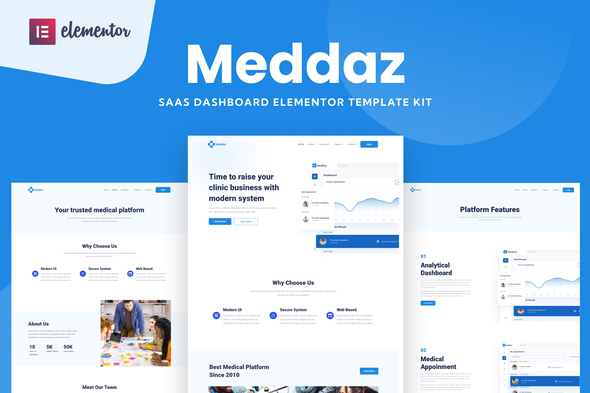
Launch your medical SaaS dashboard in days, not weeks. Meddaz gives you 15+ pre-built pages with a clean, professional design — ready to customize in Elementor and launch today.
- Secured & Scanned by Virus total & McAfee.
- Access to Free updates for Lifetime
- All products are Under GPL License (Unlimited Domain Usage)
- We Not Provide any Support For this Product

Lifetime Membership
Access 6700+ Premium WordPress Themes & Plugins, Elementor Templates, Mobile Apps, PHP scripts with Lifetime Updates.
Join Premium MembershipRecently Viewed
SaaS Medical Dashboard Template for Modern Healthcare Apps
Building a medical SaaS dashboard from scratch eats up weeks of dev time and budget. Meddaz changes that. This Elementor template kit gives you a complete, professional dashboard interface designed specifically for healthcare tech products — so you can stop designing and start launching.
Whether you’re a freelancer building for a healthcare startup or an agency handling multiple medical clients, Meddaz ships with everything you need to deliver a polished, functional dashboard fast.
What It Is
Meddaz is a premium Elementor template kit built for medical and healthcare SaaS applications. It includes 15+ pre-designed pages covering dashboards, patient management views, appointment calendars, analytics screens, and settings panels. Every element is optimized for healthcare interfaces — clean data tables, clear status indicators, and a trustworthy color scheme that patients and providers expect.
No coding required. If you can drag and drop in Elementor, you can build with Meddaz.
Key Features
Every page in this medical dashboard template kit is designed with purpose. Here’s what’s included:
- 15+ page templates covering dashboard home, patient lists, appointment scheduling, billing views, analytics, and account settings
- Fully responsive layouts that look sharp on desktop, tablet, and mobile
- Clean medical-grade UI with accessible contrast ratios and clear visual hierarchy
- Elementor Pro compatibility — use theme builder and global widgets for easy updates
- Commercial license included — use on client projects without额外 fees
Who It’s For
This template kit works best for:
- Freelance web developers building healthcare SaaS products
- Agencies delivering medical tech client projects on tight timelines
- Healthcare tech startups launching MVP dashboards without a full design team
- WordPress developers who prefer Elementor over custom-coded solutions
You should have basic Elementor experience. The kit handles design — you handle the content and customization.
How To Use It
Get started in three steps: install Elementor (free version works), import the Meddaz template kit, and start customizing. Swap the placeholder medical content with your client’s branding, adjust colors if needed, and publish. Most developers complete a basic dashboard setup in 2-4 hours.
The kit works with any WordPress theme built for Elementor. No special plugins required beyond Elementor itself.
Why Buy This
You could spend 40+ hours building a medical dashboard from scratch. Or you could download Meddaz now and deliver a professional result in a single afternoon. At this price, one client project pays for itself — and you keep the template for future healthcare builds.
Instant download. Lifetime access. Use it on unlimited projects under the commercial license.
Ready to Get Started?
Get Meddaz now and have a professional medical dashboard template ready to customize in minutes. One-time payment, lifetime access, commercial license included. Download and start building your healthcare SaaS interface today.
Only logged in customers who have purchased this product may leave a review.
How to use Kit:
Install and activate the “Template Kit – Import” plugin from Plugins > Add New in WordPress.
Do not unzip.
Go to Template Kit – Import > Upload Template Kit Zip File button.
Before importing a template, ensure the Install Requirements button is clicked to activate required plugins.
For best results, do not import more than one template at a time.
RELATED PRODUCTS

DIVI – Original License | One Time Payment – Exclusive Deal

Elementor Pro 4.2.3 + Elementorism Landing Pages WordPress Plugin

907 5.3.6 – Responsive Multi-Purpose WordPress Theme

Element Pack Pro 9.1.0 – Addon For Elementor






 Mobile Apps
 php script
 How to

Reviews
There are no reviews yet