
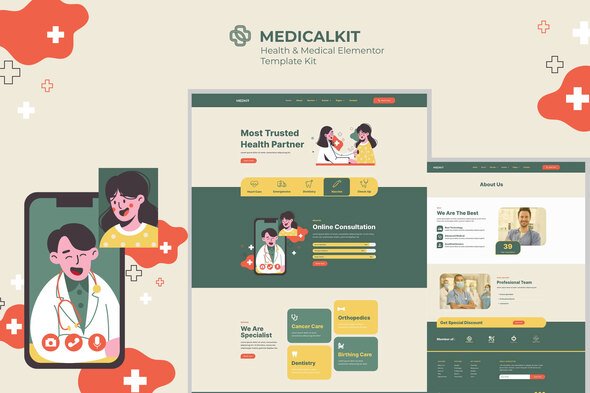
Medicalkit – Health & Clinical Care Elementor Template Kit
- Updated on April 28, 2026
- 100% Original Product & Well Documented
- Unlimited Domain Usage
*Important Note:
The image should not be Part of the template kit. You need to use your own reliable Source.


Original price was: ₹999.00.₹299.00Current price is: ₹299.00.
Build a professional medical website in an afternoon. Medicalkit gives you 15+ pre-built pages for clinics, hospitals, and healthcare practices — no coding required, just drag, drop, and publish.
- Secured & Scanned by Virus total & McAfee.
- Access to Free updates for Lifetime
- All products are Under GPL License (Unlimited Domain Usage)
- We Not Provide any Support For this Product

Lifetime Membership
Access 6700+ Premium WordPress Themes & Plugins, Elementor Templates, Mobile Apps, PHP scripts with Lifetime Updates.
Join Premium MembershipRecently Viewed
Medicalkit – Health & Clinical Care Elementor Template Kit
Your patients are searching for you online right now. When they find you, do they see a site that looks professional and trustworthy — or a mess that sends them straight to your competitor? Medicalkit solves this. It’s a complete Elementor Template Kit built specifically for medical clinics, dental offices, and healthcare practices. Fifteen pages. No code. No developer fees. Just a clean, modern website that starts converting visitors into patients from the moment you launch.
What It Is
Medicalkit gives you everything a modern medical website needs: homepage, services, doctor profiles, appointment booking, testimonials, and contact pages. All pre-designed, all ready to customize. The blue-and-white color scheme hits that sweet spot — professional without being sterile. Every page works beautifully on mobile devices, loads fast, and plays nice with search engines.
Key Features
- 15+ complete page templates — homepage, services, team, appointments, contact, the works
- Doctor profile layouts with space for photos, specialties, credentials, and education
- Appointment scheduling sections with clear, prominent call-to-action buttons
- Service listing templates that work for any medical or dental specialty
- Patient testimonial and review sections to build credibility
- Contact forms paired with embedded maps and practice details
- Fully responsive — looks sharp on iPhones, tablets, and desktop monitors alike
- Clean medical aesthetic that’s immediately recognizable as professional
Who It’s For
Independent practitioners launching a new practice can go from purchase to published in a single afternoon. Established clinics tired of their outdated website get a modern redesign without the agency invoice. Freelance designers handling healthcare clients can cut delivery time significantly. WordPress developers get a solid foundation to build on and customize.
How To Use It
If you’ve used Elementor before, you already know how this works. The kit installs directly into the plugin. Browse the templates, pick the pages you need, then swap in your own text, images, and colors. Want to reorder a section? Drag it. Need to add a block? Drop it in. Nothing complicated. No PHP, no CSS, no technical headaches — just a website that looks like you paid a designer to build it.
Why Buy This
Most medical website projects cost $2,000 to $5,000 when you hire it out. Medicalkit delivers the same quality for a fraction of that. Here’s what you get: instant download so you can start building within minutes, a commercial license that covers client work, and free lifetime updates as WordPress and Elementor evolve. One payment. No subscriptions. No surprises. Plus, if you run into any issues, support is available.
Ready to Get Started?
Ditch the monthly website builder fees and take back control of your online presence. Download Medicalkit today and launch a professional medical website that actually serves your patients. No fluff. No ongoing costs. Just a site that works.
Only logged in customers who have purchased this product may leave a review.
How to use Kit:
Install and activate the “Template Kit – Import” plugin from Plugins > Add New in WordPress.
Do not unzip.
Go to Template Kit – Import > Upload Template Kit Zip File button.
Before importing a template, ensure the Install Requirements button is clicked to activate required plugins.
For best results, do not import more than one template at a time.
RELATED PRODUCTS

DIVI – Original License | One Time Payment – Exclusive Deal

Elementor Pro 4.2.3 + Elementorism Landing Pages WordPress Plugin

907 5.3.6 – Responsive Multi-Purpose WordPress Theme

Element Pack Pro 9.1.0 – Addon For Elementor






 Mobile Apps
 php script
 How to

Reviews
There are no reviews yet