
Medicate – Health & Medical Elementor Template Kit
- Updated on May 2, 2026
- 100% Original Product & Well Documented
- Unlimited Domain Usage
*Important Note:
The image should not be Part of the template kit. You need to use your own reliable Source.


Original price was: ₹999.00.₹299.00Current price is: ₹299.00.
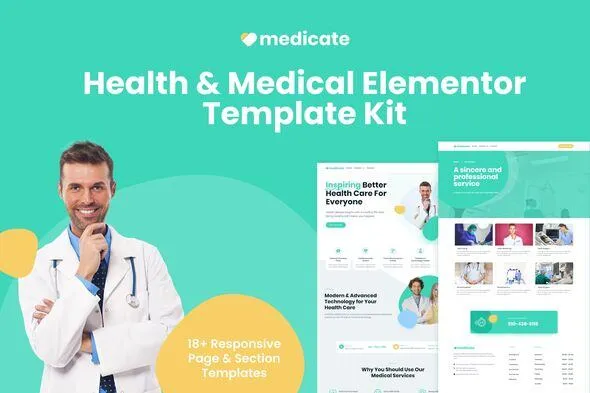
A complete Elementor template kit for medical practices. 15+ pages, doctor profiles, appointment booking, and clinic layouts — customize and publish in a single afternoon.
- Secured & Scanned by Virus total & McAfee.
- Access to Free updates for Lifetime
- All products are Under GPL License (Unlimited Domain Usage)
- We Not Provide any Support For this Product

Lifetime Membership
Access 6700+ Premium WordPress Themes & Plugins, Elementor Templates, Mobile Apps, PHP scripts with Lifetime Updates.
Join Premium MembershipRecently Viewed
Medicate Elementor Template Kit for Health & Medical Websites
You need a medical website that looks trustworthy, loads fast, and actually converts visitors into patients. Building one from scratch takes weeks. Medicate gets you there in hours. This complete Elementor Template Kit ships with everything a health or dental practice, clinic, or pharmacy needs to launch a polished, professional online presence — no coding required.
What You Get with Medicate
No scattered page pieces here. Medicate is a fully coordinated template system where every header, footer, service page, and contact form speaks the same visual language. One payment. Zero mismatched plugins.
- 15+ pre-built pages covering home, services, team, appointments, testimonials, and pricing
- Doctor profile layouts with photo placeholders, credentials, and specialization fields ready to fill in
- Appointment booking section built to reduce friction and capture leads
- Department and specialty pages for medical, dental, physiotherapy, and pharmacy sites
- Fully responsive templates that look sharp on mobile — critical for healthcare audiences
- Works with free Elementor and free Elementor Pro widgets
Who Medicate Is Built For
Opening a new practice and need a site live before your first patient walks through the door? Medicate works. Still running that outdated WordPress theme your nephew cobbled together five years ago? Medicate works. Managing a clinic and need multiple department pages without filing ten design requests? Medicate works too.
If you want a premium look without custom web development costs — or the three-month wait that comes with it — this kit fits.
How to Get Your Medical Site Live
Install Elementor (the free version), upload the kit, start editing. Every section uses drag-and-drop, so you can swap placeholder text, add your photos, and match your brand colors in a single afternoon.
No child theme required. No PHP tweaks. No compatibility headaches. Import the kit and your layouts are clean, well-structured, and ready for your content.
Why Professionals Choose Medicate
Generic stock layouts don’t cut it in healthcare. Patients look for credibility — clean design, clear information, easy navigation. Medicate delivers all three.
The template’s color palette leans toward calming blues and whites, the typography prioritizes readability, and every page structure guides visitors toward a specific action: booking an appointment, calling the clinic, or filling out a contact form.
Commercial license included. Use it for client projects without worrying about extra fees. No subscriptions, no surprises.
Ready to Get Started?
Download Medicate today and publish your medical website in less than a day. Instant access, lifetime updates, and direct support if you hit a snag during setup. Your patients are searching for you right now — make sure they land on a site worth trusting.
Only logged in customers who have purchased this product may leave a review.
How to use Kit:
Install and activate the “Template Kit – Import” plugin from Plugins > Add New in WordPress.
Do not unzip.
Go to Template Kit – Import > Upload Template Kit Zip File button.
Before importing a template, ensure the Install Requirements button is clicked to activate required plugins.
For best results, do not import more than one template at a time.
RELATED PRODUCTS

DIVI – Original License | One Time Payment – Exclusive Deal

Elementor Pro 4.2.3 + Elementorism Landing Pages WordPress Plugin

907 5.3.6 – Responsive Multi-Purpose WordPress Theme

Element Pack Pro 9.1.0 – Addon For Elementor






 Mobile Apps
 php script
 How to
Reviews
There are no reviews yet