
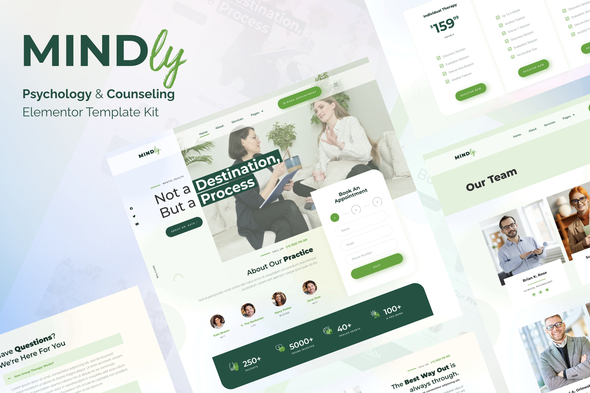
Mindly – Psychology, Therapy & Counseling Elementor Template Kit
- Updated on May 2, 2026
- 100% Original Product & Well Documented
- Unlimited Domain Usage
*Important Note:
The image should not be Part of the template kit. You need to use your own reliable Source.


Original price was: ₹999.00.₹299.00Current price is: ₹299.00.
Mindly gives psychologists, therapists, and counselors a complete, professional website in minutes. No coding or design skills needed — download, customize, and launch. Get instant access today.
- Secured & Scanned by Virus total & McAfee.
- Access to Free updates for Lifetime
- All products are Under GPL License (Unlimited Domain Usage)
- We Not Provide any Support For this Product

Lifetime Membership
Access 6700+ Premium WordPress Themes & Plugins, Elementor Templates, Mobile Apps, PHP scripts with Lifetime Updates.
Join Premium MembershipRecently Viewed
Mindly – Psychology & Therapy Website Template Kit
Building a website for your therapy practice shouldn’t mean months of technical work or costly developer fees. Mindly is a ready-to-use Elementor template kit built specifically for psychologists, therapists, and mental health professionals who need a polished online presence — fast. With this template kit, you can have a fully functional website live in hours, not weeks.
What Mindly Is
Mindly is a professionally designed Elementor template kit tailored for the mental health industry. It includes pre-built pages for your home, services, about, team profiles, testimonials, resources, and contact. Every section is crafted with the calm, trustworthy aesthetic that therapy clients expect. The kit works with the free Elementor plugin — no premium Elementor Pro required for most features.
Key Features
- 9+ complete page layouts including home, services, about, testimonials, and contact
- Appointment booking section designed for therapy scheduling systems
- Fully responsive — looks perfect on mobile, tablet, and desktop
- SEO-friendly structure optimized for mental health keywords
- One-click demo import via the free Template Kit plugin
- Customizable colors and typography to match your brand identity
- Psychology-specific icons, imagery placeholders, and content sections
Who It’s For
This kit works best for:
- Psychologists launching a private practice website
- Therapists and counselors refreshing their online image
- Mental health coaches building a client-facing site
- Counseling centers needing a multi-practitioner website
You don’t need coding knowledge. If you can use drag-and-drop editing in Elementor, you can customize this template kit to match your practice.
How To Use It
Setting up Mindly takes under two hours. Install the free Template Kit Import plugin in WordPress, upload the kit file, and import the demo content with one click. Replace placeholder text with your own practice information, swap images with your team photos, adjust colors to your brand, and hit publish. No coding, no complicated setup, no waiting for a developer.
Why Buy This Template Kit
Here’s what you get with every purchase:
- Commercial license included — use it for unlimited client projects or your own practice
- One-time payment — no subscriptions, no hidden fees
- Lifetime free updates — get new features and compatibility fixes forever
- Lifetime support — help when you need it, no ticket limits
- Beginner-friendly — designed for non-technical users
- Instant download — access your files immediately after purchase
Unlike template marketplaces where prices keep climbing, you pay once and own the template kit. Regular updates ensure it stays compatible with the latest WordPress and Elementor versions.
Ready to Get Started?
Stop paying monthly fees for generic website builders that don’t understand your industry. Download Mindly today and launch a professional psychology and therapy website that builds trust with potential clients from the first click. Get instant access now and have your website live this week.
Only logged in customers who have purchased this product may leave a review.
How to use Kit:
Install and activate the “Template Kit – Import” plugin from Plugins > Add New in WordPress.
Do not unzip.
Go to Template Kit – Import > Upload Template Kit Zip File button.
Before importing a template, ensure the Install Requirements button is clicked to activate required plugins.
For best results, do not import more than one template at a time.
RELATED PRODUCTS

DIVI – Original License | One Time Payment – Exclusive Deal

Elementor Pro 4.2.3 + Elementorism Landing Pages WordPress Plugin

907 5.3.6 – Responsive Multi-Purpose WordPress Theme

Element Pack Pro 9.1.0 – Addon For Elementor






 Mobile Apps
 php script
 How to

Reviews
There are no reviews yet