
Moverie – Movers & Packers Service Elementor Template Kit
- Updated on May 1, 2026
- 100% Original Product & Well Documented
- Unlimited Domain Usage
*Important Note:
The image should not be Part of the template kit. You need to use your own reliable Source.


Original price was: ₹999.00.₹299.00Current price is: ₹299.00.
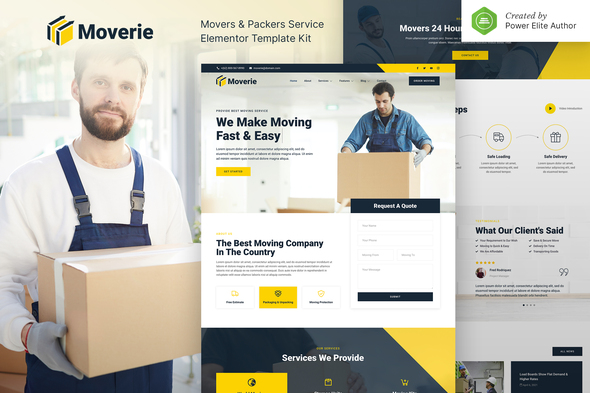
Your trucks are running. Your crew’s booked. But your website’s stuck in 2012. Moverie fixes that with 8 pages ready to edit in Elementor — swap your logo, add your routes, and launch. One payment, lifetime access, commercial license included.
- Secured & Scanned by Virus total & McAfee.
- Access to Free updates for Lifetime
- All products are Under GPL License (Unlimited Domain Usage)
- We Not Provide any Support For this Product

Lifetime Membership
Access 6700+ Premium WordPress Themes & Plugins, Elementor Templates, Mobile Apps, PHP scripts with Lifetime Updates.
Join Premium MembershipRecently Viewed
Build a Professional Moving Company Website in Hours, Not Weeks
Let’s be honest: you didn’t start a moving company to mess around with website code. Your trucks are gassed up. Your crew knows their stuff. But that dated site — or worse, no site at all — is costing you jobs every single week.
Moverie gives you a ready-made website template built specifically for moving and packing businesses. No blank canvas. No developer bills. Open Elementor, drop in your details, and go live.
Eight pages covering what your clients actually look for: who you are, what you charge, how to reach you, and — most importantly — how to book you.
What’s Included
Eight complete page templates. Each one comes loaded with real content placeholders, section layouts, and call-to-action blocks. Edit everything with Elementor’s drag-and-drop editor — no code, no stress.
- Homepage with hero banner, service overview, testimonials, and quote request form
- Services page for residential, commercial, and long-distance moves
- About Us page with team section and company story
- Pricing page with table layouts for estimates
- Contact page with embedded form and business info
- FAQ page for common moving questions
- Blog page template for SEO content
- Coming soon page included
Who This Is For
You know trucks, routes, and packing logistics. HTML and CSS? Not so much. Moverie was built for small and medium moving businesses that need a professional online presence without the agency price tag. Freelance designers working with relocation clients will also find this saves hours of layout time per project.
Local moves, international shipping, office relocations, specialty packing — the layout adapts to your services. Clean design, bold typography, and a color scheme that works whether you want to look energetic or trustworthy.
How to Set It Up
No developer required. If you’ve used any drag-and-drop page builder, you can handle this. Here’s the process:
- Install WordPress and Elementor (the free version works)
- Import Moverie via the Template Kit plugin
- Swap in your images, text, and branding
- Hit publish and connect your domain
Most users go from download to live site in under two hours. Every layout is mobile-responsive — because your clients are just as likely to request a quote from a job site as from a desktop.
Why Moverie Instead of a Free Template?
Free templates are generic by nature. Moverie was designed for the moving industry specifically — every section, every call-to-action, every layout choice is built to turn visitors into booked jobs. It’s not just about looking good. It’s about getting results.
You also get lifetime free updates. When WordPress or Elementor releases updates, the revised kit comes to you at no extra cost. One payment, yours forever. Commercial license is included — use it for your own business or client projects without worrying about restrictions.
Ready to Launch?
Stop handing leads to competitors with better websites. Download Moverie today, have your site live by tomorrow, and start collecting quote requests. Instant access. No subscriptions. No hidden fees.
Only logged in customers who have purchased this product may leave a review.
How to use Kit:
Install and activate the “Template Kit – Import” plugin from Plugins > Add New in WordPress.
Do not unzip.
Go to Template Kit – Import > Upload Template Kit Zip File button.
Before importing a template, ensure the Install Requirements button is clicked to activate required plugins.
For best results, do not import more than one template at a time.
RELATED PRODUCTS

DIVI – Original License | One Time Payment – Exclusive Deal

Elementor Pro 4.2.3 + Elementorism Landing Pages WordPress Plugin

907 5.3.6 – Responsive Multi-Purpose WordPress Theme

Element Pack Pro 9.1.0 – Addon For Elementor






 Mobile Apps
 php script
 How to
Reviews
There are no reviews yet