
Nazar – Optical Eyewear WooCommerce Store Elementor Pro Template Kit
- Updated on May 3, 2026
- 100% Original Product & Well Documented
- Unlimited Domain Usage

*Important Note:
The image should not be Part of the template kit. You need to use your own reliable Source.


Original price was: ₹999.00.₹299.00Current price is: ₹299.00.
Launch your optical shop online without the developer bills. This WooCommerce template gives you a polished eyewear store — live in hours, not weeks.
- Secured & Scanned by Virus total & McAfee.
- Access to Free updates for Lifetime
- All products are Under GPL License (Unlimited Domain Usage)
- We Not Provide any Support For this Product

Lifetime Membership
Access 6700+ Premium WordPress Themes & Plugins, Elementor Templates, Mobile Apps, PHP scripts with Lifetime Updates.
Join Premium MembershipRecently Viewed
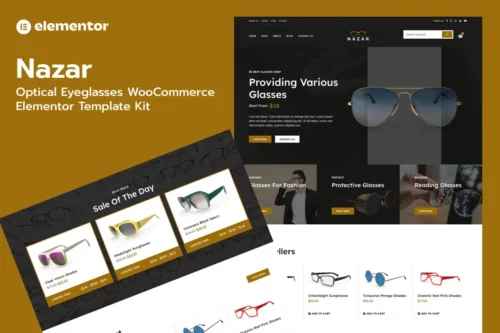
Nazar Optical Eyewear Template Kit for Elementor Pro
Building an online eyewear store shouldn’t take months of development work. Nazar gives you a professional, ready-to-launch WooCommerce template designed specifically for optical shops, eyeglass retailers, and vision care businesses. The kit includes everything you need to create a polished storefront that converts browsers into buyers — without touching a single line of code.
This template kit works with Elementor Pro and connects directly to WooCommerce, giving you control over product pages, shopping carts, checkout flows, and inventory management. The design blends modern aesthetics with a clean, trustworthy feel — exactly what customers expect when buying prescription glasses or sunglasses online.
What You Get with the Nazar Template Kit
This isn’t just a pretty homepage. Nazar includes multiple pre-designed pages covering every part of your store:
- Homepage with hero section, featured collections, and promotional banners
- Shop and product archive pages built for product showcase
- Single product page templates optimized for eyewear details
- About, contact, and blog page layouts
- Cart and checkout pages styled to reduce abandonment
- Header and footer designs that work across all devices
Every element is fully responsive. Your store will look sharp on desktops, tablets, and mobile phones — because most eyewear shoppers browse on their phones before making a purchase decision.
Key Features Designed for Eyewear Stores
Generic WooCommerce themes make you work around their limitations. Nazar was built from the ground up with optical retailers in mind:
- Specialized product layouts for displaying frame styles, lens options, and prescription details
- Clean typography and spacing that showcases product photography beautifully
- Color scheme options that complement eyewear branding (neutral tones that let products pop)
- Lightweight code that keeps your Pagespeed scores healthy
- Easy customization through Elementor’s drag-and-drop interface
Who Should Buy the Nazar Template Kit
This template kit works best for:
- Independent optical shops moving their business online
- Eyewear startups and boutique frame retailers
- Sunglasses and reading glasses e-commerce stores
- Vision care clinics offering products through their website
- Freelance designers building client stores in the optical niche
Whether you’re a complete beginner or an experienced WordPress user, you’ll find the customization straightforward. Elementor’s visual editor means you can edit text, swap images, and adjust layouts in real-time — no developers required.
How to Use This Template Kit
Getting started takes less than an hour once you’ve installed the kit. Import the template pages into your existing Elementor Pro setup, connect WooCommerce, and start adding your products. The template handles the design structure while WooCommerce handles the shopping cart, payments, and order management. You can customize colors, fonts, and images to match your brand identity in minutes.
Why Choose Nazar for Your Eyewear Store
Buying a template kit is faster and more affordable than hiring a designer. You get a cohesive, professional design at a fraction of the cost — and you own it forever. No monthly subscriptions, no recurring fees. Once you download it, it’s yours to use on unlimited projects.
The Nazar template kit includes commercial licensing, so you can use it for client work or your own store without worry. Plus, you get free updates as we improve the kit over time.
Ready to Launch Your Optical Store?
Stop paying for expensive custom designs that take weeks to complete. Get the Nazar Elementor Template Kit today and have a professional eyewear store live within days. Download instantly, install with one click, and start selling your frames — it’s that simple.
Only logged in customers who have purchased this product may leave a review.
How to use Kit:
Install and activate the “Template Kit – Import” plugin from Plugins > Add New in WordPress.
Do not unzip.
Go to Template Kit – Import > Upload Template Kit Zip File button.
Before importing a template, ensure the Install Requirements button is clicked to activate required plugins.
For best results, do not import more than one template at a time.
RELATED PRODUCTS

DIVI – Original License | One Time Payment – Exclusive Deal

Elementor Pro 4.2.3 + Elementorism Landing Pages WordPress Plugin

907 5.3.6 – Responsive Multi-Purpose WordPress Theme

Element Pack Pro 9.1.0 – Addon For Elementor






 Mobile Apps
 php script
 How to
Reviews
There are no reviews yet