
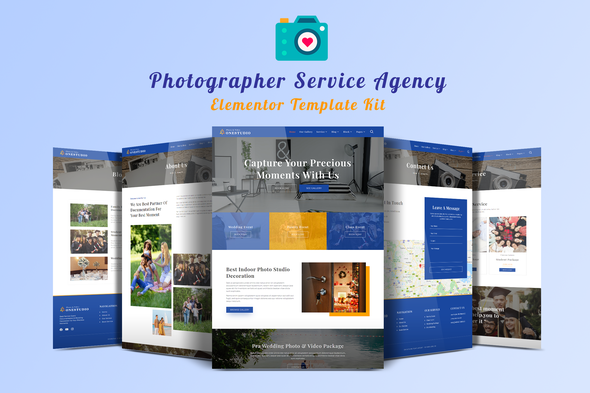
Onestudio – Photographer Agency Service Elementor Template Kit
- Updated on April 28, 2026
- 100% Original Product & Well Documented
- Unlimited Domain Usage
*Important Note:
The image should not be Part of the template kit. You need to use your own reliable Source.


Original price was: ₹999.00.₹299.00Current price is: ₹299.00.
Launch a photography portfolio that actually books clients — no code, no monthly fees. OneStudio gives you 12+ pages of polished design, an Elementor drag-and-drop editor, and a commercial license that covers client work too. Pick it up once, use it forever.
- Secured & Scanned by Virus total & McAfee.
- Access to Free updates for Lifetime
- All products are Under GPL License (Unlimited Domain Usage)
- We Not Provide any Support For this Product

Lifetime Membership
Access 6700+ Premium WordPress Themes & Plugins, Elementor Templates, Mobile Apps, PHP scripts with Lifetime Updates.
Join Premium MembershipRecently Viewed
OneStudio – Photographer Agency Elementor Template Kit
Here’s the thing about photography websites: most of them look like they were built in 2009. OneStudio fixes that. It’s a complete, ready-to-launch template kit built for photographers who want to look professional without spending months on development or thousands on a designer.
Everything’s pre-designed. A homepage that actually showcases your work. Portfolio pages with lightbox galleries. Service packages, pricing tables, testimonial sections, contact forms — all wired up and ready to go. Swap in your own photos, change the text, and you’re live.
What You Get with OneStudio
12+ pages. Not one-page wonders or landing page scraps — a full website you can publish today.
- Bold homepage with hero section and featured work
- Portfolio grid with lightbox gallery (clients can browse without clutter)
- Service listings with booking inquiry forms
- Testimonials section for social proof
- Pricing tables — because clients always ask
- Fully responsive. Mobile, tablet, desktop — looks sharp everywhere
Built with Elementor, so editing is drag-and-drop. No code. No developer needed. Change a headline in 10 seconds flat.
Who It’s Built For
If you’re a photographer who’s been putting off the website thing because the technical side feels like a second job — this is for you. OneStudio removes that excuse entirely. It works especially well for:
- Wedding and event photographers
- Portrait and fashion photographers
- Commercial and product photographers
- Creative studios and agencies
- Freelancers building their online presence
How to Use It
After purchase, you’ll get an instant download link. Install through Elementor, import the pages you want, replace the placeholder content with your own, and publish. Most people finish in under two hours. If you hit a snag, our support team can help — lifetime access, no expiration.
Why Buy This Template Kit
One payment. No subscriptions. You buy it once, you own it forever — including every update we add down the road. We ship new sections and features regularly, and they’re yours to download at no extra cost.
The commercial license is straightforward too. Use it for your own business, sell it to clients, or both. No royalties, no restrictions, no fine print surprises.
Compare that to custom web design ($2,000 minimum, usually more) or monthly subscription tools that charge you indefinitely. OneStudio gets you professional results without that ongoing hit to your wallet.
Ready to Get Started?
Your portfolio deserves a website that matches the quality of your work. OneStudio gives you the design, the structure, and the tools to launch fast — all for a one-time purchase. Download it, customize it, and start booking more clients.
Only logged in customers who have purchased this product may leave a review.
How to use Kit:
Install and activate the “Template Kit – Import” plugin from Plugins > Add New in WordPress.
Do not unzip.
Go to Template Kit – Import > Upload Template Kit Zip File button.
Before importing a template, ensure the Install Requirements button is clicked to activate required plugins.
For best results, do not import more than one template at a time.
RELATED PRODUCTS

DIVI – Original License | One Time Payment – Exclusive Deal

Elementor Pro 4.2.3 + Elementorism Landing Pages WordPress Plugin

907 5.3.6 – Responsive Multi-Purpose WordPress Theme

Element Pack Pro 9.1.0 – Addon For Elementor






 Mobile Apps
 php script
 How to
Reviews
There are no reviews yet