
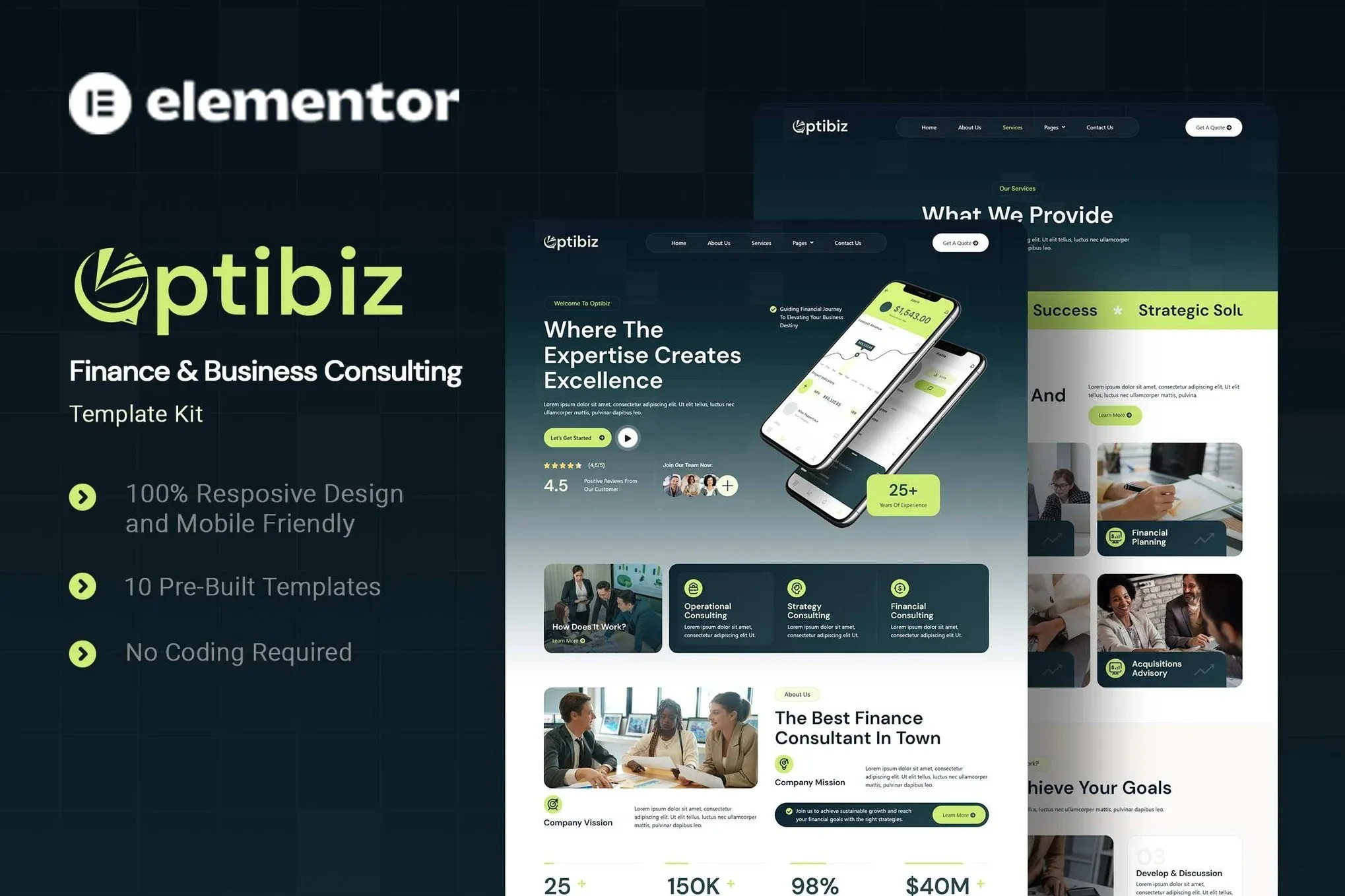
Optibiz – Finance & Business Consulting Elementor Template Kit
- Updated on May 3, 2026
- 100% Original Product & Well Documented
- Unlimited Domain Usage
*Important Note:
The image should not be Part of the template kit. You need to use your own reliable Source.


Original price was: ₹999.00.₹299.00Current price is: ₹299.00.
Stop spending weeks on your website. Optibiz gives you 15+ ready-to-use pages for finance and consulting firms — just import, customize, and go live today.
- Secured & Scanned by Virus total & McAfee.
- Access to Free updates for Lifetime
- All products are Under GPL License (Unlimited Domain Usage)
- We Not Provide any Support For this Product

Lifetime Membership
Access 6700+ Premium WordPress Themes & Plugins, Elementor Templates, Mobile Apps, PHP scripts with Lifetime Updates.
Join Premium MembershipRecently Viewed
Build a Professional Finance & Consulting Website with Optibiz
Your website is often the first impression a potential client gets of your business. For finance professionals, consultants, and agencies, that impression needs to scream credibility and expertise — fast. Optibiz is an Elementor Template Kit built specifically for the finance and business consulting niche, giving you a complete set of polished, ready-to-use pages that load fast, look stunning, and convert visitors into clients.
No design degree required. No hiring a developer. Just open Elementor, import the kit, swap in your content, and publish. That’s it. Most users have their site live the same day they download.
What Makes Optibiz Different
This isn’t a generic template dressed up for business. Every section, layout, and typography choice was made with financial services in mind. You’ll find service showcases, case study layouts, team member grids, consultation booking sections, and testimonial sliders — all designed to position your firm as trustworthy and professional.
- 15+ pre-built pages covering every section a consulting firm needs
- Fully responsive — looks sharp on mobile, tablet, and desktop
- Clean, minimal design that communicates authority without being stiff
- Global styles and an intuitive site-wide editing system
Who Is Optibiz Built For?
If you’re a finance professional, business consultant, accounting firm, investment advisor, or freelance strategist, Optibiz speaks your language. It’s designed for people who know their craft but don’t want to spend months learning web design. You want a site that looks like you paid a premium agency to build it — without the premium price tag.
It’s also a great fit for WordPress beginners who want a stress-free setup. Elementor’s drag-and-drop builder means you can customize anything — headers, footers, colors, fonts — without touching a single line of code. Change a headline in seconds. Rearrange a service grid in minutes. Your site, your way.
How to Get Started in 3 Simple Steps
First, install the free Elementor plugin on your WordPress site. Second, download the Optibiz kit from your account and import it through Elementor’s template library. Third, replace the placeholder content with your own text, images, and branding. The entire process takes most users under an hour. Instant download means no waiting — start right now.
Why Buy Optibiz Instead of Starting From Scratch
Building a professional website from a blank theme is a time sink that pulls you away from what you actually do — advising clients and growing your business. Optibiz gives you a proven foundation that already looks great, already functions well, and already converts. You skip the trial-and-error phase entirely. With a one-time purchase, you get lifetime free updates as we improve and expand the kit, plus a commercial license that lets you use it on client projects without any restrictions.
It’s affordable, it’s professional, and it’s ready the moment you download it.
Ready to Launch Your Business Website?
Stop delaying your online presence. A professional website shouldn’t take months or cost thousands. With Optibiz, you can buy a complete, premium-quality Elementor template kit today, import it in minutes, and have a finance or consulting website that genuinely impresses every visitor. Download now and start building — your future clients are already searching.
Only logged in customers who have purchased this product may leave a review.
How to use Kit:
Install and activate the “Template Kit – Import” plugin from Plugins > Add New in WordPress.
Do not unzip.
Go to Template Kit – Import > Upload Template Kit Zip File button.
Before importing a template, ensure the Install Requirements button is clicked to activate required plugins.
For best results, do not import more than one template at a time.
RELATED PRODUCTS

DIVI – Original License | One Time Payment – Exclusive Deal

Elementor Pro 4.2.3 + Elementorism Landing Pages WordPress Plugin

907 5.3.6 – Responsive Multi-Purpose WordPress Theme

Element Pack Pro 9.1.0 – Addon For Elementor






 Mobile Apps
 php script
 How to
Reviews
There are no reviews yet