
Qerja – Coworking Space WordPress Elementor Template Kit
- Updated on May 2, 2026
- 100% Original Product & Well Documented
- Unlimited Domain Usage
*Important Note:
The image should not be Part of the template kit. You need to use your own reliable Source.


Original price was: ₹999.00.₹299.00Current price is: ₹299.00.
Stop spending weeks on your website. Qerja gives you 10+ pages that work with the free Elementor plugin — swap in your logo, add your address, and you’re live. Commercial license included.
- Secured & Scanned by Virus total & McAfee.
- Access to Free updates for Lifetime
- All products are Under GPL License (Unlimited Domain Usage)
- We Not Provide any Support For this Product

Lifetime Membership
Access 6700+ Premium WordPress Themes & Plugins, Elementor Templates, Mobile Apps, PHP scripts with Lifetime Updates.
Join Premium MembershipRecently Viewed
Qerja – Coworking Space WordPress Theme for Elementor
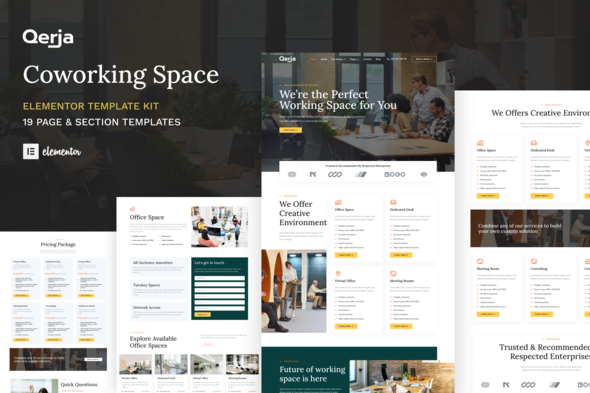
Getting a coworking space website live shouldn’t take months. Qerja is a ready-to-use Elementor template kit built specifically for shared workspaces, flex offices, and community hubs. You get 10+ pre-designed pages covering every section your site needs — from a bold hero area to pricing plans, amenity grids, and team profiles. No coding required. No design degree needed. Just install, swap in your branding, and publish.
This is a premium WordPress theme built the right way: lightweight code, mobile-responsive layouts, and sections that actually reflect how coworking spaces operate. Whether you’re opening your first location or refreshing an existing site, Qerja gives you a professional foundation without the agency price tag.
What You Get With This Coworking Website Template
Qerja comes packed with pages that cover the full client journey — from discovery to booking inquiry. Every layout is crafted for Elementor’s drag-and-drop builder, so customization stays simple even if you’ve never touched code.
- Homepage with hero, featured spaces, and social proof sections
- Membership and pricing page with tiered plan layouts
- Space showcase with photo galleries and amenity icons
- About, team, and community pages
- Blog layout for tips, events, and industry news
- Contact and inquiry forms pre-styled and ready
Who Is This Elementor Template Kit Best For?
Qerja works if you’re in the coworking industry — plain and simple. Small space operators can launch fast without hiring a developer. Freelance designers can reskin it for clients in a single afternoon. WordPress developers use it as a solid starting point for custom builds. Even creative agencies managing multiple workspace clients find Qerja’s structure saves serious setup time.
- Coworking space owners launching new locations
- Flex office providers refreshing their online presence
- Freelancers and agencies building client sites quickly
- Community managers who want to update content without tech help
Why Choose Qerja Over Other Template Kits
Most coworking templates look generic or feel overbuilt. Qerja strikes a balance — it’s polished enough to impress potential members, but flexible enough that you can make it your own. Every element uses Elementor’s native widgets, so you won’t depend on third-party plugins for core functionality. The one-time purchase includes a commercial license, meaning you can use it on client projects without additional fees. Lifetime free updates keep your site current as WordPress and Elementor evolve.
Get Your Coworking Space Website Live Today
Download Qerja instantly and start building. The file works with the free Elementor plugin — no Pro subscription required for most features. Swap colors, update images, add your location details, and you’ve got a live coworking website in a single afternoon. One payment. Lifetime access. No subscriptions, ever. Skip the design headaches — your members are waiting to find you online.
Only logged in customers who have purchased this product may leave a review.
How to use Kit:
Install and activate the “Template Kit – Import” plugin from Plugins > Add New in WordPress.
Do not unzip.
Go to Template Kit – Import > Upload Template Kit Zip File button.
Before importing a template, ensure the Install Requirements button is clicked to activate required plugins.
For best results, do not import more than one template at a time.
RELATED PRODUCTS

DIVI – Original License | One Time Payment – Exclusive Deal

Elementor Pro 4.2.3 + Elementorism Landing Pages WordPress Plugin

907 5.3.6 – Responsive Multi-Purpose WordPress Theme

Element Pack Pro 9.1.0 – Addon For Elementor






 Mobile Apps
 php script
 How to
Reviews
There are no reviews yet