
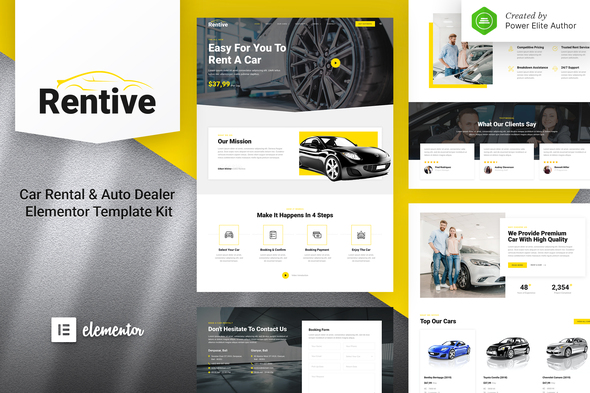
Rentive – Car Rental & Auto Dealer Elementor Template Kit
- Updated on April 30, 2026
- 100% Original Product & Well Documented
- Unlimited Domain Usage
*Important Note:
The image should not be Part of the template kit. You need to use your own reliable Source.


Original price was: ₹999.00.₹299.00Current price is: ₹299.00.
Fifteen pages, one afternoon, zero code. Rentive gives car rental businesses and auto dealers a complete website template kit that installs directly into Elementor. Pick your pages, add your cars, publish.
- Secured & Scanned by Virus total & McAfee.
- Access to Free updates for Lifetime
- All products are Under GPL License (Unlimited Domain Usage)
- We Not Provide any Support For this Product

Lifetime Membership
Access 6700+ Premium WordPress Themes & Plugins, Elementor Templates, Mobile Apps, PHP scripts with Lifetime Updates.
Join Premium MembershipRecently Viewed
Rentive – Car Rental & Auto Dealer Elementor Template Kit
Most car rental websites take forever to build and cost way more than they should. Rentive flips that. It’s a complete template kit built specifically for auto dealers, car rental agencies, and vehicle booking services — 15 pages that drop into Elementor in minutes. No developer. No weeks of back-and-forth. Just a real website that actually books cars.
What You Get with Rentive
Here’s the full picture: 15 pre-built pages covering everything from your homepage to individual vehicle listings, booking forms, service pages, team sections, and contact info. The fleet display lets you show off cars by category, pricing, and specs. There’s an online booking form built right in. Plus testimonials, FAQs, and a layout that works on phones, tablets, and desktops without looking stretched or broken.
- 15 pages ready to import into Elementor
- Fleet showcase with car categories, pricing, and specs
- Booking form integrated into the design
- Service listings, testimonials, and FAQ sections
- Responsive layout — looks good everywhere
- Clean automotive look with professional colors
Who It’s Built For
If you’re starting a car rental company and need a website yesterday, this works. If you’re an auto dealer who wants something better than a template everyone else is using, this works. If you’ve been running your booking business through social media and are ready for an actual website, this works too. The short version: if you want a site that looks expensive without the expensive price tag, Rentive delivers.
- Car rental agencies and fleet operators
- Auto dealers and car showroom websites
- Vehicle booking and reservation services
- Automotive businesses moving from social media to a full website
How to Use It
You don’t need to know how to code. If you’ve worked with WordPress and installed a plugin before, you can handle this. Install Elementor (it’s free), import the Rentive pages, swap in your own logo and colors, add your vehicles, and hit publish. Most people are live the same day they start. And if you get stuck, support is there.
Why Buy This Template Kit
Hiring an agency for a custom car rental site easily runs thousands. Rentive costs a fraction of that, and you own it forever with one payment. The commercial license means you can use it for client work or your own business — no restrictions. Updates are free for life, so your site stays compatible as WordPress and Elementor roll out new versions.
- One-time payment — use it forever, no subscriptions
- Commercial license included for business or client projects
- Free lifetime updates keep everything running smoothly
- No coding required — WordPress basics are enough
- Support available if you hit a snag
Ready to Get Started?
Skip the agency quotes, the endless revisions, and the months of waiting. Rentive gets you a complete, professional car rental website in a single afternoon. Download, customize, and launch — it’s that straightforward.
Only logged in customers who have purchased this product may leave a review.
How to use Kit:
Install and activate the “Template Kit – Import” plugin from Plugins > Add New in WordPress.
Do not unzip.
Go to Template Kit – Import > Upload Template Kit Zip File button.
Before importing a template, ensure the Install Requirements button is clicked to activate required plugins.
For best results, do not import more than one template at a time.
RELATED PRODUCTS

DIVI – Original License | One Time Payment – Exclusive Deal

Elementor Pro 4.2.3 + Elementorism Landing Pages WordPress Plugin

907 5.3.6 – Responsive Multi-Purpose WordPress Theme

Element Pack Pro 9.1.0 – Addon For Elementor






 Mobile Apps
 php script
 How to
Reviews
There are no reviews yet