
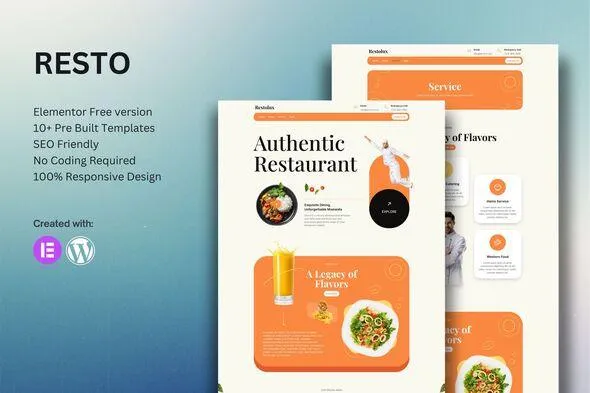
Restolux – Restaurant Elementor Template Kit
- Updated on May 2, 2026
- 100% Original Product & Well Documented
- Unlimited Domain Usage
*Important Note:
The image should not be Part of the template kit. You need to use your own reliable Source.


Original price was: ₹999.00.₹299.00Current price is: ₹299.00.
Launch your restaurant website in hours, not weeks. Restolux gives you 15+ pre-built pages — no coding, no developers, no waiting. Instant download with commercial license included.
- Secured & Scanned by Virus total & McAfee.
- Access to Free updates for Lifetime
- All products are Under GPL License (Unlimited Domain Usage)
- We Not Provide any Support For this Product

Lifetime Membership
Access 6700+ Premium WordPress Themes & Plugins, Elementor Templates, Mobile Apps, PHP scripts with Lifetime Updates.
Join Premium MembershipRecently Viewed
Restolux Restaurant Elementor Template Kit — Build Your Restaurant Website in Hours
Running a restaurant means juggling a hundred things at once. Between the kitchen, the menu, and keeping customers happy, you don’t have time to spend weeks learning how to build a website. Restolux changes that. It’s a pre-made Elementor template kit designed specifically for restaurants, cafes, bistros, and food businesses. No coding. No complicated setup. Import, customize, publish.
What Restolux Is
Restolux gives you 15+ page templates covering everything: homepage, menu layouts, reservation system, about page, gallery, contact form, and team sections. Every template is fully responsive — your site looks sharp on phones, tablets, and desktops.
Most website templates are generic. Restolux isn’t. The layouts are built around how food businesses actually work: big photo areas for dishes, menu sections with space for pricing, clear reservation callouts, and opening hours front and center. It looks custom. It feels like you paid someone to design it.
Key Features
- 15+ pre-built page templates for Elementor (works with the free version)
- Fully responsive — looks great on any device your customers use
- Drag-and-drop editing — swap images, change text, update prices anytime
- Ready-to-use menu templates, reservation forms, gallery grids, and contact sections
- Fast loading and built with SEO basics in place
- Clean design that makes food photography pop
- Commercial license included — build client sites or your own restaurant site
Who It’s For
New restaurant opening next month and need a site yesterday? Restolux works. Tired of paying developers every time you want to change your hours? Restolux works. Freelancer building websites on a budget? Restolux works. It handles cafes, food trucks, bakeries, and fine dining equally well. If you can use Elementor — or want to learn the free version — you can launch a professional restaurant site without touching code.
How To Use It
Download instantly after purchase. Open Elementor, use the native importer to load the template kit. Browse the sections, pick what fits your restaurant, swap in your own text and photos, hit publish. Most users go live the same afternoon.
You don’t need Elementor Pro or any paid plugins. The templates use free core widgets, so costs stay low and compatibility issues stay rare. Add your logo, list your menu items, upload photos of your best dishes. Done.
Why Buy Restolux Instead of Hiring a Developer
- One-time price instead of thousands in development fees
- You own the site — update it yourself whenever you want
- Commercial license means you can resell sites built with it
- Download now, not when revisions are done
- No coding knowledge required
- Lifetime support if you get stuck
No more paying monthly fees for generic templates. Restolux is a one-time purchase that lets you build a restaurant website with Elementor — the world’s most popular page builder. Download today, launch before dinner service.
Ready to Launch Your Restaurant Website?
Get Restolux now. 15+ templates, instant download, commercial license, lifetime updates and support. Buy once, use forever.
Only logged in customers who have purchased this product may leave a review.
How to use Kit:
Install and activate the “Template Kit – Import” plugin from Plugins > Add New in WordPress.
Do not unzip.
Go to Template Kit – Import > Upload Template Kit Zip File button.
Before importing a template, ensure the Install Requirements button is clicked to activate required plugins.
For best results, do not import more than one template at a time.
RELATED PRODUCTS

DIVI – Original License | One Time Payment – Exclusive Deal

Elementor Pro 4.2.3 + Elementorism Landing Pages WordPress Plugin

907 5.3.6 – Responsive Multi-Purpose WordPress Theme

Element Pack Pro 9.1.0 – Addon For Elementor






 Mobile Apps
 php script
 How to
Reviews
There are no reviews yet