
Restro – Restaurant Elementor Pro Template Kit
- Updated on April 28, 2026
- 100% Original Product & Well Documented
- Unlimited Domain Usage
*Important Note:
The image should not be Part of the template kit. You need to use your own reliable Source.


Original price was: ₹999.00.₹299.00Current price is: ₹299.00.
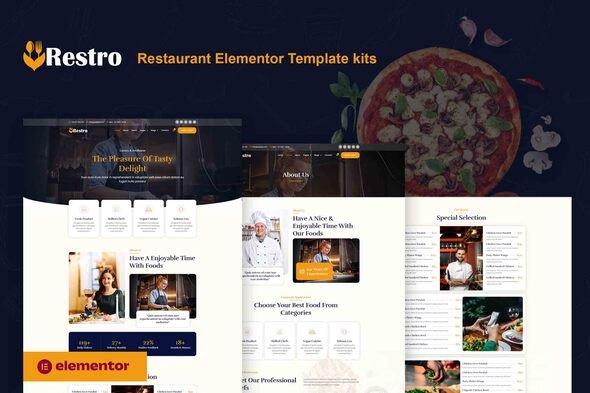
Skip the developer bills. Restro gives you a 6-page restaurant website — menus, reservations, gallery — all in Elementor. Live by dinner time.
- Secured & Scanned by Virus total & McAfee.
- Access to Free updates for Lifetime
- All products are Under GPL License (Unlimited Domain Usage)
- We Not Provide any Support For this Product

Lifetime Membership
Access 6700+ Premium WordPress Themes & Plugins, Elementor Templates, Mobile Apps, PHP scripts with Lifetime Updates.
Join Premium MembershipRecently Viewed
Restro – The Restaurant Website Template Built for Food Businesses
Here’s the thing about restaurant websites: they need to make people hungry before they even taste your food. Restro does exactly that — a polished, professional site that actually reflects your brand, without the designer invoice or the month-long back-and-forth emails.
This Elementor template kit covers everything. Homepage, menu, gallery, reservations, contact, about. Six pages that work together as one cohesive site. No cobbling together random templates. No discovering halfway through that two sections clash. Just import, tweak, and launch.
What’s Actually Included
Six complete pages, ready to go. The menu section handles categories and pricing without forcing you into rigid tables. The gallery grid works beautifully for food photography — Instagram-style but on your own site. The reservation form? It’s integrated and ready for whatever booking system you prefer.
Drag-and-drop editing means you change what you want, when you want. Mobile-responsive, so phone browsers get the same experience as desktop. Fast-loading and structured for SEO — because showing up in local search actually matters for restaurants.
- Home, Menu, Gallery, About, Contact, Reservations — all included
- One-click import into Elementor Pro
- Menu layouts with pricing tables and category filters
- Reservation booking integration
- Google Maps block for directions
- Instagram-style gallery grid
- Mobile-optimized, loads fast
Who Is This For?
Opening a new place and need something live before the soft launch? Restro works. Running a cafe that’s been hiding behind a Facebook page? Restro works. Catering companies, food trucks, bakeries, neighborhood bars — all have used this kit successfully.
You don’t need to know code. You need Elementor Pro running on WordPress. That’s it.
Getting Live Takes Less Time Than You Think
Download. Install. Import the pages. Replace the placeholder content with your own photos and text. Publish. Most people finish in under two hours. The kit comes organized by section, so you can tackle the homepage first and add the menu page next week if that’s how you work.
Why Not Just Grab a Free Template?
Free templates are fine — until you need a menu layout. Most generic themes treat your food business like a tech startup. You end up fighting the design instead of using it. Restro was built for restaurants specifically. Menu sections, reservation CTAs, photo galleries that show off dishes instead of hiding them.
One payment. Lifetime access. Use it for your own restaurant or client projects — the commercial license covers both. Updates included as Elementor evolves.
Stop Losing Diners to Your Outdated Website
Your website is working when it gets people to book a table. Right now, yours might not be. Restro fixes that. Download it, spend an afternoon customizing it, and wake up tomorrow with a restaurant website that actually represents your food.
Only logged in customers who have purchased this product may leave a review.
How to use Kit:
Install and activate the “Template Kit – Import” plugin from Plugins > Add New in WordPress.
Do not unzip.
Go to Template Kit – Import > Upload Template Kit Zip File button.
Before importing a template, ensure the Install Requirements button is clicked to activate required plugins.
For best results, do not import more than one template at a time.
RELATED PRODUCTS

DIVI – Original License | One Time Payment – Exclusive Deal

Elementor Pro 4.2.3 + Elementorism Landing Pages WordPress Plugin

907 5.3.6 – Responsive Multi-Purpose WordPress Theme

Element Pack Pro 9.1.0 – Addon For Elementor






 Mobile Apps
 php script
 How to

Reviews
There are no reviews yet