
Saxxy – Music Band & Musician Elementor Template Kit
- Updated on May 2, 2026
- 100% Original Product & Well Documented
- Unlimited Domain Usage
*Important Note:
The image should not be Part of the template kit. You need to use your own reliable Source.


- Coupon "b2g1" has expired.
- Coupon "b2g1" has expired.
- Coupon "b2g1" has expired.
- Coupon "b2g1" has expired.
Original price was: ₹999.00.₹299.00Current price is: ₹299.00.
A complete music website template kit for bands, artists, and DJs. Build your online presence in minutes with drag-and-drop ease, instant download, and lifetime updates — no coding required. Get started now.
- Secured & Scanned by Virus total & McAfee.
- Access to Free updates for Lifetime
- All products are Under GPL License (Unlimited Domain Usage)
- We Not Provide any Support For this Product

Lifetime Membership
Access 6700+ Premium WordPress Themes & Plugins, Elementor Templates, Mobile Apps, PHP scripts with Lifetime Updates.
Join Premium MembershipRecently Viewed
Saxxy – Music Band & Musician Elementor Template Kit
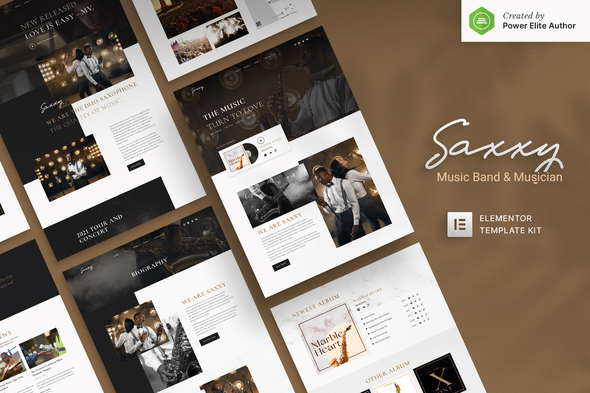
Your music deserves a website that hits the right notes. Saxxy gives bands, solo artists, and DJs a professional online home without the studio session rates. This Elementor Template Kit comes ready to deploy — 15 pre-built pages and sections that cover everything from audio portfolios to event calendars, tour dates to merch drops. No coding. No monthly subscriptions. Just a one-time purchase and you’re live.
What It Is
Saxxy is a premium Elementor Template Kit built specifically for the music industry. It includes carefully designed inner pages for artists profiles, discography sections, upcoming shows, photo galleries, and contact forms. All templates use Elementor’s native widgets, so you get the full drag-and-drop experience without relying on third-party plugins.
Key Features
This kit delivers a complete website solution for music professionals. Here’s what’s included:
- 15+ pre-designed pages: home, about, music releases, events, gallery, contact, and more
- Fully responsive layouts that look sharp on mobile devices and tablets
- Custom headers, footers, and navigation designed for music portfolios
- Audio player sections built for streaming tracks and albums
- Event listing templates with date, venue, and ticket links
- Social media integration blocks for Spotify, SoundCloud, and Bandcamp
Who It’s For
This template kit works best for independent musicians building their first professional website, bands looking to refresh their online presence, and DJs seeking a modern site without hiring a developer. Music producers, vocalists, and instrumentalists will find layouts that adapt to any genre or aesthetic. If you want to sell music directly, promote upcoming shows, or simply give fans one place to find everything, Saxxy handles it.
How To Use It
Saxxy runs on Elementor — the free WordPress page builder. Install the theme, install the template kit through Elementor, and import the pages you need. Each section uses Elementor’s native widgets, so customizing colors, fonts, and images takes minutes. Swap in your own photos, embed your latest single, and publish. If you hit a snag, lifetime support means someone answers your questions whenever you need them.
Why Buy This
Compare this to hiring a developer. Custom music websites start at $2,000 and climb fast. Saxxy costs a fraction of that with a one-time payment and zero ongoing fees. You get commercial license coverage, so using this for client projects is fine. Lifetime updates keep your site compatible as WordPress evolves. The beginner-friendly setup means you don’t need technical skills — just an idea of what your site should say.
Whether you’re launching a new act or giving an established band a cleaner online hub, Saxxy delivers a ready-to-use foundation. Download instantly, install today, and get back to making music.
Ready to Get Started?
Grab the Saxxy Elementor Template Kit now. Instant download, lifetime updates, and support included. Build your music website without touching a single line of code.
Only logged in customers who have purchased this product may leave a review.
How to use Kit:
Install and activate the “Template Kit – Import” plugin from Plugins > Add New in WordPress.
Do not unzip.
Go to Template Kit – Import > Upload Template Kit Zip File button.
Before importing a template, ensure the Install Requirements button is clicked to activate required plugins.
For best results, do not import more than one template at a time.
RELATED PRODUCTS

DIVI – Original License | One Time Payment – Exclusive Deal

Elementor Pro 4.2.3 + Elementorism Landing Pages WordPress Plugin

907 5.3.6 – Responsive Multi-Purpose WordPress Theme

Element Pack Pro 9.1.0 – Addon For Elementor






 Mobile Apps
 php script
 How to
Reviews
There are no reviews yet