
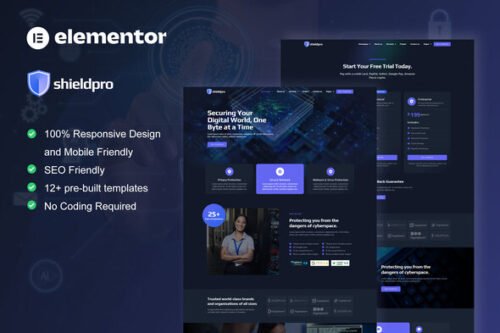
Shieldpro – Cyber Security Services Elementor Pro Template Kit
- Updated on November 27, 2025
- 100% Original Product & Well Documented
- Unlimited Domain Usage

*Important Note:
The image should not be Part of the template kit. You need to use your own reliable Source.


Original price was: ₹999.00.₹299.00Current price is: ₹299.00.
- Secured & Scanned by Virus total & McAfee.
- Access to Free updates for Lifetime
- All products are Under GPL License (Unlimited Domain Usage)
- We Not Provide any Support For this Product

Lifetime Membership
Access 6700+ Premium WordPress Themes & Plugins, Elementor Templates, Mobile Apps, PHP scripts with Lifetime Updates.
Join Premium MembershipRecently Viewed
ShieldPro
Building a professional online presence for a cyber security or IT tech service can often feel like a race against the clock, especially when you need a site that looks credible and functions reliably without extensive custom development. Generic templates rarely hit the mark for this specialized niche, leaving many struggling to convey the seriousness and expertise required. ShieldPro is an Elementor Pro Template Kit designed specifically to address this challenge. It provides a structured, modern foundation that helps you create a professional website for cyber tech and security services quickly, allowing you to focus on your clients rather than complex web design.
Key Features for an Effective Online Presence
ShieldPro includes several core features engineered to simplify your workflow and improve your site’s impact.
Specialized Cyber Security Design
This kit offers a layout with a unique design style tailored for the cyber tech and security industry. Instead of starting from scratch or adapting a general-purpose theme, you get a design that immediately communicates trustworthiness and technical proficiency. This helps you present your services in a way that resonates with potential clients.
Effortless Customization with Elementor Pro
The entire kit is built for Elementor Pro, meaning you can easily edit or customize every section using its intuitive drag-and-drop interface. No coding is required, which saves a significant amount of time during the development process. You can adjust colors, fonts, images, and content to match your brand’s identity without diving into CSS.
Well-Structured Page Layouts
ShieldPro provides a complete set of page contents, including essential layouts for services, about us, contact, and more. These pages are designed with clear content hierarchies, making it easier for visitors to find the information they need and understand your offerings. This structured approach helps ensure a professional user experience.
Practical Use Cases and Applications
This template kit is a practical choice for several types of businesses and professionals. It’s ideal for dedicated cyber security firms looking to showcase their data protection, network security, or incident response services. IT service providers who offer security as part of their broader tech solutions will find it beneficial for creating a focused section on their website. Furthermore, individual cyber security consultants or agencies specializing in digital defense can use ShieldPro to establish a strong, professional online portfolio. The kit works well with the free Hello Elementor theme and generally performs effectively with most Elementor-compatible themes.
Streamlined Implementation Benefits
Setting up ShieldPro is a straightforward process. Because it’s a template kit, you can import pre-designed pages and sections directly into your Elementor Pro builder, significantly speeding up development time. The layouts are built to be responsive, ensuring your website looks and functions effectively across all devices, from desktops to mobile phones. This attention to detail contributes to a better user experience and helps with overall site performance. Updates and minor adjustments are also simple to manage directly within the Elementor interface.
Download from Plugintheme at an affordable price and start building your cyber security website today.
 Shieldpro - Cyber Security Services Elementor Pro Template Kit
How to use Kit:
Install and activate the “Template Kit – Import” plugin from Plugins > Add New in WordPress.
Do not unzip.
Go to Template Kit – Import > Upload Template Kit Zip File button.
Before importing a template, ensure the Install Requirements button is clicked to activate required plugins.
For best results, do not import more than one template at a time.










 Mobile Apps
 php script
 How to
Reviews
There are no reviews yet