
Shoppix – Jewellery Shop Elementor Template Kit
- Updated on May 2, 2026
- 100% Original Product & Well Documented
- Unlimited Domain Usage
*Important Note:
The image should not be Part of the template kit. You need to use your own reliable Source.


Original price was: ₹999.00.₹299.00Current price is: ₹299.00.
Stop waiting months for a website. Shoppix gives you a polished jewellery shop template — install it today, sell tomorrow. Commercial license, lifetime updates, one payment.
- Secured & Scanned by Virus total & McAfee.
- Access to Free updates for Lifetime
- All products are Under GPL License (Unlimited Domain Usage)
- We Not Provide any Support For this Product

Lifetime Membership
Access 6700+ Premium WordPress Themes & Plugins, Elementor Templates, Mobile Apps, PHP scripts with Lifetime Updates.
Join Premium MembershipRecently Viewed
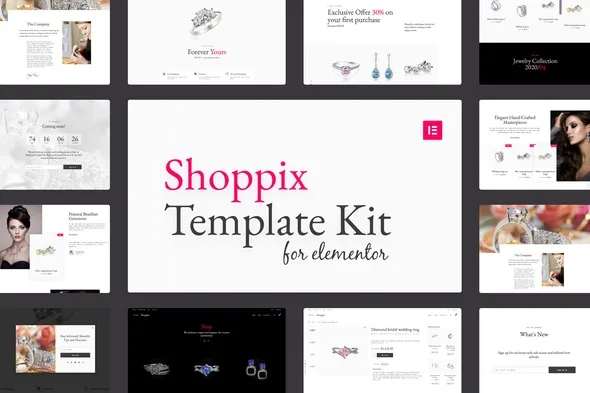
Shoppix Jewellery Shop Template Kit for Elementor
Jewellery deserves better than a generic template. Shoppix is built for gold rings, gemstone necklaces, handmade earrings, and everything in between. It’s an Elementor template kit that helps you launch a professional jewellery website without hiring a designer or writing a single line of code.
What You Get with Shoppix
Everything you need to open your virtual doors — minus the weeks of back-and-forth with developers.
- Homepage, shop page, product details, about, and contact pages — all pre-designed and ready to customize
- Elementor drag-and-drop builder — change images, text, and layouts without touching code
- Responsive across mobile, tablet, and desktop
- Typography and spacing tuned for jewellery — because fine details matter
- WooCommerce-ready — your products load in, your pricing sets itself, you’re open for business
- Commercial license — use it for your store or client projects
Designed for Jewellery Stores
Most templates treat rings and necklaces like any other product. Shoppix doesn’t. Grid layouts, font choices, white space — everything highlights precious metals, gemstones, and the craftsmanship people paid good money for.
Large product images. Subtle hover effects. Smooth transitions. Your customers get the experience they’d expect walking into a high-end boutique — online.
Who Is This Template For?
Shoppix works if you:
- Are launching your first jewellery brand and need a website live fast
- Already sell on Etsy or Instagram and want a proper home base
- Know WordPress basics but don’t code
- Design websites for clients and need to deliver on a tight deadline
- Run a boutique selling watches, rings, bracelets — anything sparkly
Built for Elementor — No Code Needed
Point, click, edit. That’s the whole skill requirement. Elementor shows you exactly what you’re building in real-time — no guesswork, no preview mode confusion. Swap in your product photos, write your own descriptions, move sections around if you don’t like where they sit.
WooCommerce integration comes set up. Add your inventory, set your shipping zones, connect your payment processor. Then focus on what actually matters: running your business.
Why Buy This Template?
Custom jewellery websites cost thousands. The back-and-forth alone takes weeks. With Shoppix, you get a professionally designed foundation at a fraction of that price — and your site goes live today, not in three months.
One payment. Instant download. Lifetime updates. Commercial license included. And if something breaks or you hit a snag, support is there.
This isn’t a bare-bones template with placeholder text and a generic header. Every design decision serves one goal: helping your jewellery sell.
Get Started
Download Shoppix, install it in Elementor, and spend the rest of your day on things that actually grow your business. Your jewellery store — built, launched, and ready to accept orders.
Only logged in customers who have purchased this product may leave a review.
How to use Kit:
Install and activate the “Template Kit – Import” plugin from Plugins > Add New in WordPress.
Do not unzip.
Go to Template Kit – Import > Upload Template Kit Zip File button.
Before importing a template, ensure the Install Requirements button is clicked to activate required plugins.
For best results, do not import more than one template at a time.
RELATED PRODUCTS

DIVI – Original License | One Time Payment – Exclusive Deal

Elementor Pro 4.2.3 + Elementorism Landing Pages WordPress Plugin

907 5.3.6 – Responsive Multi-Purpose WordPress Theme

Element Pack Pro 9.1.0 – Addon For Elementor






 Mobile Apps
 php script
 How to
Reviews
There are no reviews yet