
Skyline – Architecture Elementor Template Kit
- Updated on May 2, 2026
- 100% Original Product & Well Documented
- Unlimited Domain Usage
*Important Note:
The image should not be Part of the template kit. You need to use your own reliable Source.


Original price was: ₹999.00.₹299.00Current price is: ₹299.00.
Architecture portfolio site in minutes. 15+ pages, drag-and-drop builder, no coding required. Get live this week.
- Secured & Scanned by Virus total & McAfee.
- Access to Free updates for Lifetime
- All products are Under GPL License (Unlimited Domain Usage)
- We Not Provide any Support For this Product

Lifetime Membership
Access 6700+ Premium WordPress Themes & Plugins, Elementor Templates, Mobile Apps, PHP scripts with Lifetime Updates.
Join Premium MembershipRecently Viewed
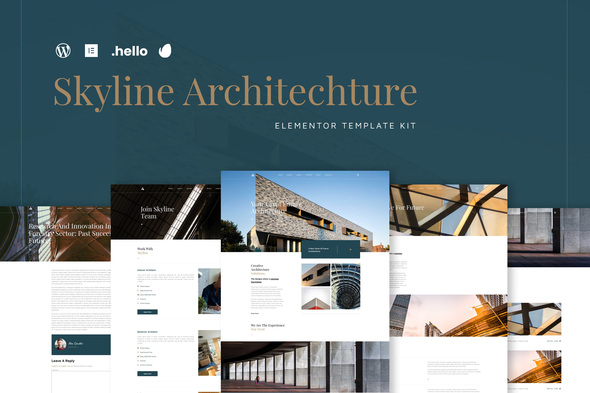
Skyline Architecture Elementor Template Kit for Professional Websites
Skyline gives architects, interior designers, and construction companies a polished website — without the developer bill. This kit works with Elementor, WordPress’s most-used page builder. You get 15+ pre-designed pages you can mix, match, and tweak. No code. No design degree. Pick your layouts, drop in your photos, go live.
Architecture is visual. Clients want to see your work, not read paragraphs about it. Every gallery, every portfolio grid, every section in this kit exists to show off what you build. The whitespace and clean lines mirror the aesthetic your clients already associate with good design.
What’s Inside the Kit
Not just a few headers and footers — full pages for your entire practice:
- Homepage with hero, featured projects, and services overview
- Portfolio and project showcase pages with category filtering
- About page with team sections and your company story
- Services page with detailed offering descriptions
- Contact page with form templates and location details
- Blog templates for project updates and industry insights
- FAQ, pricing, and testimonial blocks for client conversion
Everything’s responsive. Your portfolio looks sharp on phones — because clients absolutely browse on their phones during site visits or while researching firms.
Who This Kit Works For
Best fit:
- Solo architects launching a studio website
- Interior design firms building their first professional site
- Landscape architects and urban planners showing off projects
- Construction companies wanting a modern, project-focused web presence
- Architecture students creating portfolio sites for job applications
If the technical side of building a website has been holding you back, this kit eliminates that excuse. The creative heavy lifting is done. You just add your brand and projects.
Getting Started (Under 30 Minutes)
Install the free Elementor plugin on your WordPress site if you haven’t. Then import the Skyline kit through Elementor’s template library. Browse, import the pages you want, start editing.
The drag-and-drop editor handles everything — move sections around, swap colors to match your brand, replace placeholder text with your own content, and swap demo images for your actual project photos. Every section has styling controls for fonts, spacing, and backgrounds. Fine-tune without touching code.
Ready? Hit publish. Your site is live.
Why Skyline Beats Free Templates
Free architecture templates usually come with catches — limited pages, generic layouts, or licenses that don’t allow client work. Skyline includes a commercial license. Use it for your firm, your clients, or both. No surprises.
The design follows modern web standards: fast loading, accessible, and built for search engines. When potential clients Google “architects in [your city],” you want to show up. This kit is designed with that in mind.
You also get lifetime updates and support. As your practice grows and web standards shift, your template keeps up — no extra fees.
Ready to Launch?
Your portfolio deserves a website that matches your work. Skyline gives you a professional, visually clean site without the professional price tag. Buy once, use it indefinitely, and have your architecture website live within days.
Only logged in customers who have purchased this product may leave a review.
How to use Kit:
Install and activate the “Template Kit – Import” plugin from Plugins > Add New in WordPress.
Do not unzip.
Go to Template Kit – Import > Upload Template Kit Zip File button.
Before importing a template, ensure the Install Requirements button is clicked to activate required plugins.
For best results, do not import more than one template at a time.
RELATED PRODUCTS

DIVI – Original License | One Time Payment – Exclusive Deal

Elementor Pro 4.2.3 + Elementorism Landing Pages WordPress Plugin

907 5.3.6 – Responsive Multi-Purpose WordPress Theme

Element Pack Pro 9.1.0 – Addon For Elementor






 Mobile Apps
 php script
 How to
Reviews
There are no reviews yet