
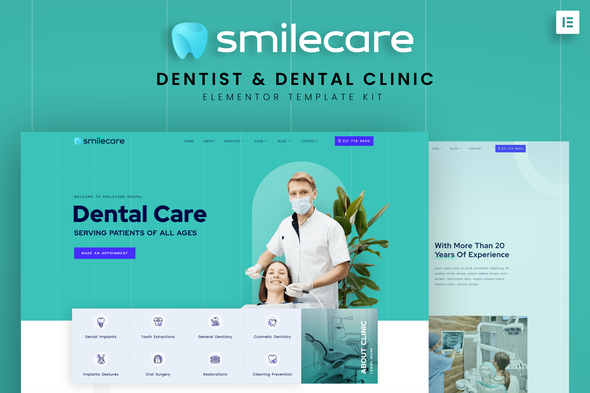
Smilecare – Dentist & Dental Clinic Elementor Template Kit
- Updated on May 2, 2026
- 100% Original Product & Well Documented
- Unlimited Domain Usage
*Important Note:
The image should not be Part of the template kit. You need to use your own reliable Source.


Original price was: ₹999.00.₹299.00Current price is: ₹299.00.
Launch a professional dental website without coding. 10+ pre-built pages, dentist-specific sections, commercial license included. Start today.
- Secured & Scanned by Virus total & McAfee.
- Access to Free updates for Lifetime
- All products are Under GPL License (Unlimited Domain Usage)
- We Not Provide any Support For this Product

Lifetime Membership
Access 6700+ Premium WordPress Themes & Plugins, Elementor Templates, Mobile Apps, PHP scripts with Lifetime Updates.
Join Premium MembershipRecently Viewed
Smilecare – Dentist & Dental Clinic Elementor Template Kit
Right now, someone nearby is Googling “dentist near me.” Is your practice showing up? Smilecare gives you a complete website template built for dental offices, orthodontists, and oral health professionals. Download it today, swap in your info, and launch.
What You Get
This is an Elementor Template Kit for dental professionals who want a polished website without hiring a developer or waiting months. Every page, section, and element is designed around what dental patients actually look for — clean layouts, clear service info, trust signals, and obvious paths to book an appointment.
Smilecare includes 10+ pre-built pages. Homepage, about, services, team, testimonials, gallery, contact, and appointment booking — all ready for your content. No staring at a blank page wondering where to start.
Key Features
- 10+ pages: Home, Services, About, Team, Testimonials, Gallery, Contact, Appointment, and more
- Service page templates for cleanings, braces, implants, veneers, pediatric dentistry, and emergency care
- Appointment booking section with clear calls-to-action that actually get people to book
- Team/dentist profile section so new patients can put a face to your practice
- Testimonial blocks to display reviews and build credibility
- Responsive design that looks great on phones, tablets, and desktops
- Calming color palette and typography suited for healthcare and wellness
- Fully customizable — swap colors, fonts, images, and text to match your brand
Who Is This For?
Freelance web designers: deliver polished dental sites in days instead of weeks. Solo dentists and small practices: buy, install, launch — no technical skills needed. Marketing agencies: white-label this kit across multiple client projects. Dental product companies: adapt it for landing pages and service showcases.
If you’ve been putting off your website because the cost or timeline felt overwhelming, Smilecare removes both obstacles. Professional results without the custom development price tag.
How It Works
Requires WordPress and the free Elementor plugin (no Elementor Pro needed). After purchase, download the kit files and import them into your WordPress dashboard. Your pre-built pages appear in the Elementor library. Replace placeholder text with your practice details, upload your clinic photos, adjust colors if desired, and publish. That’s the whole process.
Why Buy This Kit
Instant download — no waiting, no delivery process. Commercial license covers client work, your own business, or both with no extra fees. Lifetime free updates as Elementor and WordPress evolve. One payment, done.
Compare that to a custom-built site: thousands of dollars, weeks of revisions, back-and-forth emails. With Smilecare, you control the timeline and the final result.
Get Started
Download Smilecare and have a patient-ready website live today. Instant access, commercial license, lifetime updates, one-time payment. Your future patients are searching online right now — make sure they find you.
Only logged in customers who have purchased this product may leave a review.
How to use Kit:
Install and activate the “Template Kit – Import” plugin from Plugins > Add New in WordPress.
Do not unzip.
Go to Template Kit – Import > Upload Template Kit Zip File button.
Before importing a template, ensure the Install Requirements button is clicked to activate required plugins.
For best results, do not import more than one template at a time.
RELATED PRODUCTS

DIVI – Original License | One Time Payment – Exclusive Deal

Elementor Pro 4.2.3 + Elementorism Landing Pages WordPress Plugin

907 5.3.6 – Responsive Multi-Purpose WordPress Theme

Element Pack Pro 9.1.0 – Addon For Elementor






 Mobile Apps
 php script
 How to
Reviews
There are no reviews yet