
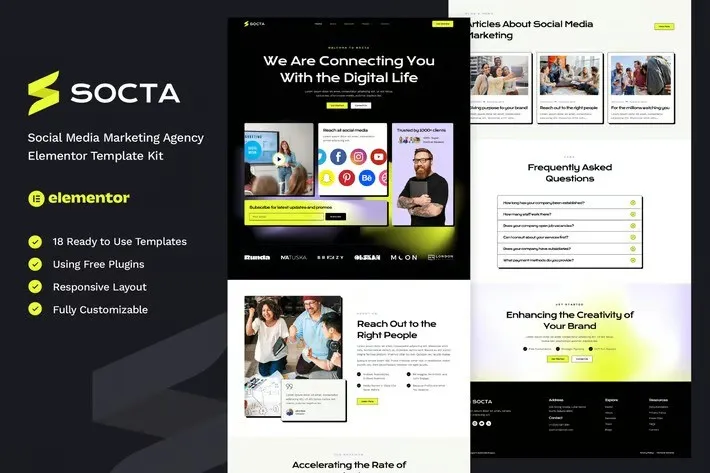
Socta – Social Media Marketing Agency Elementor Template Kit
- Updated on May 3, 2026
- 100% Original Product & Well Documented
- Unlimited Domain Usage
*Important Note:
The image should not be Part of the template kit. You need to use your own reliable Source.


Original price was: ₹999.00.₹299.00Current price is: ₹299.00.
15+ pages, zero coding, same-day launch. Socta gives social media agencies a professional website with commercial license, lifetime updates, and one simple price.
- Secured & Scanned by Virus total & McAfee.
- Access to Free updates for Lifetime
- All products are Under GPL License (Unlimited Domain Usage)
- We Not Provide any Support For this Product

Lifetime Membership
Access 6700+ Premium WordPress Themes & Plugins, Elementor Templates, Mobile Apps, PHP scripts with Lifetime Updates.
Join Premium MembershipRecently Viewed
Social Media Marketing Agency Website Template Kit for Elementor
Most agency owners spend months (and too much money) trying to get a professional website online. Socta changes that. It’s a purpose-built Elementor template kit made specifically for social media agencies and digital marketing professionals who need to look credible without hiring developers.
What You Get With Socta
15+ pre-built pages. Homepage. Services. About. Portfolio. Team. Testimonials. Pricing. FAQ. Blog. Contact. Header and footer included. All designed to make potential clients take you seriously from the first click.
- 15+ pre-built pages covering every section a marketing agency needs
- Homepage, Services, About, Portfolio, Team, Testimonials, Pricing, FAQ, Blog, and Contact pages
- Header and footer templates included for consistency across your site
- Fully responsive design that looks sharp on mobile devices
Key Features Built for Marketing Professionals
The design speaks directly to what clients look for: bold typography that commands attention, hero sections that hook instantly, and case study layouts that show off results. No clutter. Just strategic layouts built to convert.
- Drag-and-drop page building with Elementor — no coding knowledge required
- Uses free Elementor plugin — no expensive Pro version needed
- One-click demo import to get your site live fast
- Organized, well-commented code for easy customization
Who Should Buy This Template Kit
Social media agency? Digital marketing team? Freelance social media consultant? If you need to prove you know what you’re doing without spending weeks learning web development, Socta was built for you. First time with WordPress? No problem. You’ll be published the same day you buy.
How To Use Socta
Three steps. Install the free Elementor plugin, import the Socta template kit, and customize with your own branding. Swap in your colors, add your portfolio pieces, update the copy with your services, and publish. No developer required. No complicated setup. Just a professional agency website that looks like you hired a design team.
Why This Template Kit Works
Generic WordPress themes make you build everything from scratch. Socta skips that frustration. It’s designed by people who understand what marketing agencies actually need — authority signals, clear service breakdowns, portfolio showcases, and testimonials that build trust. Every section is positioned to move visitors toward hiring you.
Commercial license included means you can use this for client projects without paying additional fees. One payment, lifetime access, all future updates included. Hit a problem during setup? Support is one message away.
Ready to Get Started?
Stop delaying your online presence. Socta gives you a professional social media marketing agency website that attracts clients, builds credibility, and grows your business. Buy instantly and download today — your new website is waiting.
Only logged in customers who have purchased this product may leave a review.
How to use Kit:
Install and activate the “Template Kit – Import” plugin from Plugins > Add New in WordPress.
Do not unzip.
Go to Template Kit – Import > Upload Template Kit Zip File button.
Before importing a template, ensure the Install Requirements button is clicked to activate required plugins.
For best results, do not import more than one template at a time.
RELATED PRODUCTS

DIVI – Original License | One Time Payment – Exclusive Deal

Elementor Pro 4.2.3 + Elementorism Landing Pages WordPress Plugin

907 5.3.6 – Responsive Multi-Purpose WordPress Theme

Element Pack Pro 9.1.0 – Addon For Elementor






 Mobile Apps
 php script
 How to
Reviews
There are no reviews yet