
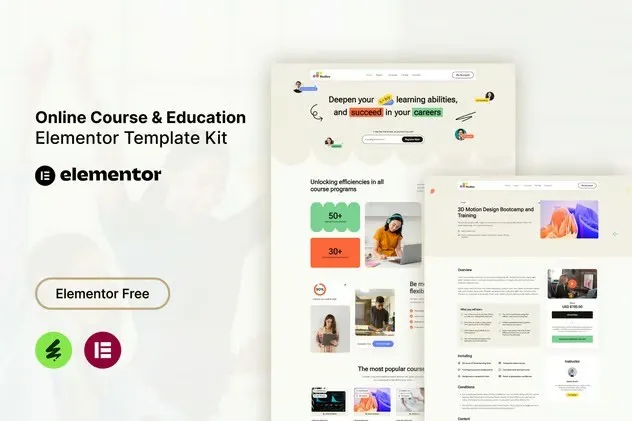
Studiez – Online Course & Education Elementor Template Kit
- Updated on May 2, 2026
- 100% Original Product & Well Documented
- Unlimited Domain Usage
*Important Note:
The image should not be Part of the template kit. You need to use your own reliable Source.


Original price was: ₹999.00.₹299.00Current price is: ₹299.00.
Stop waiting on developers. Studiez gives you 10+ pages — course layouts, instructor profiles, pricing tables — that plug straight into WordPress. Build your online school today, no code required.
- Secured & Scanned by Virus total & McAfee.
- Access to Free updates for Lifetime
- All products are Under GPL License (Unlimited Domain Usage)
- We Not Provide any Support For this Product

Lifetime Membership
Access 6700+ Premium WordPress Themes & Plugins, Elementor Templates, Mobile Apps, PHP scripts with Lifetime Updates.
Join Premium MembershipRecently Viewed
Build a Professional Online Course Website with Studiez
You’ve got the course content. Maybe you’ve recorded the videos. But now you’re staring at a blank screen wondering how to turn this into an actual website.
That’s where Studiez comes in. It’s an Elementor Template Kit built specifically for course creators, coaches, and education businesses. Instead of hiring a developer or wrestling with custom code for weeks, you get a complete set of pre-built pages you can customize in a single afternoon using drag-and-drop.
Whether you’re launching one course, running a full e-learning platform, or setting up tutoring services, Studiez gives you the professional look you need without the designer invoice.
What You Get with the Studiez Template Kit
This kit works with the free Hello Elementor theme and the Elementor page builder. Every layout is responsive and looks clean on desktop, tablet, and mobile.
- Homepage with hero section, featured courses, and call-to-action blocks
- Course catalog and individual course detail pages
- Instructor and team profile layouts
- Pricing and comparison tables for course packages
- Blog layout for education articles and tips
- Contact page, FAQ section, and about us templates
- Student testimonial and review blocks
- Registration and login page designs
Who Is This Template Kit For?
Studiez works for anyone who needs a professional website fast and doesn’t want to learn to code just to get there.
- Course creators selling video-based training
- Coaches and consultants with educational programs
- Schools and tutoring services building their online presence
- LMS website owners using LearnDash, LifterLMS, or similar plugins
- Freelancers building education websites for clients
How to Use Studiez
It’s straightforward. Install Hello Elementor, activate Elementor, then import the kit from your WordPress dashboard. Browse the page library, insert what you need, and swap in your colors, fonts, and images. Each section is organized logically — you can piece together your entire site in a few hours.
The kit performs best with Hello Elementor, though it works with most WordPress themes. All placeholder images and content are easily replaceable.
Why Choose Studiez for Your Education Website
With a template kit, you own everything. Your hosting, your site, your rules. No monthly platform fees eating into your revenue. One upfront payment gets you lifetime updates and a commercial license — use it for your own business or client projects.
- Commercial license included — build client sites or your own
- Lifetime free updates as the kit improves
- Direct support if you hit a snag during setup
- No coding or design skills required — really
- Clean, SEO-friendly structure out of the box
Students judge a course by its website. A polished, professional presence tells them you’re legitimate before they even watch your first video.
Ready to Get Started?
Download Studiez and have your online course website live today. Instant access after purchase — start building immediately. One payment, lifetime access, and a site that actually looks like you hired someone.
Only logged in customers who have purchased this product may leave a review.
How to use Kit:
Install and activate the “Template Kit – Import” plugin from Plugins > Add New in WordPress.
Do not unzip.
Go to Template Kit – Import > Upload Template Kit Zip File button.
Before importing a template, ensure the Install Requirements button is clicked to activate required plugins.
For best results, do not import more than one template at a time.
RELATED PRODUCTS

DIVI – Original License | One Time Payment – Exclusive Deal

Elementor Pro 4.2.3 + Elementorism Landing Pages WordPress Plugin

907 5.3.6 – Responsive Multi-Purpose WordPress Theme

Element Pack Pro 9.1.0 – Addon For Elementor






 Mobile Apps
 php script
 How to
Reviews
There are no reviews yet