
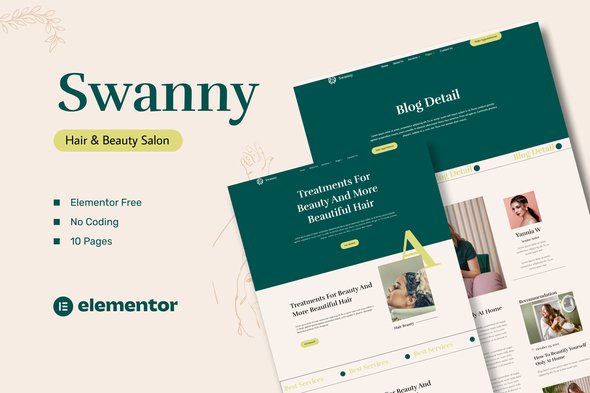
Swanny – Hair & Beauty Salon Elementor Template Kit
- Updated on October 11, 2025
- 100% Original Product & Well Documented
- Unlimited Domain Usage
*Important Note:
The image should not be Part of the template kit. You need to use your own reliable Source.


Original price was: ₹999.00.₹299.00Current price is: ₹299.00.
- Secured & Scanned by Virus total & McAfee.
- Access to Free updates for Lifetime
- All products are Under GPL License (Unlimited Domain Usage)
- We Not Provide any Support For this Product

Lifetime Membership
Access 6700+ Premium WordPress Themes & Plugins, Elementor Templates, Mobile Apps, PHP scripts with Lifetime Updates.
Join Premium MembershipRecently Viewed
Swanny – Hair & Beauty Salon Template Kit
Building a professional online presence for a hair or beauty salon often involves a lot of design work and time. If you’re a web developer managing client projects, an agency looking for efficient solutions, or a business owner wanting to establish a strong online identity without starting from scratch, the Swanny template kit offers a practical approach. This kit provides a complete set of pre-designed pages specifically for the beauty industry, helping you create an effective website quickly using Elementor. It addresses the common challenge of needing a polished, industry-specific site that is straightforward to set up and manage, allowing you to focus on your services rather than complex web development.
Key Features for Efficient Web Development
Streamlined Customization with Elementor
Swanny integrates fully with the Elementor Page Builder, meaning you can adjust layouts and content using its drag-and-drop visual interface. This removes the need for custom coding, saving significant development time for both seasoned pros and those new to web design. You can easily move elements, edit text, and swap images directly on the page, simplifying the entire customization process.
Consistent Branding and Design Control
The kit allows you to manage fonts and colors from a central location, ensuring your brand’s visual identity remains consistent across all pages. This global styling capability means a single change can update your entire site’s look, though you still have the flexibility to fine-tune individual elements when needed. The design itself is professional and current, providing a credible face for any beauty business.
Optimized for Performance
In today’s web, site speed is important for user experience and search engine visibility. Swanny is designed to be fast-loading, helping ensure visitors have a smooth browsing experience. A quicker website can help reduce bounce rates and improve overall engagement with your content and services.
Practical Applications for Your Business
The Swanny template kit is well-suited for a range of beauty and wellness businesses. Hair salons, nail studios, spas, aesthetic clinics, and independent stylists can all use this kit to establish or update their online presence. It includes essential pages like Home, About Us, Our Service, Service Detail, Our Team, Pricing, Our Blogs, Blog Detail, Contact Us, and a 404 page. This comprehensive structure helps you effectively showcase your offerings, introduce your staff, list your pricing, and manage your online content. The kit works well with Elementor Page Builder and has been optimized for the free Hello Elementor theme, though it’s compatible with most themes that support Elementor.
Benefits for Implementation and Maintenance
Getting your website online quickly is a key benefit of using a template kit like Swanny. The setup process is simple, allowing you to import the pages and start customizing them without delay. Being built with Elementor means the site will adapt well to different screen sizes, providing a good experience for users on desktops, tablets, and phones. Ongoing management is also straightforward; updating content or making design tweaks is easily handled within the Elementor interface, helping keep your site current with minimal effort.
Download from Plugintheme at an affordable price and start building your beauty salon website today.
 Swanny - Hair & Beauty Salon Elementor Template Kit
How to use Kit:
Install and activate the “Template Kit – Import” plugin from Plugins > Add New in WordPress.
Do not unzip.
Go to Template Kit – Import > Upload Template Kit Zip File button.
Before importing a template, ensure the Install Requirements button is clicked to activate required plugins.
For best results, do not import more than one template at a time.










 Mobile Apps
 php script
 How to

Reviews
There are no reviews yet