
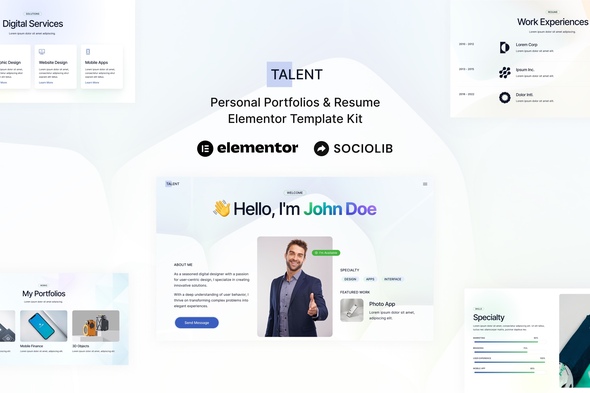
Talent – Personal Portfolios & Resume Elementor Template Kit
- Updated on May 1, 2026
- 100% Original Product & Well Documented
- Unlimited Domain Usage
*Important Note:
The image should not be Part of the template kit. You need to use your own reliable Source.


Original price was: ₹999.00.₹299.00Current price is: ₹299.00.
Skip the developer fees. Talent gives you 10+ professionally designed portfolio pages — customize in Elementor and go live today.
- Secured & Scanned by Virus total & McAfee.
- Access to Free updates for Lifetime
- All products are Under GPL License (Unlimited Domain Usage)
- We Not Provide any Support For this Product

Lifetime Membership
Access 6700+ Premium WordPress Themes & Plugins, Elementor Templates, Mobile Apps, PHP scripts with Lifetime Updates.
Join Premium MembershipRecently Viewed
Talent Elementor Template Kit for Professional Portfolios
You don’t need weeks or developer bills to get a portfolio that actually lands clients. Talent gives you a complete, professionally crafted portfolio solution — set it up, customize it, and launch it in a single afternoon. Freelancers, developers, consultants, small business owners — this kit works for anyone who needs a polished online presence without the usual back-and-forth.
What You Get With the Talent Template Kit
Ten pages. Not a few scattered templates — a full website system. Every section a strong portfolio needs is here: a homepage with a bold hero section, an about page that tells your story, a services breakdown, a portfolio gallery with filters, individual project pages, a resume/CV page, a blog section, contact forms, plus matching headers and footers. Everything matches visually, so your site feels cohesive instead of stitched together.
- Homepage, About, Services, and Portfolio pages
- Dedicated Resume and Contact page templates
- Blog section with single post layouts
- Header and Footer templates for consistent branding
- Mobile-responsive layouts that look sharp on any device
Who This Template Kit Is For
Freelance designers, photographers, writers, developers, and consultants use Talent to build a credible online presence fast — one that actually converts visitors into clients. Web designers and agencies buy this kit too. They skip the blank-canvas phase entirely and go straight to customization, cutting their client delivery time in half.
- Freelancers wanting a professional portfolio without hiring a designer
- Web designers and agencies building client sites quickly
- Small business owners showcasing services and past work
- Job seekers who need a standout resume website
How to Use This Template Kit
No code required. If you have WordPress and the free Elementor plugin, you’re ready. Import the kit through Elementor’s template library, pick the pages you want, and start adding your own text, images, and branding. Drag and drop to adjust anything. Tweak colors, fonts, and spacing with a few clicks. Since the kit uses Elementor’s native widgets, everything behaves exactly as you’d expect — no custom code, no compatibility headaches, no surprises.
Once your pages look right, hit publish. Your portfolio is live, professional, and ready to impress.
Why Buy the Talent Elementor Template Kit
Custom portfolio design costs hundreds to thousands of dollars and takes weeks. Pre-made themes often come bloated with features you’ll never touch, require paid plugins to work properly, and look generic the moment you install them. Talent is different — it’s professionally designed, lightweight, and genuinely ready to use out of the box.
- One-time payment — no subscriptions, no hidden fees
- Commercial license included — use it for client projects freely
- Instant download — start building within minutes of purchase
- Lifetime updates — your kit stays current with future Elementor versions
- Dedicated support — help is available if you get stuck
Ready to Get Started?
Download instantly, customize in Elementor, and have your portfolio live before the end of the day. No design skills needed. No ongoing costs. Grab Talent now and show off your work the way it deserves.
Only logged in customers who have purchased this product may leave a review.
How to use Kit:
Install and activate the “Template Kit – Import” plugin from Plugins > Add New in WordPress.
Do not unzip.
Go to Template Kit – Import > Upload Template Kit Zip File button.
Before importing a template, ensure the Install Requirements button is clicked to activate required plugins.
For best results, do not import more than one template at a time.
RELATED PRODUCTS

DIVI – Original License | One Time Payment – Exclusive Deal

Elementor Pro 4.2.3 + Elementorism Landing Pages WordPress Plugin

907 5.3.6 – Responsive Multi-Purpose WordPress Theme

Element Pack Pro 9.1.0 – Addon For Elementor






 Mobile Apps
 php script
 How to

Reviews
There are no reviews yet