
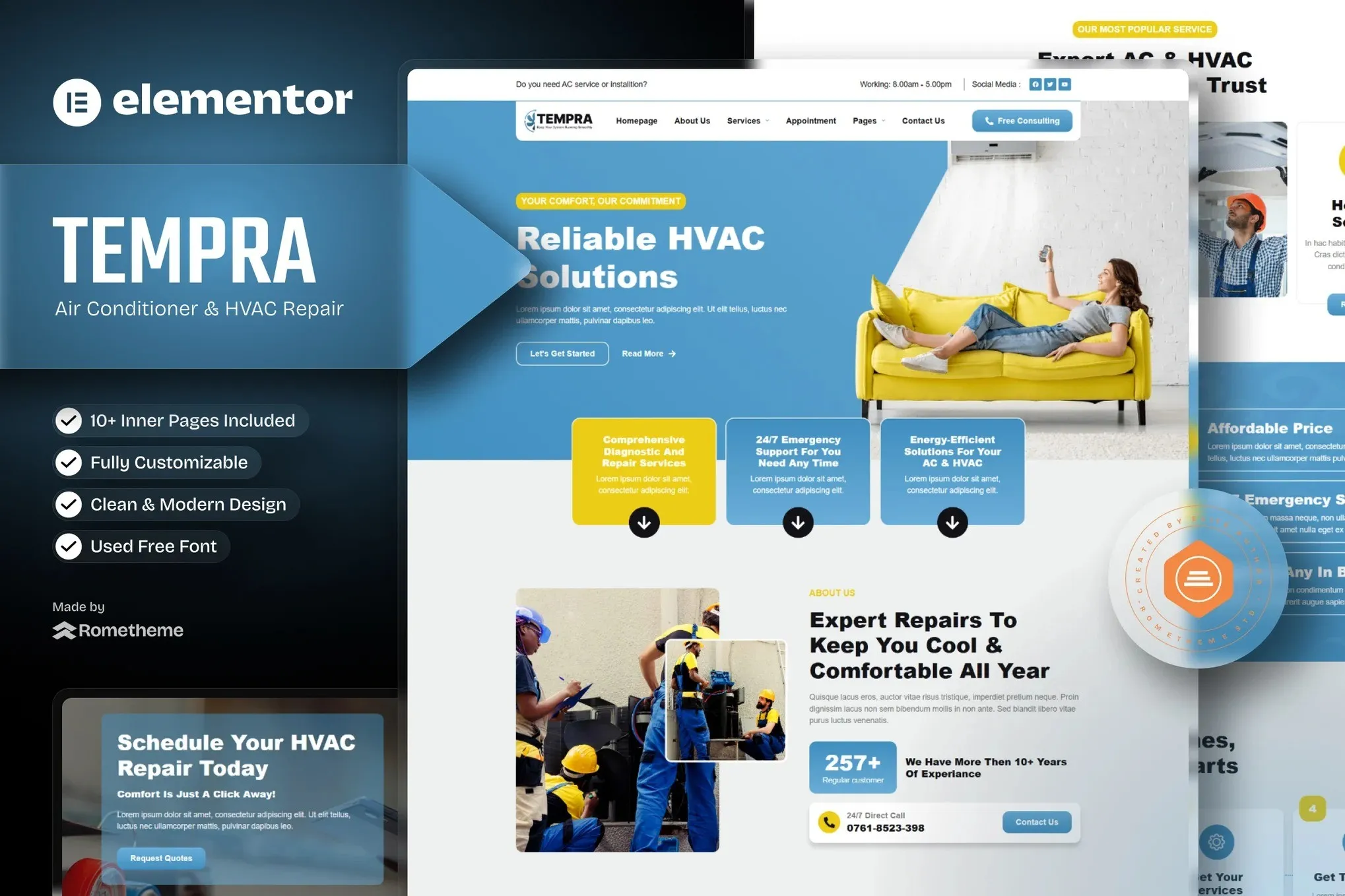
Tempra – Air Conditioner & HVAC Repair Elementor Template Kit
- Updated on May 3, 2026
- 100% Original Product & Well Documented
- Unlimited Domain Usage
*Important Note:
The image should not be Part of the template kit. You need to use your own reliable Source.


Original price was: ₹999.00.₹299.00Current price is: ₹299.00.
Launch an HVAC website in two hours flat. This Elementor kit gives AC repair companies a clean, professional look — no developer needed, no WordPress experience required. Swap in your logo, add your services, and you’re live.
- Secured & Scanned by Virus total & McAfee.
- Access to Free updates for Lifetime
- All products are Under GPL License (Unlimited Domain Usage)
- We Not Provide any Support For this Product

Lifetime Membership
Access 6700+ Premium WordPress Themes & Plugins, Elementor Templates, Mobile Apps, PHP scripts with Lifetime Updates.
Join Premium MembershipRecently Viewed
Air Conditioner & HVAC Repair Website Template for Elementor
Let’s be honest — you didn’t start an HVAC business to become a web designer. But right now, your website might be costing you jobs. Either it looks outdated, or you haven’t built one yet because, frankly, there are more pressing matters than learning WordPress.
Tempra changes that. It’s a complete Elementor template kit built specifically for air conditioning and HVAC companies. Download, customize, publish. No code. No monthly designer fees.
What’s Inside the Kit
Sixteen pre-designed pages and sections, all organized around how HVAC businesses actually work. You’ll find a homepage with a hero section that grabs attention, dedicated pages for heating, cooling, maintenance, and emergency calls, team profiles for your certified technicians, and contact forms that actually get filled out.
- Homepage with service highlights and clear calls to action
- Individual service pages for every offering
- Technician profiles that build trust
- Quote request forms optimized for lead capture
- Mobile-friendly layout that looks good on any device
Who This Is For
Small HVAC shops tired of paying agencies $3,000+ for sites that took six weeks to build. Freelance designers working with AC contractors who need to move fast. If you know your way around WordPress enough to install a plugin, you can handle this. If you don’t, the setup guide walks you through every step.
Getting Started
Four steps. Install Elementor. Import the kit. Swap in your info. Publish. Most people finish in under two hours. I’ve heard from customers who had something live the same morning they bought it.
Why Not Just Use a Generic Theme?
Generic themes make you do the heavy lifting. You spend days choosing fonts, testing color palettes, figuring out which page builder to use. Tempra’s already made those decisions — and made them with HVAC clients in mind. The layout guides visitors toward requesting a quote. The design signals professionalism. You get that “we know what we’re doing” feeling without hiring someone to create it.
- Pay once, use forever — no subscriptions sneaking up on you
- Commercial license included for client work
- Free updates as the template evolves
- Support team if you get stuck
Bottom Line
Your competitors have professional websites. Now you can too — without the professional price tag. Download Tempra, spend an afternoon customizing it, and wake up tomorrow with a site that actually represents your business.
Only logged in customers who have purchased this product may leave a review.
How to use Kit:
Install and activate the “Template Kit – Import” plugin from Plugins > Add New in WordPress.
Do not unzip.
Go to Template Kit – Import > Upload Template Kit Zip File button.
Before importing a template, ensure the Install Requirements button is clicked to activate required plugins.
For best results, do not import more than one template at a time.
RELATED PRODUCTS

DIVI – Original License | One Time Payment – Exclusive Deal

Elementor Pro 4.2.3 + Elementorism Landing Pages WordPress Plugin

907 5.3.6 – Responsive Multi-Purpose WordPress Theme

Element Pack Pro 9.1.0 – Addon For Elementor






 Mobile Apps
 php script
 How to
Reviews
There are no reviews yet