
Textiln – Textile & Garment Industry Elementor Template Kit
- Updated on April 30, 2026
- 100% Original Product & Well Documented
- Unlimited Domain Usage
*Important Note:
The image should not be Part of the template kit. You need to use your own reliable Source.


Original price was: ₹999.00.₹299.00Current price is: ₹299.00.
Stop waiting months for a website. Textiln gives textile factories and garment makers 8 ready pages that look custom-built — live in hours. Commercial license included.
- Secured & Scanned by Virus total & McAfee.
- Access to Free updates for Lifetime
- All products are Under GPL License (Unlimited Domain Usage)
- We Not Provide any Support For this Product

Lifetime Membership
Access 6700+ Premium WordPress Themes & Plugins, Elementor Templates, Mobile Apps, PHP scripts with Lifetime Updates.
Join Premium MembershipRecently Viewed
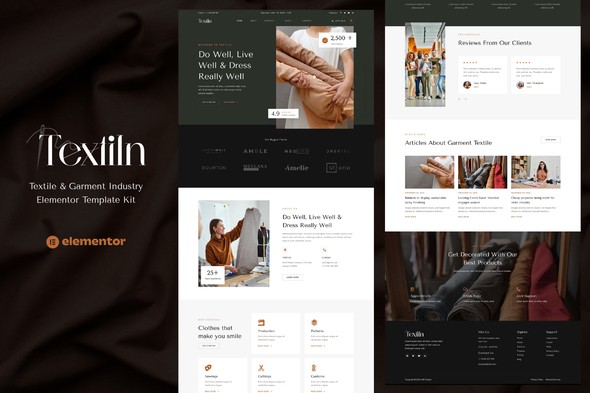
Textiln – Professional Textile Website Template for WordPress
Your fabric samples deserve better than a generic WordPress theme. Textiln gives textile factories, garment manufacturers, and clothing brands a ready-to-use website that actually looks like your industry. No design skills needed — just install, swap in your content, and launch.
What You Get with Textiln
This Elementor Template Kit comes packed with everything you need to build a complete textile business website in a single afternoon. Eight professionally crafted pages cover every section your clients and partners expect to see.
- Homepage with hero banner, featured products, and company overview
- About Us page showcasing your manufacturing capabilities
- Product catalog layout for showcasing fabric types and garment collections
- Services page for highlighting manufacturing processes
- Contact page with inquiry form and company details
- Blog layout for industry news and updates
Who It’s Built For
Textiln works best for textile businesses that want to compete with larger players online. Whether you run a garment factory in Bangladesh, a fabric trading company, or a custom clothing brand, this template gives you a professional foundation without the designer price tag. It’s specifically formatted for the textile industry — fabric texture sections, product grid layouts, and manufacturing process showcases are all built in.
Easy Setup, No Coding Required
Elementor’s drag-and-drop builder means you can customize every page without touching a single line of code. Change colors to match your brand, update images with your product photos, and edit text directly on the page. If you’ve ever used a presentation tool, you can build this website.
- Fully responsive — looks great on mobile, tablet, and desktop
- Global styles let you update your entire site’s fonts and colors in one click
- Placeholder content included — just replace with your own information
Commercial License, Instant Download
Buy once, use forever. Your purchase includes a commercial license, so you can use Textiln for client projects or your own business without additional fees. Download the files immediately after checkout — no waiting, no subscriptions.
Why Choose Textiln Over Custom Design
Custom textile website design costs thousands and takes months. Textiln delivers the same professional result in hours. You get industry-specific layouts designed for fabric businesses, not generic corporate templates. Every section is optimized for the textile trade — from product showcases to inquiry forms that help you collect leads from international buyers.
Ready to Get Started?
Stop struggling with themes that weren’t designed for your industry. Download Textiln today and have a professional textile website live this week. One-time payment, lifetime access, commercial license included. Build your online presence without breaking your budget.
Only logged in customers who have purchased this product may leave a review.
How to use Kit:
Install and activate the “Template Kit – Import” plugin from Plugins > Add New in WordPress.
Do not unzip.
Go to Template Kit – Import > Upload Template Kit Zip File button.
Before importing a template, ensure the Install Requirements button is clicked to activate required plugins.
For best results, do not import more than one template at a time.
RELATED PRODUCTS

DIVI – Original License | One Time Payment – Exclusive Deal

Elementor Pro 4.2.3 + Elementorism Landing Pages WordPress Plugin

907 5.3.6 – Responsive Multi-Purpose WordPress Theme

Element Pack Pro 9.1.0 – Addon For Elementor






 Mobile Apps
 php script
 How to
Reviews
There are no reviews yet