
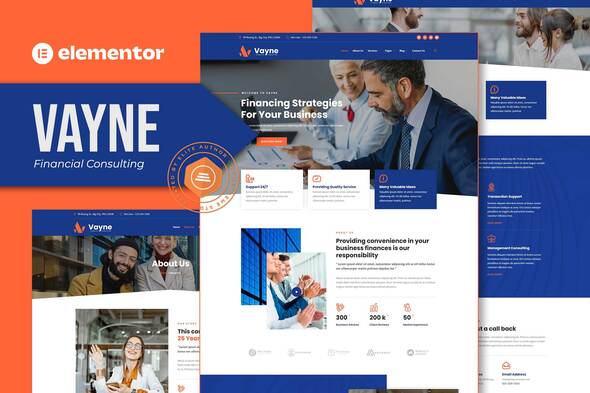
Vayne – Financial Consulting Elementor Template Kit
- Updated on May 2, 2026
- 100% Original Product & Well Documented
- Unlimited Domain Usage
*Important Note:
The image should not be Part of the template kit. You need to use your own reliable Source.


Original price was: ₹999.00.₹299.00Current price is: ₹299.00.
Twelve pages. One weekend. A financial consulting website that actually closes deals. Vayne comes pre-loaded with everything you need — no developer required.
- Secured & Scanned by Virus total & McAfee.
- Access to Free updates for Lifetime
- All products are Under GPL License (Unlimited Domain Usage)
- We Not Provide any Support For this Product

Lifetime Membership
Access 6700+ Premium WordPress Themes & Plugins, Elementor Templates, Mobile Apps, PHP scripts with Lifetime Updates.
Join Premium MembershipRecently Viewed
Vayne – Financial Consulting Elementor Template Kit
Most financial consultants spend 6+ weeks and thousands of dollars on web design. Vayne cuts that down to an afternoon. This is a complete Elementor Template Kit built for advisors, wealth managers, and financial agencies who need a site that looks like they hired a pro — without the agency price tag.
What You Get With This Template Kit
Twelve ready-to-use templates covering every section a consulting firm actually needs. Import them directly into Elementor — no extra page builders, no complicated setup. Works with most standard WordPress themes.
- Home, About, Services, Team, and Testimonials pages
- Case Studies, FAQ, Blog, and Contact page templates
- Pricing Plans page with comparison table layouts
- Pre-built Header and Footer sections
- Coming Soon and 404 Error pages included
Design Built for Financial Services
Deep navy, crisp whites, gold accents. Classic financial colors that signal stability and expertise. Serif headings give it that traditional credibility; sans-serif body text keeps it readable on any screen. The layouts follow a 12-column grid — everything aligns, everything breathes. No cluttered sections, no awkward spacing. Just clean pages that make your services look legitimate.
Who Should Download This Template Kit
You’re a financial professional who knows your website should be working for you, not gathering dust. This kit removes the biggest bottleneck: time. No dev team. No weeks of back-and-forth revisions. Swap content in minutes using Elementor’s drag-and-drop editor.
- Financial advisors and wealth managers launching new practices
- Accounting firms modernizing their online presence
- Business consultants building credibility with prospective clients
- Investment firms and insurance agencies needing fast website deployment
- Freelance finance professionals creating portfolio sites
How to Use Vayne
Thirty minutes. That’s all it takes to go from download to published. Install through your WordPress dashboard, pick the pages you want, import into Elementor, then swap in your logo and copy. Hit publish. The templates are responsive — they look sharp on phones, tablets, and desktops without any extra tweaking.
Why Financial Consultants Choose Vayne
Subscription website builders eat into your margins every month. Vayne is a one-time purchase — pay once, use it forever. Built on a 12-column grid system so layouts stay pixel-perfect when you customize. Compatible with Yoast SEO, WooCommerce, Contact Form 7, and WPForms right out of the box.
Pages load fast. That matters for Google rankings and for keeping potential clients from bouncing. Each template has clear calls-to-action, strategic whitespace, and image placeholders that make your content take center stage. Whether you’re starting from scratch or refreshing an outdated site, Vayne gives you a foundation clients will actually trust.
Ready to Get Started?
Your website should work as hard as you do. Download Vayne today and have a professional financial consulting site live before the weekend. One payment covers the full kit, lifetime updates, and support when you need it.
Only logged in customers who have purchased this product may leave a review.
How to use Kit:
Install and activate the “Template Kit – Import” plugin from Plugins > Add New in WordPress.
Do not unzip.
Go to Template Kit – Import > Upload Template Kit Zip File button.
Before importing a template, ensure the Install Requirements button is clicked to activate required plugins.
For best results, do not import more than one template at a time.
RELATED PRODUCTS

DIVI – Original License | One Time Payment – Exclusive Deal

Elementor Pro 4.2.3 + Elementorism Landing Pages WordPress Plugin

907 5.3.6 – Responsive Multi-Purpose WordPress Theme

Element Pack Pro 9.1.0 – Addon For Elementor






 Mobile Apps
 php script
 How to

Reviews
There are no reviews yet