
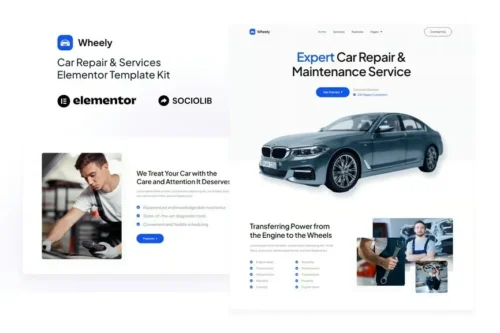
Wheely – Car Repair & Auto Services Elementor Template Kit
- Updated on May 3, 2026
- 100% Original Product & Well Documented
- Unlimited Domain Usage

*Important Note:
The image should not be Part of the template kit. You need to use your own reliable Source.


Original price was: ₹999.00.₹299.00Current price is: ₹299.00.
Get your auto shop online today — no dev required. Wheely gives you 10+ pre-built pages, a clean booking flow, and everything you need to look legit from day one. Download and go.
- Secured & Scanned by Virus total & McAfee.
- Access to Free updates for Lifetime
- All products are Under GPL License (Unlimited Domain Usage)
- We Not Provide any Support For this Product

Lifetime Membership
Access 6700+ Premium WordPress Themes & Plugins, Elementor Templates, Mobile Apps, PHP scripts with Lifetime Updates.
Join Premium MembershipRecently Viewed
Build Your Auto Repair Website Fast with Wheely
You know engines. Transmissions. Brake systems. But the thought of building a website at 11 p.m. because some directory listing is embarrassing you? That’s not your skill set, and it shouldn’t be.
Wheely fixes that. It’s a ready-to-use Elementor Template Kit built for car repair shops, auto service centers, and mechanics who want a real website without the designer price tag or the six-week timeline.
Download. Import in Elementor. Swap your logo and phone number. Live. That’s literally it.
What Is Wheely?
A pre-built website kit for the auto repair industry. It comes with 10+ pages — home, services, gallery, team, FAQ, contact, and more. Every section is styled, spaced, and ready to publish. You add your photos, your words, and it looks like you paid someone thousands for it.
Works with the free Elementor plugin. No extra page builders needed. Mobile-friendly, loads fast, keeps customers focused on booking — not trying to figure out your navigation.
Key Features of Wheely
- 10+ pages: home, services, gallery, team, FAQ, contact, and more
- One-click import through Elementor’s template library
- Looks sharp on phones, tablets, and desktops
- Conversion-focused layout — guides visitors toward booking or calling
- Built-in appointment request form that captures leads while you sleep
- Commercial license included — use it for client projects or your own shop
Lifetime free updates, too. We add new pages or polish existing ones, you grab them at no extra charge. One payment, yours forever.
Who Is Wheely For?
Auto repair shops. Mobile mechanics. Car service centers. Anyone in the automotive industry who needs to look credible online without spending months on a website project.
Also solid for freelance designers and WordPress devs building sites for auto clients. Import, customize, deliver. Commercial license covers it.
If you’ve been putting off your website because the process feels overwhelming — this removes that excuse. You don’t need to code. You need a professional starting point. This is it.
How to Use Wheely
Buy. Download the ZIP. In your WordPress dashboard, go to Templates > Theme Builder in Elementor, import the kit, apply the templates.
Replace the placeholder text with your shop name, hours, services, and contact info. Drop in photos of your team or your bay. Publish.
Most users go from download to live site in under two hours. If you hit a snag, lifetime support is included.
Why Buy Wheely Instead of Starting From Scratch?
Starting from a blank Elementor page sounds flexible. In reality, it’s hundreds of micro-decisions — font choices, spacing, button colors, section order — that eat up an entire weekend and still look inconsistent.
Wheely skips all of that. Professional designers spent weeks on the layout, typography, and conversion flow. You get the result without the hours.
Compared to hiring a designer from scratch? A fraction of the cost. Compared to free templates that look like 2015 called and wants its website back? This was built specifically for auto shops with conversion in mind.
Get Wheely Now
Instant download. Commercial license included. Lifetime updates and support if you need them. Your auto service business can have a professional website live today — not in six weeks when the designer finally finishes revisions.
Only logged in customers who have purchased this product may leave a review.
How to use Kit:
Install and activate the “Template Kit – Import” plugin from Plugins > Add New in WordPress.
Do not unzip.
Go to Template Kit – Import > Upload Template Kit Zip File button.
Before importing a template, ensure the Install Requirements button is clicked to activate required plugins.
For best results, do not import more than one template at a time.
RELATED PRODUCTS

DIVI – Original License | One Time Payment – Exclusive Deal

Elementor Pro 4.2.3 + Elementorism Landing Pages WordPress Plugin

907 5.3.6 – Responsive Multi-Purpose WordPress Theme

Element Pack Pro 9.1.0 – Addon For Elementor






 Mobile Apps
 php script
 How to
Reviews
There are no reviews yet