
Xedia – Medical Marijuana Elementor Template Kit
- Updated on May 2, 2026
- 100% Original Product & Well Documented
- Unlimited Domain Usage
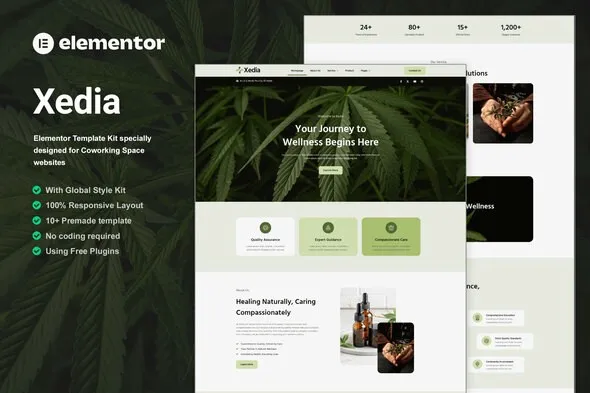
*Important Note:
The image should not be Part of the template kit. You need to use your own reliable Source.


Original price was: ₹999.00.₹299.00Current price is: ₹299.00.
Stop spending months on web development. Xedia gives you 15+ pages for dispensary menus, strain guides, booking forms, and compliance-ready design — all customizable in Elementor. Download and launch today.
- Secured & Scanned by Virus total & McAfee.
- Access to Free updates for Lifetime
- All products are Under GPL License (Unlimited Domain Usage)
- We Not Provide any Support For this Product

Lifetime Membership
Access 6700+ Premium WordPress Themes & Plugins, Elementor Templates, Mobile Apps, PHP scripts with Lifetime Updates.
Join Premium MembershipRecently Viewed
Medical Marijuana Website Template Built for Dispensaries and Clinics
Your website needs to do three things: build trust, educate patients, and turn visitors into booked appointments. Xedia handles all of it. This is a complete Elementor template kit built specifically for medical marijuana businesses. No coding. No month-long development cycles. Just a professional site you can customize in an afternoon.
15+ pre-built pages cover every section your dispensary needs. Mobile-responsive. Fast-loading. Designed to the standards patients expect from any reputable healthcare provider.
What’s Included
Xedia isn’t a generic WordPress theme with green colors. It’s built for cannabis businesses from the ground up — right down to state compliance disclaimers and educational content about strains and consumption methods.
- Homepage with hero, featured products, and trust signals
- Dispensary menu with filtering and product categories
- Strain pages showing THC/CBD levels, effects, and medical benefits
- Appointment booking and scheduling system
- Doctor recommendation and certification pages
- Blog setup for education and search rankings
- Contact forms, location pages, and patient resources
- Compliance footer with legal disclaimers
Who Is This For
Running a dispensary, clinic, telemedicine service, or cannabis education platform? This kit adapts. Perfect for:
- Dispensaries making the move online
- Cannabis clinics handling patient consultations
- Entrepreneurs launching new marijuana businesses
- Agencies working with cannabis clients
- Freelancers who need to deliver fast
Built for Elementor — Drag, Drop, Done
Know how to click and drag? Then you can build your entire site. Every section uses Elementor’s native widgets. Edit text, swap images, change colors, move sections — all without touching code. The kit also includes custom widgets made for cannabis businesses: product cards, strain selectors, booking calendars.
Connect your favorite WordPress plugins too. WooCommerce works out of the box for online sales. Yoast SEO integration helps your pages show up when patients search for dispensaries nearby.
Why Skip the Custom Build
Custom cannabis websites cost thousands and take months. Hiring a developer means revisions, hourly rates, and waiting on someone else’s calendar. Xedia puts you in the driver’s seat.
Download instantly — no waiting for approvals. The commercial license covers client work, so build sites for yourself or sell what you create. One payment, lifetime access. Future Elementor updates and new pages included free.
Detailed docs and video walkthroughs come with the kit. Even first-time Elementor users have sites live the same day.
Get Started
Generic templates weren’t made for medical marijuana businesses. Xedia was. Buy the kit, download your files, and start attracting patients — not debugging mismatched layouts. Buy now and launch today.
Only logged in customers who have purchased this product may leave a review.
How to use Kit:
Install and activate the “Template Kit – Import” plugin from Plugins > Add New in WordPress.
Do not unzip.
Go to Template Kit – Import > Upload Template Kit Zip File button.
Before importing a template, ensure the Install Requirements button is clicked to activate required plugins.
For best results, do not import more than one template at a time.
RELATED PRODUCTS

DIVI – Original License | One Time Payment – Exclusive Deal

Elementor Pro 4.2.3 + Elementorism Landing Pages WordPress Plugin

907 5.3.6 – Responsive Multi-Purpose WordPress Theme

Element Pack Pro 9.1.0 – Addon For Elementor






 Mobile Apps
 php script
 How to
Reviews
There are no reviews yet