
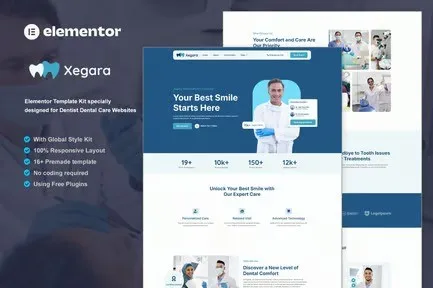
Xegara – Dentist Dental Care Elementor Template Kit
- Updated on May 3, 2026
- 100% Original Product & Well Documented
- Unlimited Domain Usage
*Important Note:
The image should not be Part of the template kit. You need to use your own reliable Source.


Original price was: ₹999.00.₹299.00Current price is: ₹299.00.
Skip the $5,000 agency quote. Xegara gives you 12 dentist-ready pages — homepage, services, booking, team, pricing — that look custom-built without the custom price tag. One purchase, unlimited projects, instant download.
- Secured & Scanned by Virus total & McAfee.
- Access to Free updates for Lifetime
- All products are Under GPL License (Unlimited Domain Usage)
- We Not Provide any Support For this Product

Lifetime Membership
Access 6700+ Premium WordPress Themes & Plugins, Elementor Templates, Mobile Apps, PHP scripts with Lifetime Updates.
Join Premium MembershipRecently Viewed
Dental Elementor Template Kit for Professional Clinic Websites
Most dental practices fall into two camps: they either paid way too much for a website that took months to finish, or they’re running something that looks like it was built in 2008. Xegara gets you professional results without the agency drama or the DIY embarrassment.
Your website has one job — get people to book an appointment. Xegara is built around that goal. Clean layouts, a color palette that doesn’t hurt your eyes, and navigation that actually makes sense. Patients find what they need in seconds, not clicks.
What’s Included in the Kit
12 pages, each designed for a specific purpose on your dental website:
- Homepage with hero section, service highlights, and patient testimonials
- About Us page — practice story, team members, credentials
- Services pages — general dentistry, cosmetic work, emergency care
- Appointment booking section with integrated scheduling
- Team profiles for each dentist and staff member
- Pricing page — transparency builds trust
- FAQ section for common patient questions
- Contact page with maps, forms, and clinic details
- Blog layout for dental health content
These pages link together logically. A patient lands on your homepage, checks out your services, meets your team, glances at pricing, then books. The flow makes sense.
How It Works
You don’t need to code anything. Elementor’s drag-and-drop builder handles everything — swap images, edit text, rearrange sections. If you’ve dragged elements in Canva, you can handle this.
The free Elementor plugin works with this kit. Elementor Pro adds dynamic content and enhanced forms if you want those later.
Mobile responsiveness is built in. Over 60% of healthcare searches happen on phones. Your site needs to look good there. Xegara does.
Who Is This For?
- General dentists launching new practices or updating old sites
- Specialists — orthodontists, oral surgeons, periodontists
- Multi-provider clinics needing staff showcase pages
- Pediatric dentists wanting family-friendly design
- Cosmetic dentists highlighting smile work
Web designers and agencies: you can deliver a complete dentist website in days, not weeks. Customize colors, add client logos, adjust services, bill at your rate.
Pricing Comparison
Custom dental website from an agency: $3,000 to $10,000, plus monthly maintenance, plus hosting fees.
Xegara: one flat price. Use it forever. Use it on unlimited client projects. Commercial license covers it all.
Free updates when WordPress or Elementor releases compatibility fixes. No surprise charges. No subscriptions to cancel when you forget.
Ready to Launch?
Download, install, customize, publish. That’s the whole process. Most users are live within a few hours of opening the template kit.
Your competitors already have websites. Some are good, most aren’t. This is your chance to put something professional online without blowing your marketing budget on day one.
Only logged in customers who have purchased this product may leave a review.
How to use Kit:
Install and activate the “Template Kit – Import” plugin from Plugins > Add New in WordPress.
Do not unzip.
Go to Template Kit – Import > Upload Template Kit Zip File button.
Before importing a template, ensure the Install Requirements button is clicked to activate required plugins.
For best results, do not import more than one template at a time.
RELATED PRODUCTS

DIVI – Original License | One Time Payment – Exclusive Deal

Elementor Pro 4.2.3 + Elementorism Landing Pages WordPress Plugin

907 5.3.6 – Responsive Multi-Purpose WordPress Theme

Element Pack Pro 9.1.0 – Addon For Elementor






 Mobile Apps
 php script
 How to
Reviews
There are no reviews yet