
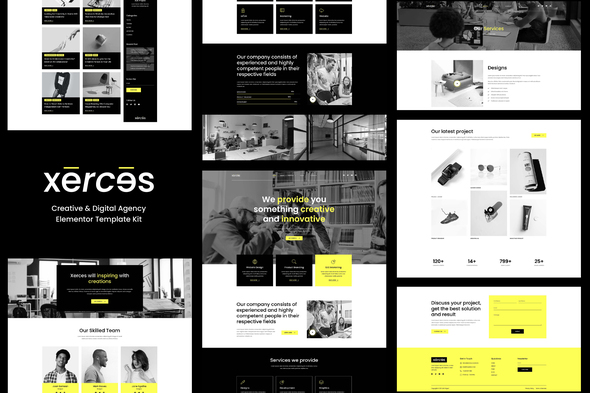
Xerces – Creative & Digital Agency Elementor Template Kit
- Updated on April 30, 2026
- 100% Original Product & Well Documented
- Unlimited Domain Usage
*Important Note:
The image should not be Part of the template kit. You need to use your own reliable Source.


Original price was: ₹999.00.₹299.00Current price is: ₹299.00.
Built for agencies that need a polished site without the wait. Xerces gives you 20+ pages, a drag-and-drop editor, and a commercial license — no coding, no developers, no weeks of back-and-forth. Get it now and launch today.
- Secured & Scanned by Virus total & McAfee.
- Access to Free updates for Lifetime
- All products are Under GPL License (Unlimited Domain Usage)
- We Not Provide any Support For this Product

Lifetime Membership
Access 6700+ Premium WordPress Themes & Plugins, Elementor Templates, Mobile Apps, PHP scripts with Lifetime Updates.
Join Premium MembershipRecently Viewed
Xerces – Creative & Digital Agency Elementor Template Kit
You didn’t become a creative to spend your days figuring out website builders. Xerces is a ready-made Elementor Template Kit built for creative agencies, freelancers, and studios that need a professional online presence — without hiring developers or burning through weeks of revisions. Every layout, section, and page was designed to help you win clients, not just exist on the internet.
The kit runs on Elementor — the free WordPress page builder millions already use. No Pro version needed. No code. No weekend-long setup sessions. Open Elementor, import the template, swap in your colors and photos, and you’re live.
What’s Inside
Over 20 pre-built pages covering every section a modern agency website needs. Clean designs that look custom without the custom price tag.
- 20+ fully editable pages: home, about, services, portfolio, team, pricing, contact, and more
- Multiple header and footer layouts you can swap depending on the project
- Portfolio and case study templates that actually show off creative work
- Team sections with room for photos, bios, and social links
- Service pages with pricing tables, feature lists, and conversion-focused CTAs
- Blog templates and inner post layouts for content marketing
Who Is This For?
If you’ve been putting off your website because the options were either too expensive, too generic, or too complicated — this kit was made for you:
- Freelancers who want a portfolio site that matches the quality of their actual work
- New agencies trying to look established from day one
- Digital marketing teams that need a decent template yesterday
- WordPress users who’d rather skip the developer and build it themselves
Getting Started
Have WordPress running? Good. Install the free Elementor plugin if you haven’t already. Then import the kit straight from your dashboard — the whole set loads in minutes. From there, edit any section using drag-and-drop. Change colors. Swap images. Update text. Publish. Done.
Why Xerces?
Template kits are everywhere. Here’s what you’re actually getting with this one: a commercial license so you can use it for client projects or your own business without legal headaches. Free lifetime updates so it stays compatible as WordPress and Elementor evolve. One payment. No subscriptions. No surprise charges. And if you get stuck during setup, support is available.
The design itself is built for agencies that care about their brand. Thoughtful spacing, modern typography, layouts that communicate professionalism before visitors read a single word. Because looking credible is half the battle when a potential client lands on your site.
Ready to Launch?
Download Xerces and have a complete creative agency website running within hours. One purchase. Instant access. Commercial license included.
Only logged in customers who have purchased this product may leave a review.
How to use Kit:
Install and activate the “Template Kit – Import” plugin from Plugins > Add New in WordPress.
Do not unzip.
Go to Template Kit – Import > Upload Template Kit Zip File button.
Before importing a template, ensure the Install Requirements button is clicked to activate required plugins.
For best results, do not import more than one template at a time.
RELATED PRODUCTS

DIVI – Original License | One Time Payment – Exclusive Deal

Elementor Pro 4.2.3 + Elementorism Landing Pages WordPress Plugin

907 5.3.6 – Responsive Multi-Purpose WordPress Theme

Element Pack Pro 9.1.0 – Addon For Elementor






 Mobile Apps
 php script
 How to
Reviews
There are no reviews yet