
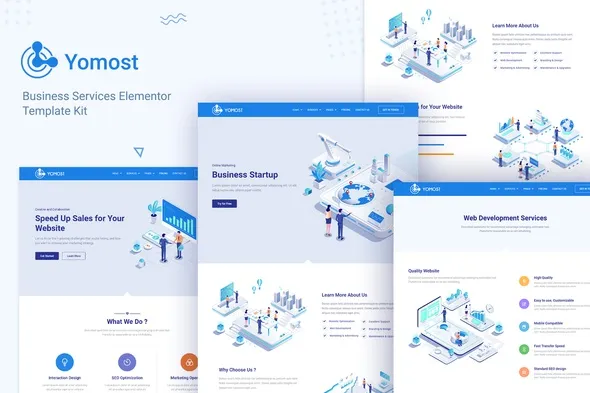
Yomost – Business Services Elementor Template Kit
- Updated on May 2, 2026
- 100% Original Product & Well Documented
- Unlimited Domain Usage
*Important Note:
The image should not be Part of the template kit. You need to use your own reliable Source.


Original price was: ₹999.00.₹299.00Current price is: ₹299.00.
Launch a professional business site today. This Elementor kit gives you 10+ pages, commercial rights, and lifetime updates — all for a single payment. Get started in under 15 minutes.
- Secured & Scanned by Virus total & McAfee.
- Access to Free updates for Lifetime
- All products are Under GPL License (Unlimited Domain Usage)
- We Not Provide any Support For this Product

Lifetime Membership
Access 6700+ Premium WordPress Themes & Plugins, Elementor Templates, Mobile Apps, PHP scripts with Lifetime Updates.
Join Premium MembershipRecently Viewed
Yomost Business Services Elementor Template Kit for Professional Websites
Between fiddling with page builders and waiting weeks for a developer to finish, your business website keeps getting pushed back. Yomost solves that. It’s a complete Elementor template kit built for service providers who need a professional site without the usual hassle. Download it, tweak a few colors and images, and publish.
What You Get with Yomost
Ten pages ready to go: Home, About, Services, Portfolio, Team, FAQ, Contact, and more. Each one uses clean layouts designed to look good and guide visitors toward taking action. Install Elementor, import the kit, and your foundation is done.
- 10+ pre-designed pages covering all major business site needs
- Responsive layouts that work on phones, tablets, and desktops
- Header and footer templates included
- Commercial license — build client sites without extra fees
- Works with free Elementor and Elementor Pro
Features That Actually Matter
Every section in this kit exists for a reason. Testimonials that build trust. Service descriptions that answer questions before they come up. Pricing layouts that don’t make visitors hunt for information.
- Demo import in one click — your site can be live within 15 minutes
- Clean code that loads quickly and performs better in search results
- Global colors and fonts — swap your brand palette across the whole site in seconds
- No coding needed — drag, drop, and edit visually with Elementor
Who Is Yomost For?
Agencies that need to spin up client sites quickly. Consultants who want to look professional without hiring a designer. Coaches, freelancers, and anyone running a service business who’s tired of their current site letting them down. If you want a site that actually represents your work, this kit gives you that foundation.
How to Use Yomost
Install Elementor (the free version works), import the kit, and start replacing the placeholder text with your own. Upload your images, adjust the colors to match your brand, and hit publish. You don’t need design experience or WordPress knowledge. If you can use a document editor, you can use this kit.
Why Yomost Instead of Free Templates?
Free options usually mean: limited ways to customize, designs that look like every other site using the same template, no help when something breaks, and a license that forbids client work. Yomost includes a commercial license so you can use it for your own business or your clients’ sites. You also get support from the people who built it.
Pay once, use it forever, download immediately.
Make the Switch Today
Your website is often the first impression potential clients get. If yours is holding you back, fix it now. Yomost arrives in seconds after purchase — no waiting, no back-and-forth with developers. Works for freelancers, agencies, and small businesses who want results without the usual complexity.
Only logged in customers who have purchased this product may leave a review.
How to use Kit:
Install and activate the “Template Kit – Import” plugin from Plugins > Add New in WordPress.
Do not unzip.
Go to Template Kit – Import > Upload Template Kit Zip File button.
Before importing a template, ensure the Install Requirements button is clicked to activate required plugins.
For best results, do not import more than one template at a time.
RELATED PRODUCTS

DIVI – Original License | One Time Payment – Exclusive Deal

Elementor Pro 4.2.3 + Elementorism Landing Pages WordPress Plugin

907 5.3.6 – Responsive Multi-Purpose WordPress Theme

Element Pack Pro 9.1.0 – Addon For Elementor






 Mobile Apps
 php script
 How to
Reviews
There are no reviews yet