
Zapatto – Shoes Store WooCommerce Elementor Template Kit
- Updated on May 2, 2026
- 100% Original Product & Well Documented
- Unlimited Domain Usage
*Important Note:
The image should not be Part of the template kit. You need to use your own reliable Source.


Original price was: ₹999.00.₹299.00Current price is: ₹299.00.
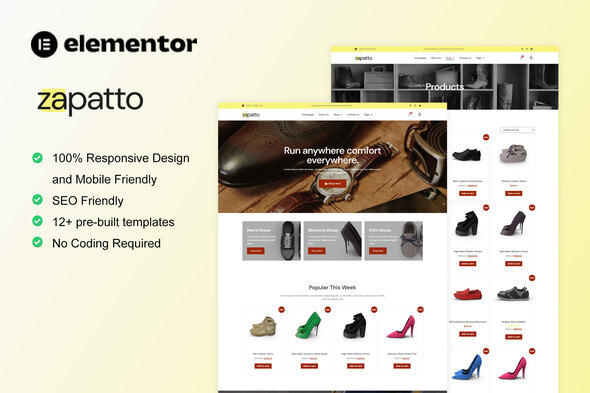
Skip the developer bills and the weeks of back-and-forth. Zapatto gives you a complete shoe store website — pre-designed pages, WooCommerce setup, product layouts that actually show off footwear — ready in a few hours.
- Secured & Scanned by Virus total & McAfee.
- Access to Free updates for Lifetime
- All products are Under GPL License (Unlimited Domain Usage)
- We Not Provide any Support For this Product

Lifetime Membership
Access 6700+ Premium WordPress Themes & Plugins, Elementor Templates, Mobile Apps, PHP scripts with Lifetime Updates.
Join Premium MembershipRecently Viewed
A Shoe Store Website That Looks Expensive (Without the Price Tag)
Your sneakers deserve better than a generic template and a checkout button that confuses half your customers. Zapatto is a full WooCommerce template kit built specifically for footwear shops: big product photos, layouts that breathe, and a buying flow that doesn’t require a manual.
No coding. No hiring a developer. Just Elementor, your product photos, and an afternoon.
What You Get With This Shoes Store Template
Zapatto isn’t a random collection of page pieces. It’s a coordinated kit with headers, product grids, single product pages, cart, checkout, and account pages — all styled for the footwear industry. The layouts prioritize photography, because nobody buys shoes from blurry thumbnails.
Key Features of the Zapatto Template Kit
- 15+ pre-built pages and section templates covering your entire store
- WooCommerce handles products, size variations, stock tracking, and orders automatically
- Quick view lets shoppers inspect shoes without clicking through to a new page
- Sale badges, stock counters, and size selector dropdowns built into product templates
- Mobile-responsive — because your customers are browsing on their phones
- Mega menu organizes sneakers, boots, sandals, and formal shoes into easy navigation
- Blog section for sizing guides, style posts, and SEO content
- Contact, about, and FAQ pages included out of the box
Who This Template Kit Is For
Running a physical shoe shop and need to move online? Building a dropshipping store around sneakers or fashion footwear? Launching your own shoe brand? Zapatto handles all three. If you can drag elements around in WordPress, you can build this site.
How to Set Up Your Shoe Store With Zapatto
Three steps. First, set up WordPress and install the free Elementor plugin. Second, import the Zapatto template kit through Elementor’s library. Third, swap the placeholder content with your products and hit publish. Most people finish in one afternoon. No theme dependencies, no setup wizards, no developer required.
Why Buy This Shoes Store Template
- Commercial license — use it for client work or your own store
- One payment, lifetime access — no subscriptions eating into margins
- Lifetime updates included — if WooCommerce or Elementor changes, your site stays compatible
- Direct support if you hit a snag during setup
- Drag-and-drop only — no coding, no PHP, no custom scripts
This kit gives you the foundation that normally costs $3,000+ to build from scratch. Instead of waiting six weeks for a developer, you get a professional starting point today. Every page is wired for WooCommerce. Every layout is built to convert. Every element edits through the visual builder.
Ready to Build Your Shoe Store?
Stop wrestling with generic templates that weren’t designed for your product. Download Zapatto and have a fully functional, professionally styled shoe store ready within hours. Instant download, commercial license included, lifetime updates and support.
Only logged in customers who have purchased this product may leave a review.
How to use Kit:
Install and activate the “Template Kit – Import” plugin from Plugins > Add New in WordPress.
Do not unzip.
Go to Template Kit – Import > Upload Template Kit Zip File button.
Before importing a template, ensure the Install Requirements button is clicked to activate required plugins.
For best results, do not import more than one template at a time.
RELATED PRODUCTS

DIVI – Original License | One Time Payment – Exclusive Deal

Elementor Pro 4.2.3 + Elementorism Landing Pages WordPress Plugin

907 5.3.6 – Responsive Multi-Purpose WordPress Theme

Element Pack Pro 9.1.0 – Addon For Elementor






 Mobile Apps
 php script
 How to
Reviews
There are no reviews yet