
Zenin – Photography & Portfolio Elementor Template Kit
- Updated on May 1, 2026
- 100% Original Product & Well Documented
- Unlimited Domain Usage
*Important Note:
The image should not be Part of the template kit. You need to use your own reliable Source.


Original price was: ₹999.00.₹299.00Current price is: ₹299.00.
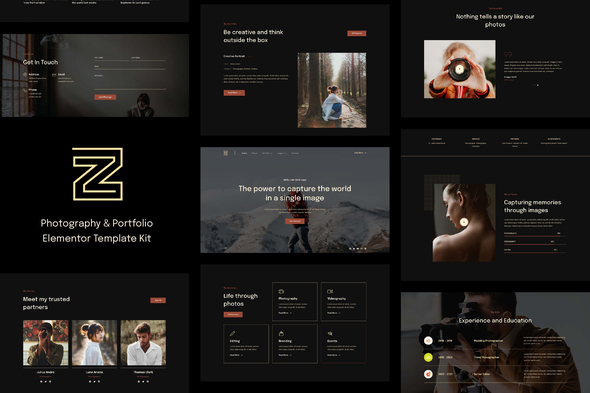
Zenin is an Elementor template kit built for photographers who want a portfolio that actually converts. Twelve pages ready to customize. Upload your images, hit publish, done.
- Secured & Scanned by Virus total & McAfee.
- Access to Free updates for Lifetime
- All products are Under GPL License (Unlimited Domain Usage)
- We Not Provide any Support For this Product

Lifetime Membership
Access 6700+ Premium WordPress Themes & Plugins, Elementor Templates, Mobile Apps, PHP scripts with Lifetime Updates.
Join Premium MembershipRecently Viewed
Zenin Photography & Portfolio Elementor Template Kit
Here’s the truth: most photographers spend more time wrestling with website builders than actually shooting. Zenin exists for one reason — to get your work online fast, without the usual headache.
This is a complete Elementor template kit designed specifically for visual artists. No, really — not a generic website template that happens to include a photo gallery. Every layout, every spacing choice, every animation was made with photographers in mind. Your images sit front and center while the design stays out of the way.
What’s Inside
Twelve pages and counting. Hero sections, service pages, contact forms, masonry galleries, about pages — all pre-built and ready to customize. The drag-and-drop builder means you can rearrange anything without touching code. Swap a header, move a gallery, change colors, add your own fonts. It all works together without forcing you into rigid templates.
What You Actually Get
- 12+ pages built for photography portfolios — not adapted from generic business sites
- Responsive layouts that look sharp on phones, tablets, and large monitors
- One-click demo import — up and running in 15 minutes, not 15 hours
- Commercial license — build client sites, charge your rate, keep the profit
- Free lifetime updates as Elementor releases new features
- Direct access to support when something goes sideways
Who Uses This
Wedding photographers launching their own brands. Portrait shooters building a second income stream with client websites. Small studios tired of referral-only business. Freelance creatives who need a portfolio that doesn’t look like every other Squarespace template. If you want something that looks custom-designed without the custom price tag, this is your shortcut.
Non-technical? The interface is beginner-friendly. You know enough to be dangerous with Canva? You’ll manage fine here. Developers like the clean structure too — easy to tweak for more complex projects.
Getting Started Takes Minutes
Three steps. Install the free Elementor plugin. Import the Zenin kit with one click. Swap the placeholder images for your own work. Most people go from download to live site in under an hour. If you hit a snag, support will get you sorted.
No subscriptions. Pay once, own it forever. No wake-up surprises when pricing changes or features get pulled. Your site stays yours.
The Photography-Specific Advantage
General website templates treat photos as one element among many. Zenin treats them as the whole point. Wide image displays, gallery formats that let your work breathe, generous whitespace that directs attention where it belongs. Portfolio-focused typography, smooth transitions, layouts designed to showcase consistency and range.
The commercial license isn’t just marketing speak — use it to build sites for paying clients. Your first paid project basically pays for the kit itself.
Bottom Line
Your portfolio should look as good as your photography. Right now, probably doesn’t. Grab Zenin, spend an hour customizing it, and change that. One payment, lifetime access, your work finally gets the website it deserves.
Only logged in customers who have purchased this product may leave a review.
How to use Kit:
Install and activate the “Template Kit – Import” plugin from Plugins > Add New in WordPress.
Do not unzip.
Go to Template Kit – Import > Upload Template Kit Zip File button.
Before importing a template, ensure the Install Requirements button is clicked to activate required plugins.
For best results, do not import more than one template at a time.
RELATED PRODUCTS

DIVI – Original License | One Time Payment – Exclusive Deal

Elementor Pro 4.2.3 + Elementorism Landing Pages WordPress Plugin

907 5.3.6 – Responsive Multi-Purpose WordPress Theme

Element Pack Pro 9.1.0 – Addon For Elementor






 Mobile Apps
 php script
 How to
Reviews
There are no reviews yet