
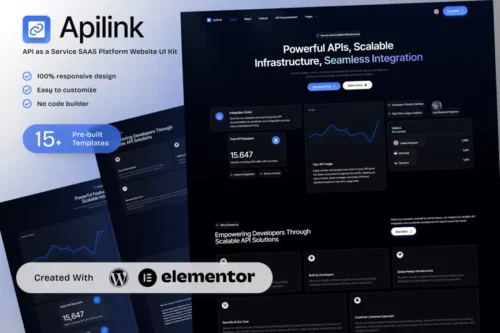
Apilink – API as a Service SAAS Platform Elementor Template Kit for Developer Solutions
- Updated on May 3, 2026
- 100% Original Product & Well Documented
- Unlimited Domain Usage

*Important Note:
The image should not be Part of the template kit. You need to use your own reliable Source.


- Coupon "b2g1" has expired.
- Coupon "b2g1" has expired.
- Coupon "b2g1" has expired.
- Coupon "b2g1" has expired.
- Coupon "b2g1" has expired.
Original price was: ₹999.00.₹299.00Current price is: ₹299.00.
Stop wasting weeks on custom development. This Elementor kit gets your API platform live today — developer-focused design, conversion-ready pages, and zero coding required.
- Secured & Scanned by Virus total & McAfee.
- Access to Free updates for Lifetime
- All products are Under GPL License (Unlimited Domain Usage)
- We Not Provide any Support For this Product

Lifetime Membership
Access 6700+ Premium WordPress Themes & Plugins, Elementor Templates, Mobile Apps, PHP scripts with Lifetime Updates.
Join Premium MembershipRecently Viewed
Build Your API Platform Website with the Apilink Elementor Template Kit
Apilink gives API-as-a-Service businesses a professional website without the development time. No month-long projects. No expensive developers. Just a polished, ready-to-launch site built specifically for technical audiences.
What Is the Apilink Elementor Template Kit?
It’s a pre-built website template for API-first businesses. Since it runs inside Elementor, you can edit everything visually — drag sections around, swap images, update text. No code. The kit comes with professionally designed pages for landing, pricing, documentation, and feature showcases. Clean layouts. Modern typography. Code snippet styling that developers actually recognize and trust.
Key Features of This API Platform Template
Every element serves API and developer-focused businesses:
- 6 pre-designed pages: Home, Features, Pricing, Documentation, Contact, and API Showcase
- Developer-friendly aesthetics: syntax-highlighted code blocks, clean spacing, technical visual hierarchy
- Fully responsive — works on phones, tablets, and desktops
- Built-in pricing tables, feature comparison layouts, and conversion-focused CTAs
- Works with free Elementor and Elementor Pro
- One-click import through WordPress dashboard
Who Is This Template For?
Perfect if you’re an independent developer launching an API product, an agency building client sites on WordPress, or a SAAS founder who needs a professional proof-of-concept fast. Technical teams creating documentation hubs or developer portals love it too. Payment APIs, data services, authentication tools — whatever developer-facing product you’re building, Apilink gives you the structural foundation to look credible from day one.
How to Use Apilink for Your Website
Setup takes under 30 minutes. Install Elementor on your WordPress site, upload the kit file, import the pages you want, and swap in your own content. Change colors to match your brand. Add your API documentation. Set your pricing tiers. Publish. Done. No code required — the template handles the structure so you can focus on your actual product. One purchase, lifetime access, unlimited projects under the commercial license.
Why Choose the Apilink Template Kit?
Building from scratch means months of back-and-forth with developers and thousands in costs. Generic templates miss the mark for technical audiences. Apilink solves both problems — purpose-built for API and developer-centric messaging, at a fraction of custom development prices. Your visitors will immediately understand what you offer and how it helps them. The template installs in minutes, edits in Elementor’s visual builder, and launches your online presence without the technical overhead.
Ready to Get Started?
Download Apilink and have a professional API platform website live this week. The commercial license covers client projects, commercial use, and unlimited installations.
Only logged in customers who have purchased this product may leave a review.
How to use Kit:
Install and activate the “Template Kit – Import” plugin from Plugins > Add New in WordPress.
Do not unzip.
Go to Template Kit – Import > Upload Template Kit Zip File button.
Before importing a template, ensure the Install Requirements button is clicked to activate required plugins.
For best results, do not import more than one template at a time.
RELATED PRODUCTS

DIVI – Original License | One Time Payment – Exclusive Deal

Elementor Pro 4.1.3 + Elementorism Landing Pages WordPress Plugin

907 5.3.6 – Responsive Multi-Purpose WordPress Theme

Element Pack Pro 9.1.0 – Addon For Elementor

Lifetime Mini Membership





 Mobile Apps
 php script
 How to
Reviews
There are no reviews yet