
Aspro – Creative Design Agency Elementor Template Kit
- Updated on May 1, 2026
- 100% Original Product & Well Documented
- Unlimited Domain Usage
*Important Note:
The image should not be Part of the template kit. You need to use your own reliable Source.


Original price was: ₹999.00.₹299.00Current price is: ₹299.00.
Stop building websites from scratch. This Elementor template kit launches creative agencies live in hours — portfolio grids, service pages, and client-winning design included. No coding required.
- Secured & Scanned by Virus total & McAfee.
- Access to Free updates for Lifetime
- All products are Under GPL License (Unlimited Domain Usage)
- We Not Provide any Support For this Product

Lifetime Membership
Access 6700+ Premium WordPress Themes & Plugins, Elementor Templates, Mobile Apps, PHP scripts with Lifetime Updates.
Join Premium MembershipRecently Viewed
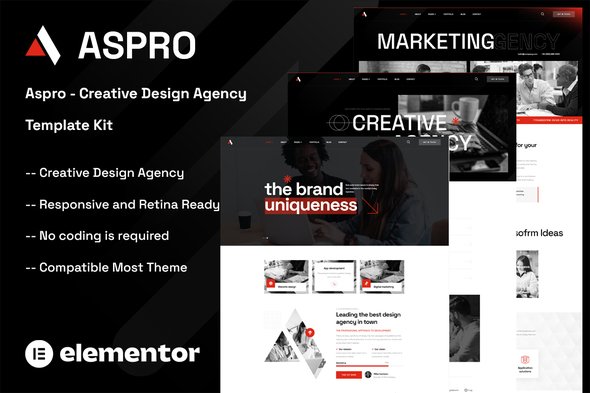
Aspro Creative Design Agency Elementor Template Kit
You’ve got the portfolio. You’ve got the skills. What you don’t have is another week to spend on website development. The Aspro Creative Design Agency Elementor Template Kit gives you a complete, professional online presence for your creative studio — no coding required, no design degree needed.
Built specifically for design agencies, creative studios, and freelance professionals who want to look established from day one. It includes portfolio layouts, service pages, team sections, testimonials, and contact forms — all designed with a modern aesthetic that impresses clients and wins projects.
What You Get With the Aspro Template Kit
Pre-designed pages and sections that work together in Elementor. Each layout showcases creative work in the best possible light while maintaining a clean, professional look.
- Homepage with hero section, featured services, and portfolio grid
- About page with team member profiles and agency story
- Services page with customizable service cards
- Portfolio/project showcase with filtering options
- Contact page with integrated form and map section
- Blog layout templates for content marketing
- Header and footer templates for consistent branding
Who Is This Template Kit For?
Freelance designers launching their personal brand. Small agency teams wanting to level up their website. Established studios refreshing their digital image. If you can drag and drop in Elementor, you can build your entire site with these templates.
You don’t need to be a WordPress expert. These are beginner-friendly while still offering the flexibility that experienced users expect.
How to Use the Aspro Template Kit
Getting started takes minutes. Install Elementor (the free version works), upload the kit through the WordPress dashboard, and begin editing. Every section is labeled clearly, every element is customizable, and every page connects logically.
Swap in your colors, upload your work, adjust the typography to match your brand, and publish. You can launch a fully functional creative agency website in a single afternoon.
Why Choose the Aspro Template Kit?
Most template kits look generic. The Aspro kit stands apart with its focus on visual storytelling — exactly what creative agencies need to convert visitors into clients. It prioritizes portfolio presentation, uses whitespace effectively, and keeps navigation intuitive so potential clients can find your work fast.
You also get instant access to all future updates at no additional cost. One payment, lifetime access, commercial license included for client projects. Build sites for yourself or your clients without worrying about recurring fees or restrictions.
Ready to Build Your Agency Website?
Stop delaying your launch. Get the Aspro Creative Design Agency Elementor Template Kit today and have a professional, conversion-focused website ready in hours. Download instantly and start customizing to match your unique brand.
Only logged in customers who have purchased this product may leave a review.
How to use Kit:
Install and activate the “Template Kit – Import” plugin from Plugins > Add New in WordPress.
Do not unzip.
Go to Template Kit – Import > Upload Template Kit Zip File button.
Before importing a template, ensure the Install Requirements button is clicked to activate required plugins.
For best results, do not import more than one template at a time.
RELATED PRODUCTS

DIVI – Original License | One Time Payment – Exclusive Deal

Elementor Pro 4.2.1 + Elementorism Landing Pages WordPress Plugin

907 5.3.6 – Responsive Multi-Purpose WordPress Theme

Element Pack Pro 9.1.0 – Addon For Elementor






 Mobile Apps
 php script
 How to
Reviews
There are no reviews yet