
Avenue – Event & Conference Elementor Template Kit
- Updated on May 3, 2026
- 100% Original Product & Well Documented
- Unlimited Domain Usage
*Important Note:
The image should not be Part of the template kit. You need to use your own reliable Source.


Original price was: ₹999.00.₹299.00Current price is: ₹299.00.
Skip the design phase. Avenue gives you 15+ pre-built pages for speaker schedules, ticket registration, and countdown timers — built for Elementor, ready to publish today. Commercial license included.
- Secured & Scanned by Virus total & McAfee.
- Access to Free updates for Lifetime
- All products are Under GPL License (Unlimited Domain Usage)
- We Not Provide any Support For this Product

Lifetime Membership
Access 6700+ Premium WordPress Themes & Plugins, Elementor Templates, Mobile Apps, PHP scripts with Lifetime Updates.
Join Premium MembershipRecently Viewed
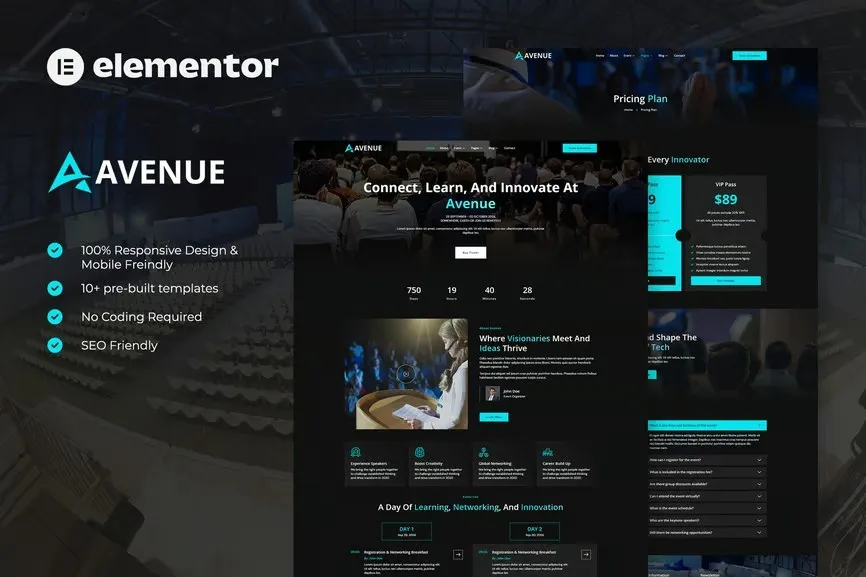
Avenue Event & Conference Elementor Template Kit
Your event deserves a website that makes attendees think ‘these people have their act together’ before they’ve even registered. Avenue is that website — polished, conversion-focused, and ready to capture your conference’s energy. No coding. No expensive freelancers. Just drag, drop, and you’re live.
What You Get With Avenue
This Elementor Template Kit is built specifically for event and conference websites. We’re talking complete page layouts for every section you need — hero section with countdown timer, speaker grids, session schedules, ticket registration, and sponsor showcases.
- 15+ pre-built pages and section templates
- Speaker profiles with photo, bio, and social links
- Session schedule grid with time slots and room assignments
- Ticket pricing tables with comparison features
- Sponsor gallery and partner logos section
- FAQ, venue map, and contact forms ready to go
- Mobile-responsive design that looks sharp on any screen
Who It’s Built For
Event planners juggling multiple conferences a year. Freelance designers who need to ship client sites faster. Small business owners running workshops, seminars, or meetups. WordPress developers looking for a professional starting point without building from zero.
If you’ve ever stared at a blank WordPress dashboard wondering where to even begin with an event site, Avenue eliminates that whole problem. Every layout is already designed, styled, and conversion-optimized. Pick what works for your event, swap in your content, hit publish.
How It Works
Install the kit through Elementor like any template. Browse the library, select the pages you need, start editing. The design system stays consistent throughout — same typography scale, same color variables, same spacing rhythm. So your finished site looks cohesive even if you mix different template sections.
Built with free Elementor widgets, so you’re not dependent on premium plugins. Works with most WordPress themes that support Elementor. If you can run Elementor, you can run Avenue.
Why Buy This Template Kit
Time matters. With Avenue, you skip the research phase, skip the wireframing, skip the testing. You get a proven design already optimized for event websites — layouts that push visitors toward registration, clear calls-to-action, and information architecture that actually makes sense for conference attendees.
Commercial license included means you can use this for client projects without additional fees. Free lifetime updates keep you covered as Elementor evolves. One-time payment, ongoing support — no subscriptions eating into your budget.
While you’re still researching registration plugins, booking systems, and calendar tools, Avenue users are already live. That’s the difference between launching in a day versus dragging a project out for three weeks.
Ready to Get Started?
Download Avenue and have your event website running this week. Choose your pages, add your event details, and watch registrations come in with a design that actually matches your conference quality.
Only logged in customers who have purchased this product may leave a review.
How to use Kit:
Install and activate the “Template Kit – Import” plugin from Plugins > Add New in WordPress.
Do not unzip.
Go to Template Kit – Import > Upload Template Kit Zip File button.
Before importing a template, ensure the Install Requirements button is clicked to activate required plugins.
For best results, do not import more than one template at a time.
RELATED PRODUCTS

DIVI – Original License | One Time Payment – Exclusive Deal

Elementor Pro 4.1.3 + Elementorism Landing Pages WordPress Plugin

907 5.3.6 – Responsive Multi-Purpose WordPress Theme

Element Pack Pro 9.1.0 – Addon For Elementor

Lifetime Mini Membership





 Mobile Apps
 php script
 How to
Reviews
There are no reviews yet