
Barber 1997 – Barbershop Elementor Template Kits
- Updated on April 30, 2026
- 100% Original Product & Well Documented
- Unlimited Domain Usage
*Important Note:
The image should not be Part of the template kit. You need to use your own reliable Source.


Original price was: ₹999.00.₹299.00Current price is: ₹299.00.
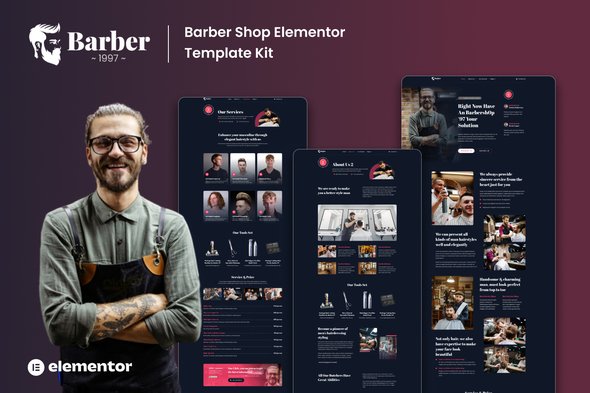
Your barbershop deserves better than a Facebook page and a phone number. Barber 1997 gives you a complete, retro-styled website with services, pricing, and booking built in. Open Elementor, drop in your photos, publish. No code, no designer, no weeks of waiting.
- Secured & Scanned by Virus total & McAfee.
- Access to Free updates for Lifetime
- All products are Under GPL License (Unlimited Domain Usage)
- We Not Provide any Support For this Product

Lifetime Membership
Access 6700+ Premium WordPress Themes & Plugins, Elementor Templates, Mobile Apps, PHP scripts with Lifetime Updates.
Join Premium MembershipRecently Viewed
Barber 1997 Elementor Template Kit — Build Your Barbershop Website in Minutes
Standing out in the barbershop industry takes more than skill with clippers. You need a website that captures your style, showcases your services, and makes it easy for clients to book an appointment. Barber 1997 handles all of that — without the designer price tag or weeks of back-and-forth.
This template kit gives you a complete, professionally designed website built specifically for barbershops and men’s grooming. Every page is layout-ready. Every section is styled. You open Elementor, swap in your logo and photos, and hit publish.
What’s Included
Six pages total. Homepage with hero section and call-to-action. Dedicated services page for cuts, shaves, fades, and grooming packages. Pricing section with clean, easy-to-update rate cards. About page to tell your barbers’ stories. Contact page with location, hours, phone number, and embedded map. Plus a booking inquiry section.
Bold Retro Design That Stops Scroll
Deep blacks. Warm golds. Vintage typography. An atmosphere that feels like walking into a classic barbershop. The 1997 name isn’t just a number — it’s the vibe. Clients notice the attention to detail before they read a single word. Works for old-school straight razor shops, modern fade bars, and everything in between.
Who Is This For?
Barber 1997 fits barbershop owners, grooming salon operators, and freelance designers working with local shops who want a professional site without hiring a developer.
- Independent barbers opening their own shop and needing a website fast
- Established salons refreshing their online presence with something new
- Freelance designers building client sites on tight turnarounds
- WordPress users who prefer drag-and-drop with Elementor
Setup Takes Minutes, Not Days
If you can drag and drop, you can use this. The kit installs directly into Elementor. All styling is pre-applied. You customize colors, images, and text to match your brand. No CSS knowledge needed. No developer required. One purchase, one download, and your barbershop website is live.
Commercial License Included
Every purchase includes a commercial license. Use it for client projects, your own barbershop site, or multiple shop locations. No recurring fees. No restrictions. Buy once, use it freely.
Why Not Start From Scratch?
Custom barbershop websites cost hundreds to thousands of dollars and take weeks to build. With this kit, you skip the design phase entirely. The hard work is already done. You just make it yours.
No subscriptions. No monthly payments. One-time purchase, lifetime access to updates. Your barbershop deserves a website that looks as good as the cuts you deliver.
Download Barber 1997 Now
Instant delivery. Commercial license included. Have your barbershop website live this week.
Only logged in customers who have purchased this product may leave a review.
How to use Kit:
Install and activate the “Template Kit – Import” plugin from Plugins > Add New in WordPress.
Do not unzip.
Go to Template Kit – Import > Upload Template Kit Zip File button.
Before importing a template, ensure the Install Requirements button is clicked to activate required plugins.
For best results, do not import more than one template at a time.
RELATED PRODUCTS

DIVI – Original License | One Time Payment – Exclusive Deal

Elementor Pro 4.2.1 + Elementorism Landing Pages WordPress Plugin

907 5.3.6 – Responsive Multi-Purpose WordPress Theme

Element Pack Pro 9.1.0 – Addon For Elementor






 Mobile Apps
 php script
 How to
Reviews
There are no reviews yet