
BarberLabs – Barber Shop Elementor Pro Template Kit
- Updated on May 3, 2026
- 100% Original Product & Well Documented
- Unlimited Domain Usage
*Important Note:
The image should not be Part of the template kit. You need to use your own reliable Source.


Original price was: ₹999.00.₹299.00Current price is: ₹299.00.
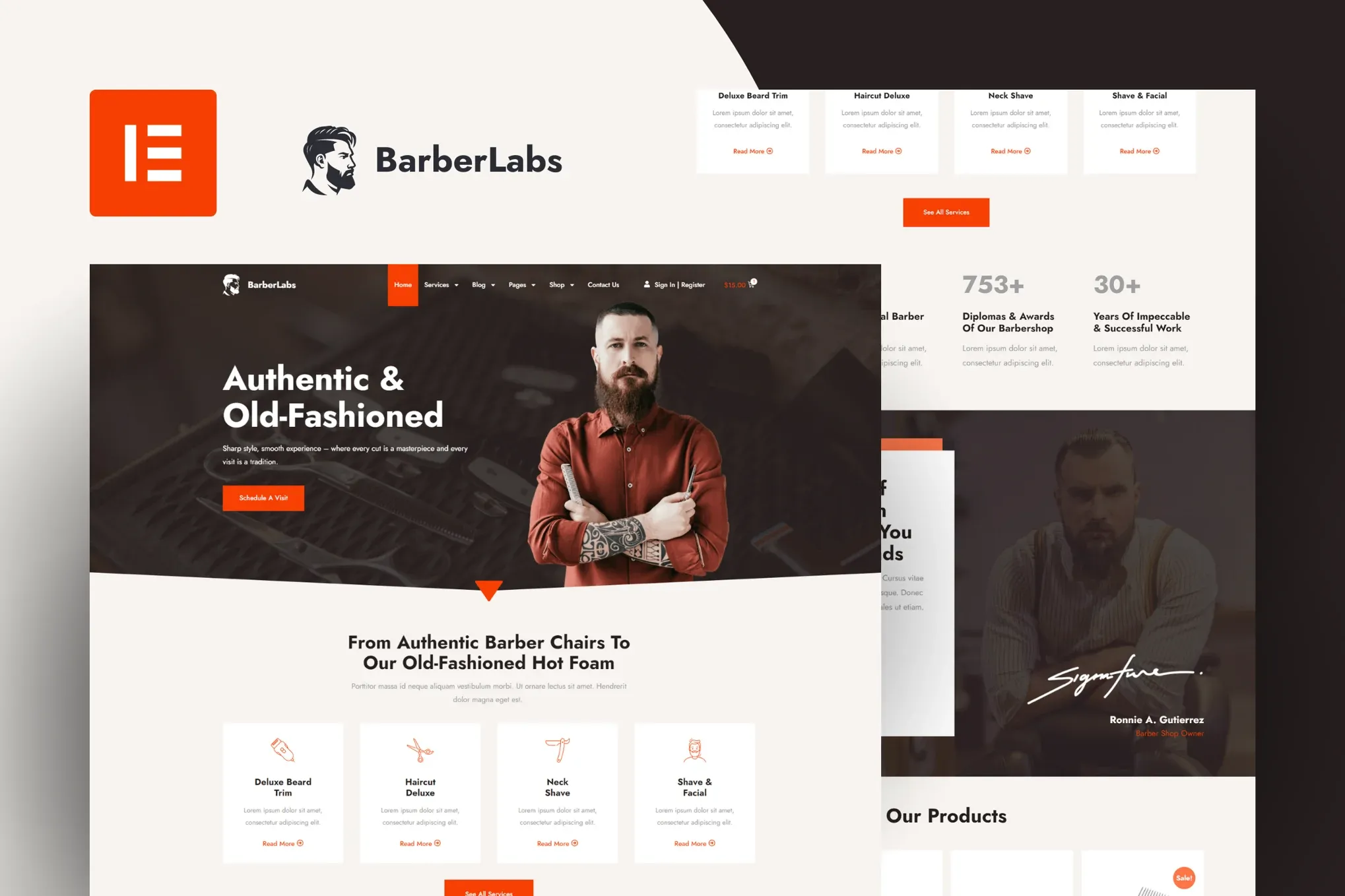
Your barbershop deserves a website that books clients, not one that looks like you built it in 2009. BarberLabs gives you 8+ ready pages, pro layouts, and Elementor’s drag-and-drop editor — no code, no developers, no weeks of back-and-forth. Launch today.
- Secured & Scanned by Virus total & McAfee.
- Access to Free updates for Lifetime
- All products are Under GPL License (Unlimited Domain Usage)
- We Not Provide any Support For this Product

Lifetime Membership
Access 6700+ Premium WordPress Themes & Plugins, Elementor Templates, Mobile Apps, PHP scripts with Lifetime Updates.
Join Premium MembershipRecently Viewed
BarberLabs Elementor Template Kit — Build Your Barber Shop Website in Minutes
You’ve seen those barbershop websites that look like they were designed in 2005. Yellow text on a black background. A contact form that doesn’t work. No mobile version. That’s not going to be you.
BarberLabs is a complete Elementor Template Kit built specifically for barber shops and men’s grooming businesses. It’s not a generic template with your logo slapped on top — every section, color, and font choice was made with one goal: helping you book more clients.
What’s Inside the Kit
Eight pages, ready to go:
- Homepage with hero section, service showcase, and a booking callout that actually converts
- Services page with pricing tables (yes, you can edit these)
- About page — tell clients who their barber is
- Gallery page for your best work
- Contact page with map, hours, and an appointment form
- Blog layout for grooming tips and shop news
- Header and footer templates
- Testimonial, FAQ, and pricing inner pages
How It Works
Elementor Pro gives you drag-and-drop editing. Elementor Free works too — your choice. Change text. Swap photos. Adjust colors. Move sections around. All from your WordPress dashboard, no code required.
- Looks great on mobile, tablet, and desktop
- Speed-optimized and SEO-friendly right out of the box
- Commercial license — build client sites or use it for your own shop
- Pay once, keep it forever, get lifetime updates
- Documentation included
Who Is This For?
Three groups buy this kit. Independent barbers who are tired of paying agencies $3,000+ for a basic website. Freelance designers who build WordPress sites for grooming clients and need to cut their project time in half. Marketing managers at multi-location chains who need consistent branding across 10+ locations.
Beginner with your first WordPress site? You’ll be fine — the setup guide walks you through everything. Experienced developer who wants to stop rebuilding the same layouts? This solves that problem too.
Setup Takes 30 Minutes
Install Elementor. Import the kit with one click. Swap the placeholder images with your own. Update your hours. Hit publish. That’s it. The included documentation covers image swaps, booking software integration, and local SEO basics. Questions? A real human responds within 24 hours — not an auto-responder.
Why Not Just Find a Free Template?
Free templates are generic. They don’t know what a barbershop needs. Half the pages are in a language you can’t read. When something breaks, you’re on your own. With BarberLabs, you get industry-specific layouts, lifetime updates, and a commercial license that lets you use it for client work or your own business.
This costs less than two hours with a freelancer. No subscriptions. No hidden fees. No “hosting fees” on top of your hosting fees.
Get Started Now
Download BarberLabs. Follow the setup guide. Have your site live before the weekend. Instant download. Commercial license included. Human support included.
Only logged in customers who have purchased this product may leave a review.
How to use Kit:
Install and activate the “Template Kit – Import” plugin from Plugins > Add New in WordPress.
Do not unzip.
Go to Template Kit – Import > Upload Template Kit Zip File button.
Before importing a template, ensure the Install Requirements button is clicked to activate required plugins.
For best results, do not import more than one template at a time.
RELATED PRODUCTS

DIVI – Original License | One Time Payment – Exclusive Deal

Elementor Pro 4.1.3 + Elementorism Landing Pages WordPress Plugin

907 5.3.6 – Responsive Multi-Purpose WordPress Theme

Element Pack Pro 9.1.0 – Addon For Elementor

Lifetime Mini Membership





 Mobile Apps
 php script
 How to
Reviews
There are no reviews yet