
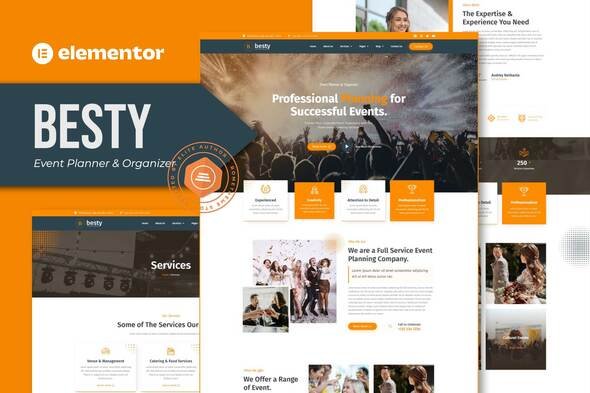
Besty – Event Planner & Organizer Elementor Template Kit
- Updated on May 1, 2026
- 100% Original Product & Well Documented
- Unlimited Domain Usage
*Important Note:
The image should not be Part of the template kit. You need to use your own reliable Source.


Original price was: ₹999.00.₹299.00Current price is: ₹299.00.
Launch your event planning website today. Besty gives you 12 pre-built pages, a commercial license, and lifetime updates — no developer needed. Pick it up and start customizing in minutes.
- Secured & Scanned by Virus total & McAfee.
- Access to Free updates for Lifetime
- All products are Under GPL License (Unlimited Domain Usage)
- We Not Provide any Support For this Product

Lifetime Membership
Access 6700+ Premium WordPress Themes & Plugins, Elementor Templates, Mobile Apps, PHP scripts with Lifetime Updates.
Join Premium MembershipRecently Viewed
Besty Event Planner Template Kit — Your Website Could Be Live Today
Most event planners spend months waiting on web developers or thousands on agencies. Besty skips all that. It’s a complete website you can set up this afternoon — no code, no technical skills, no endless email chains.
Here’s what’s included: homepage, services, portfolio with filterable galleries, team profiles, testimonials, pricing layouts, contact page with forms, blog template, FAQ section, and footer with newsletter signup. Twelve pages total, ready to swap in your branding.
What’s Actually In The Kit
Homepage layouts with smooth animations and elegant typography. Service pages that explain what you do without sounding robotic. A portfolio section that lets past clients flip through your work — wedding planners, corporate event managers, and party organizers all use it the same way.
Beyond that:
- About page with space for team photos and your story
- Contact section with map integration and inquiry forms
- Pricing page layouts for your packages
- Blog template if you want to share planning tips
- FAQ page for the questions you answer every day
- Footer with social links and email signup
Built For Event Businesses, Not Generic Portfolios
The color palette handles weddings, corporate events, birthdays — whatever you specialize in. Typography choices lean elegant but stay readable. Because when a couple is browsing on their phone at lunch, they shouldn’t need to squint.
Only free Elementor widgets. That means no hidden premium plugins, no surprise costs. Headers and footers stay consistent across every page. Mobile design works — most of your clients will book you from their phones anyway.
Who Uses Besty
Wedding planners use it to show off their portfolio and attract couples browsing venues. Corporate event managers need that polished business presence to win bigger contracts. Birthday party planners, conference organizers, caterers — anyone who needs to look professional without hiring a designer.
Web developers and agencies grab this to speed up client work. Drop in the client’s branding, customize a few pages, ship it fast. Commercial license covers unlimited client projects.
Getting Started Is Straightforward
Install free Elementor, upload this kit, and you’re editing. Replace the placeholder text with your business name and services. Swap demo photos for your actual work. Most people finish setup in one afternoon.
Hit a snag? Support responds within 24 hours. The included docs walk you through installation, customization, and launch step by step.
Why Not Pay For Custom Development?
A professional custom website runs $3,000 to $15,000 — before revisions. You also wait weeks or months while someone else builds it. Besty costs a fraction of that, and you get it immediately.
One payment. Lifetime updates included. Commercial license. Support when you need it.
Download Besty Today
Your website should match the quality of your events. Download Besty, spend an afternoon customizing it, and launch something you’re actually proud to show clients.
Only logged in customers who have purchased this product may leave a review.
How to use Kit:
Install and activate the “Template Kit – Import” plugin from Plugins > Add New in WordPress.
Do not unzip.
Go to Template Kit – Import > Upload Template Kit Zip File button.
Before importing a template, ensure the Install Requirements button is clicked to activate required plugins.
For best results, do not import more than one template at a time.
RELATED PRODUCTS

DIVI – Original License | One Time Payment – Exclusive Deal

Elementor Pro 4.2.1 + Elementorism Landing Pages WordPress Plugin

907 5.3.6 – Responsive Multi-Purpose WordPress Theme

Element Pack Pro 9.1.0 – Addon For Elementor






 Mobile Apps
 php script
 How to

Reviews
There are no reviews yet