
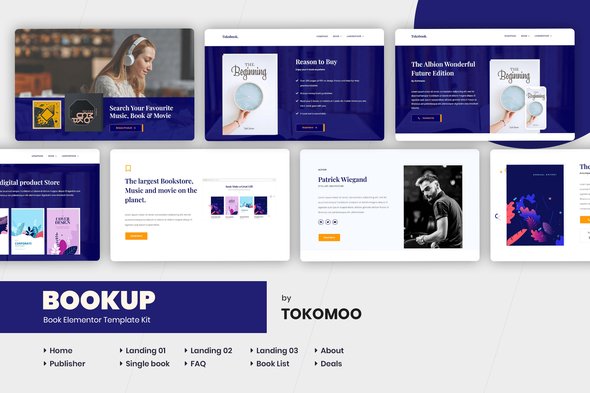
Bookup | Book Store Elementor Template Kit
- Updated on May 1, 2026
- 100% Original Product & Well Documented
- Unlimited Domain Usage
*Important Note:
The image should not be Part of the template kit. You need to use your own reliable Source.


- Coupon "b2g1" has expired.
- Coupon "b2g1" has expired.
- Coupon "b2g1" has expired.
- Coupon "b2g1" has expired.
- Coupon "b2g1" has expired.
Original price was: ₹999.00.₹299.00Current price is: ₹299.00.
Launch a professional book store website today with Bookup. Elementor template kit with 10+ sections, WooCommerce-ready, instant download, lifetime updates.
- Secured & Scanned by Virus total & McAfee.
- Access to Free updates for Lifetime
- All products are Under GPL License (Unlimited Domain Usage)
- We Not Provide any Support For this Product

Lifetime Membership
Access 6700+ Premium WordPress Themes & Plugins, Elementor Templates, Mobile Apps, PHP scripts with Lifetime Updates.
Join Premium MembershipRecently Viewed
Bookup Elementor Template Kit for Your Book Store Website
Bookup gives you a complete website foundation for bookstores, authors, and publishers — without the developer bill. Twelve pre-built sections cover everything from book showcases to author bios, event calendars to newsletter signups. Install the free Elementor plugin, import the template, swap in your content. Done.
What Bookup Includes
This kit was built specifically for book-related businesses. You get headers with navigation built for browsing, hero sections that display featured titles, book grids with proper cover art layouts, author profile pages, event announcement sections, and newsletter signup forms. Typography prioritizes readability — your visitors should focus on the books, not fight the design.
Key Features of the Bookup Template Kit
Everything serves a practical purpose:
- 12 section layouts ready to drag into place in Elementor
- WooCommerce-compatible product grids for selling online
- Mobile-responsive design that adapts to phones, tablets, and desktops
- Clean structure that search engines can read and index properly
- Event sections built for launch parties, book tours, and signings
- Author bio templates with space for headshots, credentials, and links
The kit runs on the free Elementor plugin. WordPress is your only requirement. Change colors, adjust spacing, replace placeholder images — all through the visual editor. No code, no templates within templates, no confusion.
Who Uses Bookup
Three groups get the most value. Publishers use it to display catalogs without wrestling with complex themes. Independent authors build a home base for direct sales and reader connections. Small online bookstores launch quickly and update as inventory changes.
Bookstore owners particularly like how fast it handles seasonal launches. New releases, holiday promotions, author events — swap in the content, publish, done. No waiting on developers for simple updates.
Getting Started Takes About 20 Minutes
Step one: install Elementor on your WordPress site. Step two: upload the Bookup template files from your dashboard. Step three: replace headlines, book covers, and author info with your own.
Each section stands alone. Customize what you need, leave what you don’t. The structure holds together whether you use eight sections or all twelve.
What You Get With Your Purchase
One payment covers lifetime access. When WordPress or Elementor releases updates, your kit updates too — at no extra cost. Commercial licensing is included, so you can use this for client sites or build-and-sell projects without additional fees.
Hiring a developer for a custom book store site typically runs thousands and takes weeks. Bookup costs less than a dinner out and launches the same day you buy it.
Start Building Your Site
Purchase and download immediately. One price, lifetime updates, commercial license, and support if you hit a snag. Build on your own timeline — no subscriptions, no recurring charges beyond your first purchase.
Only logged in customers who have purchased this product may leave a review.
How to use Kit:
Install and activate the “Template Kit – Import” plugin from Plugins > Add New in WordPress.
Do not unzip.
Go to Template Kit – Import > Upload Template Kit Zip File button.
Before importing a template, ensure the Install Requirements button is clicked to activate required plugins.
For best results, do not import more than one template at a time.
RELATED PRODUCTS

DIVI – Original License | One Time Payment – Exclusive Deal

Elementor Pro 4.2.1 + Elementorism Landing Pages WordPress Plugin

907 5.3.6 – Responsive Multi-Purpose WordPress Theme

Element Pack Pro 9.1.0 – Addon For Elementor






 Mobile Apps
 php script
 How to

Reviews
There are no reviews yet