
Bubup — Kids Store & Baby Shop Elementor Template Kit
- Updated on April 29, 2026
- 100% Original Product & Well Documented
- Unlimited Domain Usage
*Important Note:
The image should not be Part of the template kit. You need to use your own reliable Source.


- Coupon "b2g1" has expired.
- Coupon "b2g1" has expired.
- Coupon "b2g1" has expired.
- Coupon "b2g1" has expired.
- Coupon "b2g1" has expired.
Original price was: ₹999.00.₹299.00Current price is: ₹299.00.
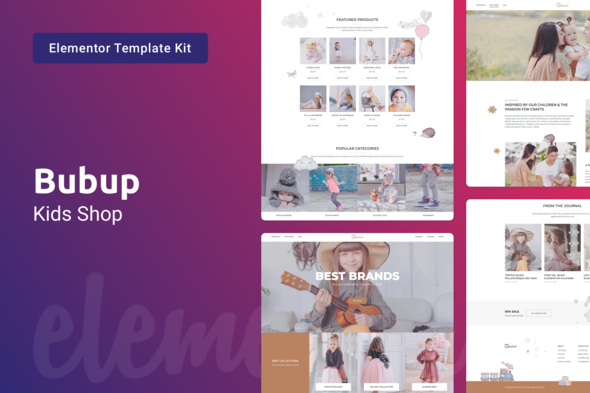
Launch your kids store in hours, not weeks. Bubup gives you 15+ pre-built pages that actually look good — playful enough for parents to trust you, polished enough to make the sale. Instant download included.
- Secured & Scanned by Virus total & McAfee.
- Access to Free updates for Lifetime
- All products are Under GPL License (Unlimited Domain Usage)
- We Not Provide any Support For this Product

Lifetime Membership
Access 6700+ Premium WordPress Themes & Plugins, Elementor Templates, Mobile Apps, PHP scripts with Lifetime Updates.
Join Premium MembershipRecently Viewed
Kids Store Elementor Template Kit for Your Online Baby Shop
Building an online presence for a children’s boutique or baby shop shouldn’t take months of design work. Bubup gives you a complete Elementor template kit that lets you launch a professional, playful website without touching a single line of code.
What It Is
Bubup is a premium Elementor template kit built specifically for children’s clothing stores, baby shops, toy retailers, and kids’ accessories businesses. It comes with 15+ pre-built pages covering your homepage, product catalogs, about us, contact, and all the key landing pages your store needs. Every layout uses a warm, inviting design language that resonates with parents and caregivers — without sacrificing the professionalism that drives conversions.
Key Features
This kids store template kit was designed with real e-commerce needs in mind. Here’s what you get:
- 15+ pre-built pages optimized for product displays, collections, and seasonal promotions
- Fully responsive layouts that look great on desktop, tablet, and mobile devices
- WooCommerce-ready structure for product listings, cart, checkout, and inventory management
- Playful color palette and typography curated for children’s retail brands
- Drag-and-drop editing through Elementor — no coding required
- Commercial license included — use it for your own store or client projects
- Lifetime free updates and dedicated support
Each template section uses clean, semantic code that loads fast and stays stable across WordPress updates. No bloated scripts or unnecessary plugins here — just solid, maintainable pages that work.
Who It’s For
Bubup works for anyone launching or redesigning a kids-focused online store. It’s ideal for first-time store owners setting up their first website, established boutiques refreshing their digital presence, and freelance designers building client sites on a budget. If you’re selling children’s clothing, baby gear, toys, nursery items, or kids’ accessories, this template kit gives you a head start that generic templates simply can’t match.
How To Use It
Getting started takes less than 30 minutes. Install Elementor on your WordPress site, upload the Bubup kit, and you’re ready to customize. Swap in your logo, adjust colors to match your brand, add your product images, and publish. The kit works with any WordPress theme that supports Elementor, though it pairs especially well with Hello Elementor or Astra. From there, connect WooCommerce if you haven’t already, add your products, and your store is live.
Why Buy This
You could spend weeks learning design principles, hire a developer, or piece together free templates that don’t fit. Or download Bubup today and have a professional kids store website ready by tomorrow. One price. Instant access to all current and future updates. Use it on client projects too — commercial license is included.
Ready to Get Started?
Stop wrestling with generic templates that make your store look like everyone else’s. Download Bubup and give your kids store the professional, playful design it deserves.
Only logged in customers who have purchased this product may leave a review.
How to use Kit:
Install and activate the “Template Kit – Import” plugin from Plugins > Add New in WordPress.
Do not unzip.
Go to Template Kit – Import > Upload Template Kit Zip File button.
Before importing a template, ensure the Install Requirements button is clicked to activate required plugins.
For best results, do not import more than one template at a time.
RELATED PRODUCTS

DIVI – Original License | One Time Payment – Exclusive Deal

Elementor Pro 4.2.1 + Elementorism Landing Pages WordPress Plugin

907 5.3.6 – Responsive Multi-Purpose WordPress Theme

Element Pack Pro 9.1.0 – Addon For Elementor






 Mobile Apps
 php script
 How to
Reviews
There are no reviews yet