
Cabsy – Transport Company & On Demand Taxi Elementor Template Kit
- Updated on April 30, 2026
- 100% Original Product & Well Documented
- Unlimited Domain Usage
*Important Note:
The image should not be Part of the template kit. You need to use your own reliable Source.


Original price was: ₹999.00.₹299.00Current price is: ₹299.00.
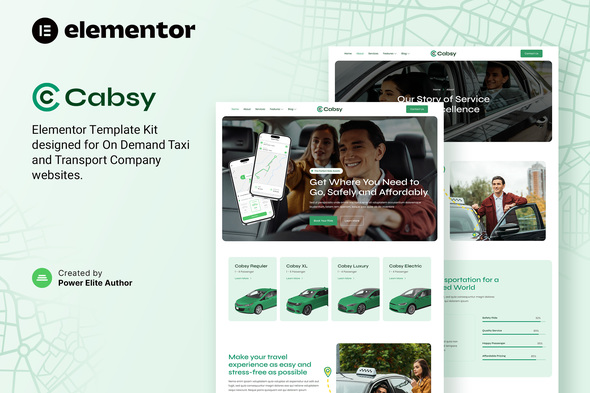
Skip the developer quotes. Cabsy gives you a professional taxi website — booking forms, pricing tables, driver profiles, mobile-ready — ready in an afternoon, no code needed.
- Secured & Scanned by Virus total & McAfee.
- Access to Free updates for Lifetime
- All products are Under GPL License (Unlimited Domain Usage)
- We Not Provide any Support For this Product

Lifetime Membership
Access 6700+ Premium WordPress Themes & Plugins, Elementor Templates, Mobile Apps, PHP scripts with Lifetime Updates.
Join Premium MembershipRecently Viewed
Cabsy Elementor Template Kit for Transport & Taxi Businesses
Building a professional website for your taxi service or transport company shouldn’t take months or cost thousands. Cabsy gives you a complete, ready-to-use Elementor Template Kit that lets you launch a stunning website in a single afternoon — no design skills or coding knowledge required.
Whether you’re running a single taxi, managing a fleet, or offering car rental services, Cabsy has every section you need. Service showcases, booking forms, driver profiles, testimonial sections — all in a clean, modern layout that works perfectly on mobile devices where most of your customers will find you.
What You Get with the Cabsy Template Kit
This isn’t a basic theme with limited customization options. Cabsy provides a complete set of professionally designed pages and sections that you can mix, match, and customize directly within the Elementor editor.
- Home page with hero section, service highlights, and call-to-action
- About page for your company story and team introduction
- Services page with pricing tables and vehicle options
- Booking form integrated with contact information fields
- Driver profile templates to showcase your team
- Blog section layout for company news and updates
- Contact page with maps and multiple contact methods
Who Is This Template For?
Cabsy works for taxi companies, private car services, airport transfers, car rental businesses, and shuttle services. If you want to compete with larger operators without the massive development budget, this template levels the playing field.
Freelance designers building sites for transport industry clients will find it useful too. Instead of starting from scratch, you can deliver a polished result in a fraction of the time.
Easy Setup, No Technical Skills Needed
The entire kit uses Elementor’s drag-and-drop builder. You don’t need to touch a single line of code. Every section is designed to work together, and you can swap out images, colors, and text in minutes. The template is optimized for speed and SEO, so your site will load fast and rank well in local search results.
One-Time Purchase, Lifetime Value
Unlike subscription-based website builders, you buy Cabsy once and own it forever. The template includes lifetime free updates, so you’ll always have access to the latest version. A commercial license is included, meaning you can use it for client projects or your own business without any ongoing fees.
- Instant download after purchase
- Commercial license included
- Lifetime free updates
- Dedicated support team ready to help
Ready to Get Started?
Stop paying monthly fees for generic website builders. Get Cabsy today and launch a professional transport website that actually represents the quality of your service. Download instantly and start customizing — your new website is waiting.
Only logged in customers who have purchased this product may leave a review.
How to use Kit:
Install and activate the “Template Kit – Import” plugin from Plugins > Add New in WordPress.
Do not unzip.
Go to Template Kit – Import > Upload Template Kit Zip File button.
Before importing a template, ensure the Install Requirements button is clicked to activate required plugins.
For best results, do not import more than one template at a time.
RELATED PRODUCTS

DIVI – Original License | One Time Payment – Exclusive Deal

Elementor Pro 4.2.1 + Elementorism Landing Pages WordPress Plugin

907 5.3.6 – Responsive Multi-Purpose WordPress Theme

Element Pack Pro 9.1.0 – Addon For Elementor






 Mobile Apps
 php script
 How to
Reviews
There are no reviews yet