
Carenta – Car Rental Business Elementor Template Kits
- Updated on May 4, 2026
- 100% Original Product & Well Documented
- Unlimited Domain Usage
*Important Note:
The image should not be Part of the template kit. You need to use your own reliable Source.


- Coupon "b2g1" has expired.
- Coupon "b2g1" has expired.
- Coupon "b2g1" has expired.
- Coupon "b2g1" has expired.
- Coupon "b2g1" has expired.
Original price was: ₹999.00.₹299.00Current price is: ₹299.00.
Stop spending weeks (and thousands) on website development. Carenta gives car rental businesses a professional, conversion-ready website in hours — built for Elementor, commercial license included.
- Secured & Scanned by Virus total & McAfee.
- Access to Free updates for Lifetime
- All products are Under GPL License (Unlimited Domain Usage)
- We Not Provide any Support For this Product

Lifetime Membership
Access 6700+ Premium WordPress Themes & Plugins, Elementor Templates, Mobile Apps, PHP scripts with Lifetime Updates.
Join Premium MembershipRecently Viewed
Carenta – Car Rental Business Elementor Template Kits
You’ve got the cars. You’ve got the customers waiting. What you don’t have is three months to wait for a developer to finish your site.
Carenta changes that. A complete Elementor template kit, ready to customize and live today — no code, no agency invoices.
This template works if you’re launching from scratch or upgrading an existing site. It gives you a polished, modern design that appeals to leisure travelers and business clients alike.
What It Is
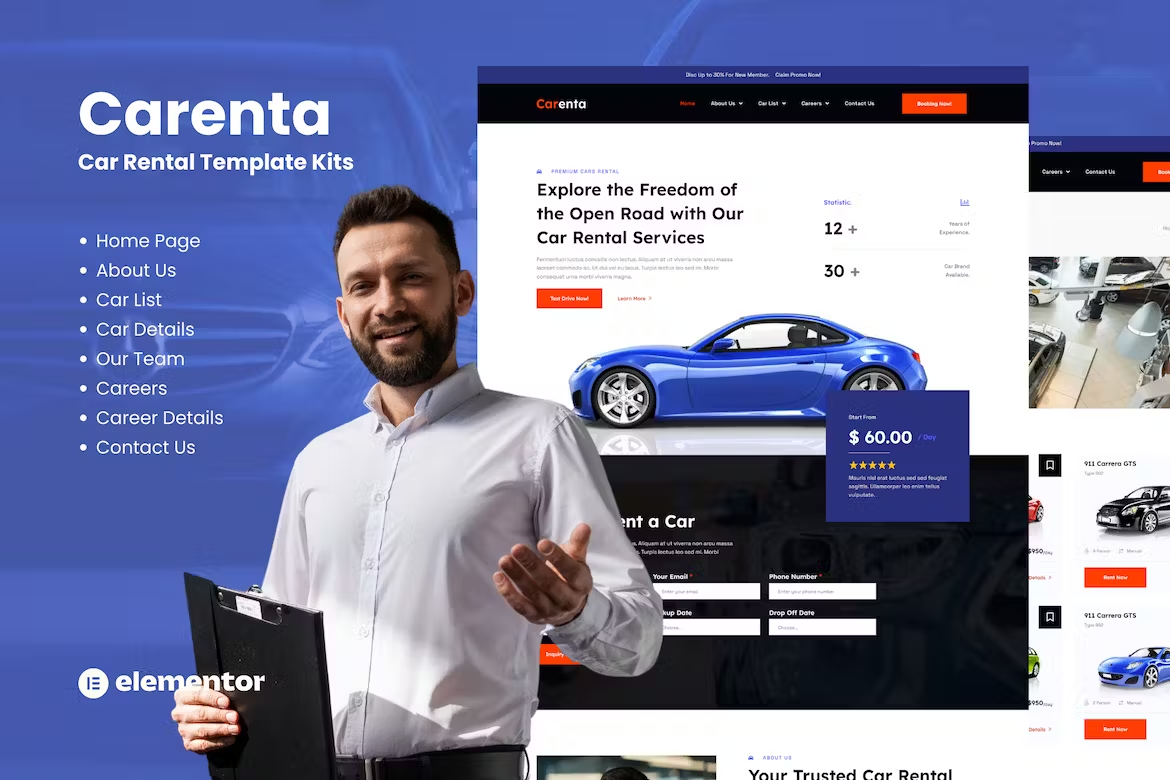
Carenta is a premium Elementor template kit built specifically for car rental companies, fleet owners, and automotive service businesses. It comes pre-designed with pages for showcasing your vehicle fleet, displaying rental packages, handling bookings, and building customer trust through testimonials and service sections.
The kit works with the free Elementor plugin and Hello Elementor theme. You open the template, customize it with your branding, and publish — that’s it.
Key Features
Every section in this kit was designed with one goal: helping you rent more cars. Here’s what’s included:
- Homepage with hero section, fleet showcase, service highlights, and a booking call-to-action
- Fleet listing pages with vehicle specs, pricing tiers, and availability indicators
- About, contact, and testimonials sections to build credibility and capture leads
- Responsive design — your site looks perfect on phones, tablets, and desktops
- SEO-friendly structure that helps search engines find your rental business
- Compatible with free Elementor and Hello Elementor theme
Who It’s For
Carenta was created for car rental business owners who need a professional website without the agency price tag. It’s also a smart choice for freelancers and web designers building sites for rental clients — deliver polished results in hours instead of weeks.
If you’re starting a new venture or upgrading from a clunky existing site, this kit removes the biggest bottleneck in your launch timeline.
How To Use It
Getting started takes three steps. Install the free Elementor plugin on your WordPress site. Import the Carenta template kit from your dashboard. Replace placeholder text and images with your fleet photos, pricing, and business details.
No code. No design skills. If you can use Word, you can build this website. Lifetime free updates included.
Why Buy This
Here’s the math: a custom developer costs $5,000-$15,000 and takes 4-8 weeks. Generic themes mean wrestling with outdated code and poor support. Carenta sits in the sweet spot — professionally designed for car rental businesses, backed by a commercial license that lets you use it for client projects or your own business. No restrictions. One-time payment. Instant download. Lifetime support included.
Ready to Get Started?
Your car rental business deserves a website that converts visitors into bookings. Download Carenta today and have a professional, booking-ready site live this week. Commercial license included. Lifetime updates. One-time payment.
Only logged in customers who have purchased this product may leave a review.
How to use Kit:
Install and activate the “Template Kit – Import” plugin from Plugins > Add New in WordPress.
Do not unzip.
Go to Template Kit – Import > Upload Template Kit Zip File button.
Before importing a template, ensure the Install Requirements button is clicked to activate required plugins.
For best results, do not import more than one template at a time.
RELATED PRODUCTS

DIVI – Original License | One Time Payment – Exclusive Deal

Elementor Pro 4.2.1 + Elementorism Landing Pages WordPress Plugin

907 5.3.6 – Responsive Multi-Purpose WordPress Theme

Element Pack Pro 9.1.0 – Addon For Elementor






 Mobile Apps
 php script
 How to

Reviews
There are no reviews yet