
Carlist – Modern Minimalist Car Rental Elementor Template Kit
- Updated on May 2, 2026
- 100% Original Product & Well Documented
- Unlimited Domain Usage
*Important Note:
The image should not be Part of the template kit. You need to use your own reliable Source.


- Coupon "b2g1" has expired.
- Coupon "b2g1" has expired.
- Coupon "b2g1" has expired.
- Coupon "b2g1" has expired.
- Coupon "b2g1" has expired.
Original price was: ₹999.00.₹299.00Current price is: ₹299.00.
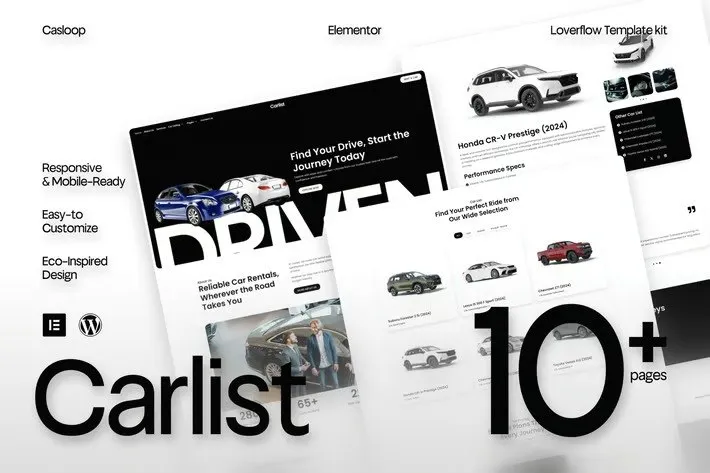
Build a car rental website that actually looks like you hired a pro. Carlist gives you 10+ pages built for vehicle rentals — homepage, listings, booking forms, the works. Download now, launch today.
- Secured & Scanned by Virus total & McAfee.
- Access to Free updates for Lifetime
- All products are Under GPL License (Unlimited Domain Usage)
- We Not Provide any Support For this Product

Lifetime Membership
Access 6700+ Premium WordPress Themes & Plugins, Elementor Templates, Mobile Apps, PHP scripts with Lifetime Updates.
Join Premium MembershipRecently Viewed
Carlist Elementor Template Kit — Your Car Rental Website, Live Today
Here’s the thing about most car rental websites: they either look like they were built in 2008, or they cost a small fortune to create. Carlist sits in the middle. It’s a template kit that actually makes your fleet look legitimate — without the designer invoice.
You get everything ready to go in Elementor, which is free. No coding knowledge needed. No monthly platform fees. No learning curve that eats up your weekend.
What’s Actually Included
Ten pages, built specifically for how car rental businesses work:
- Homepage with a hero section that actually converts
- Vehicle listings page where customers browse your fleet
- Individual car detail pages with specs, pricing, and photos
- Booking inquiry form (simple, not overwhelming)
- About, contact, testimonials, and service pages
The design is clean. Lots of breathing room. Professional fonts. It makes a ten-year-old Corolla look presentable and a Mercedes look, well, like a Mercedes.
Built for How Customers Actually Rent Cars
People don’t browse car rental sites leisurely. They filter by price, check passenger count, look at transmission options, and book. Carlist’s vehicle grid was designed around this behavior — specs visible at a glance, smart filters that narrow down choices fast, and mobile responsiveness so phone browsers don’t bounce.
The one-click import means you’re not rebuilding anything. Just import, swap in your vehicles and photos, adjust the colors to match your logo, and you’re live.
Who It’s For
Running five cars or fifty? Doesn’t matter. The layout scales without looking empty on small fleets or cramped on larger ones. Works for traditional rentals, luxury vehicles, airport shuttles, van services — anywhere you need to show cars and take bookings.
The Realistic Timeline
Expect a few hours, not a few weeks. The documentation walks you through setup step by step. If you can copy-paste text and upload images, you’re qualified. No developers, no designers, no back-and-forth emails.
Why Not Just Build It Myself / Hire Someone / Use a Website Builder?
You could. Here’s what you’d be signing up for:
Hiring a developer: $3,000 to $10,000, minimum. Weeks of revisions. That back-and-forth where they ask if you want “the blue or the slightly different blue.”
Generic website builders: Their car rental templates are an afterthought. You’ll spend hours forcing a square peg into a round hole.
Carlist solves this with one purchase. Instant download. Commercial license included (use it for client projects). Lifetime updates. Real support when you need it.
Pay once. Use it forever. The first booking that comes through your new site? It’ll have paid for itself.
Only logged in customers who have purchased this product may leave a review.
How to use Kit:
Install and activate the “Template Kit – Import” plugin from Plugins > Add New in WordPress.
Do not unzip.
Go to Template Kit – Import > Upload Template Kit Zip File button.
Before importing a template, ensure the Install Requirements button is clicked to activate required plugins.
For best results, do not import more than one template at a time.
RELATED PRODUCTS

DIVI – Original License | One Time Payment – Exclusive Deal

Elementor Pro 4.1.3 + Elementorism Landing Pages WordPress Plugin

907 5.3.6 – Responsive Multi-Purpose WordPress Theme

Element Pack Pro 9.1.0 – Addon For Elementor

Lifetime Mini Membership





 Mobile Apps
 php script
 How to
Reviews
There are no reviews yet