
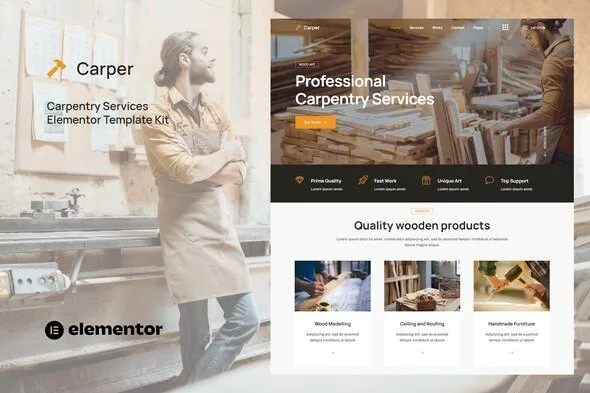
Carper – Carpenter & Craftman Elementor Template Kit
- Updated on May 2, 2026
- 100% Original Product & Well Documented
- Unlimited Domain Usage
*Important Note:
The image should not be Part of the template kit. You need to use your own reliable Source.


- Coupon "b2g1" has expired.
- Coupon "b2g1" has expired.
- Coupon "b2g1" has expired.
- Coupon "b2g1" has expired.
- Coupon "b2g1" has expired.
Original price was: ₹999.00.₹299.00Current price is: ₹299.00.
8-page carpenter website template for Elementor. Portfolio, services, contact layouts that turn visitors into clients. Commercial license included.
- Secured & Scanned by Virus total & McAfee.
- Access to Free updates for Lifetime
- All products are Under GPL License (Unlimited Domain Usage)
- We Not Provide any Support For this Product

Lifetime Membership
Access 6700+ Premium WordPress Themes & Plugins, Elementor Templates, Mobile Apps, PHP scripts with Lifetime Updates.
Join Premium MembershipRecently Viewed
Build a Professional Carpenter Website Without Touching Code
Your craftsmanship deserves a website that looks the part. Carper gives you that professional presence without the custom-build price tag.
This Elementor Template Kit comes with 8 pre-designed pages: homepage, about section, project portfolio, service listings, contact form, and more. The layouts show off your work. Testimonial sections build trust. Service pages are structured to answer client questions and drive inquiries. No design experience needed.
What’s Inside the Kit
Not a random pile of widgets. A cohesive system where every section, header, and footer works together across all pages.
- Homepage with hero section, service highlights, and call-to-action
- About page with team profiles and company story layouts
- Services page with pricing table placeholders
- Portfolio/gallery page for completed projects
- Contact page with integrated form and map placeholder
- Blog page layout for sharing tips and project updates
- Fully responsive and mobile-optimized designs
- Works with free Elementor and Elementor Pro
Who Is This For
Three types of people get the most out of Carper. Carpentry businesses and woodworkers who need a professional site without hiring a developer. Freelance designers and agencies building sites for their carpentry clients. Contractors who want to update their online presence quickly and get back to the job site.
If you’re a one-person shop or small team, this kit removes the biggest barrier to getting online: time. No HTML. No designer. No waiting weeks. Open Elementor, import the kit, swap in your photos and contact info, publish.
Getting Started
Under 30 minutes to launch. Install the free Elementor plugin on WordPress, upload the Carper kit, and start editing. Every section has placeholder text you replace with your own content. Add your project photos, phone number, service areas. Go live.
The kit works with any WordPress theme and pairs especially well with Astra, Hello Elementor, or other lightweight themes. Use the full package or mix pages from the kit—your call.
Why This Template Kit
You could spend hours hunting down templates, page builders, and design assets separately. Carper gives you a complete carpenter website system in one download.
Commercial license included. Use it for client projects or your own business—no restrictions. Lifetime updates come free. When WordPress or Elementor releases changes that affect the template, you get the fixes without paying again.
Built for conversions. Service pages and contact sections guide visitors toward booking. Portfolio layout showcases your finished work. Every element exists for one reason: helping potential clients trust your skills and reach out.
Download Now
Get Carper and have a professional carpenter website live this week. One-time payment, lifetime access, commercial license included. No subscriptions. No hidden fees.
Only logged in customers who have purchased this product may leave a review.
How to use Kit:
Install and activate the “Template Kit – Import” plugin from Plugins > Add New in WordPress.
Do not unzip.
Go to Template Kit – Import > Upload Template Kit Zip File button.
Before importing a template, ensure the Install Requirements button is clicked to activate required plugins.
For best results, do not import more than one template at a time.
RELATED PRODUCTS

DIVI – Original License | One Time Payment – Exclusive Deal

Elementor Pro 4.2.1 + Elementorism Landing Pages WordPress Plugin

907 5.3.6 – Responsive Multi-Purpose WordPress Theme

Element Pack Pro 9.1.0 – Addon For Elementor






 Mobile Apps
 php script
 How to

Reviews
There are no reviews yet