
Cashly – Finance App & SaaS Showcase Elementor Template Kit
- Updated on May 3, 2026
- 100% Original Product & Well Documented
- Unlimited Domain Usage
*Important Note:
The image should not be Part of the template kit. You need to use your own reliable Source.


Original price was: ₹999.00.₹299.00Current price is: ₹299.00.
Get a polished finance website live in hours — no coding needed. Cashly includes 15+ pages, a commercial license for client work, and instant download. Built for fintech founders, freelance developers, and anyone who needs a professional finance site without the agency price tag.
- Secured & Scanned by Virus total & McAfee.
- Access to Free updates for Lifetime
- All products are Under GPL License (Unlimited Domain Usage)
- We Not Provide any Support For this Product

Lifetime Membership
Access 6700+ Premium WordPress Themes & Plugins, Elementor Templates, Mobile Apps, PHP scripts with Lifetime Updates.
Join Premium MembershipRecently Viewed
Cashly Finance App Elementor Template Kit
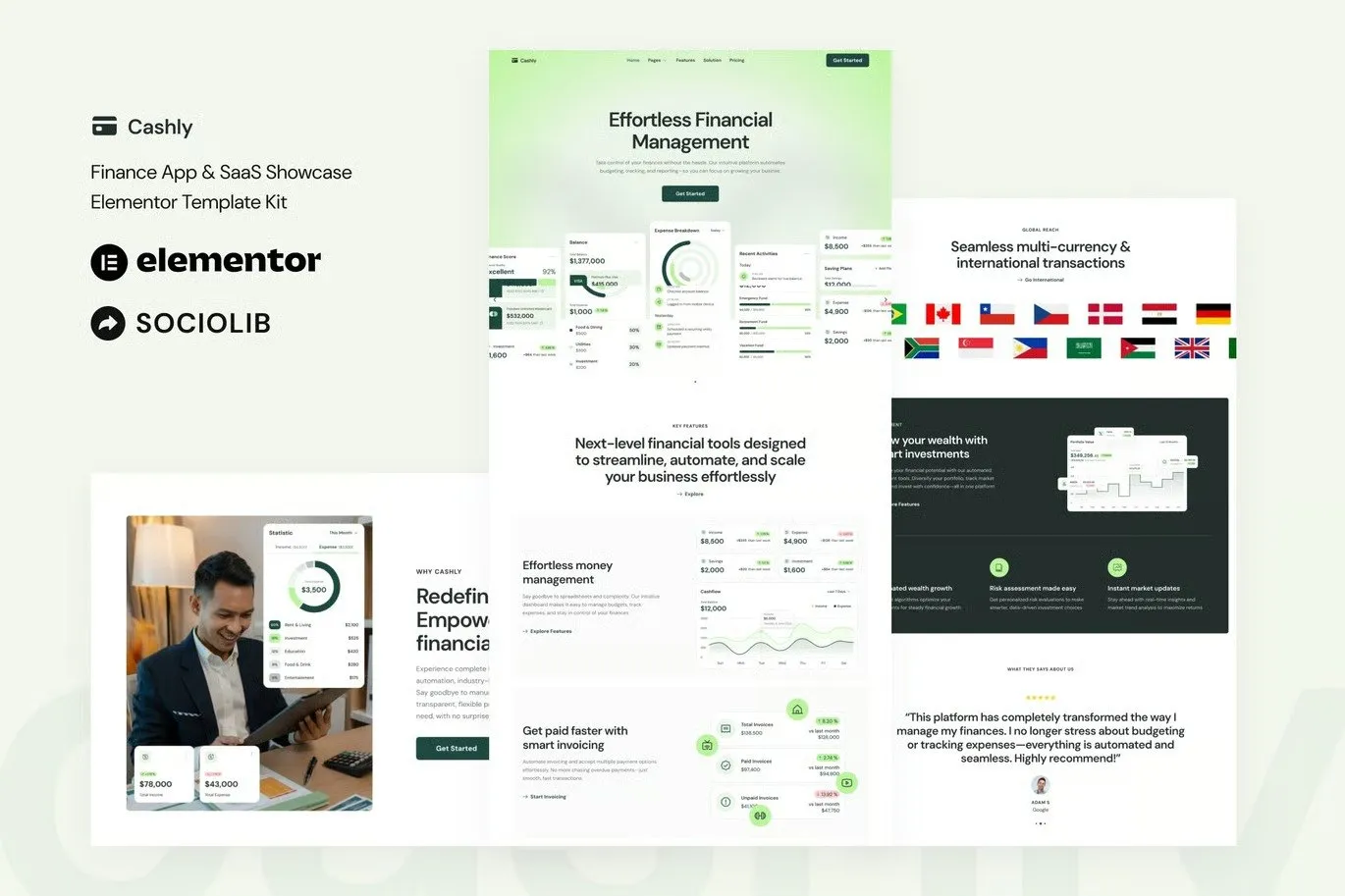
You’ve got a finance app to launch. You don’t have weeks to wait on a designer. Cashly is an Elementor Template Kit built for the digital finance space — clean layouts that build trust, sections designed to convert, and a look that says “we know what we’re doing.”
Freelance dev building client sites? Startup founder putting together a landing page? This cuts your timeline from weeks to hours. Download, import, customize — you’re live before end of day.
What’s Inside
One complete kit. Everything you need for a full finance website:
- 15+ Pre-Built Pages — Home, features, pricing, about, contact, blog, and more. Covers your entire funnel from awareness to signup.
- Finance-Specific Sections — App showcases, dashboard previews, stat counters, pricing tables, testimonial sliders, FAQ areas. All the blocks fintech and SaaS sites actually need.
- Dark and Light Variants — Minimal layouts with generous whitespace. Typography that reads professional without trying too hard.
- Responsive on Every Device — Mobile, tablet, desktop. Your site looks polished no matter where visitors come from.
- Free Elementor Only — No Pro subscription required. Install the free plugin and start editing.
Who It’s For
Cashly fits if you’re:
- Building client sites and need to turn projects around faster without compromising quality
- A fintech startup or finance app founder who wants a professional online presence without the agency quote
- Running a SaaS in the payments, budgeting, or investment space and need a marketing site that doesn’t look like every other SaaS template
- A financial services business owner who’d rather spend time on your practice than learn web design
How It Works
No setup headaches. Here’s the whole process:
- Install the free Elementor plugin on your WordPress site
- Import the Cashly template kit through Elementor’s built-in wizard
- Swap placeholder text and images for your own brand assets
- Hit publish
Drag-and-drop editing means you can change text, colors, and layouts without touching code. Anyone can do it.
The Practical Stuff
Here’s why people choose Cashly over expensive theme bundles or custom builds:
Commercial License. Use it for your own projects or charge clients for sites you build. Unlimited sites, one purchase.
Free Lifetime Updates. New sections and improvements ship to you automatically. No recurring fees, no surprises.
One-Time Payment. $29 at checkout. Done. No subscriptions eating into your project budget.
Lifetime Support. Hit a snag? Our team responds. No chatbots, no waiting three days for an email.
That’s $29 versus the hundreds you’d spend on a custom build. One paid client project covers the cost outright.
Get Started
Ditch the generic themes that make your finance app look like every other startup. Download Cashly and have a professional website ready today. Instant access, commercial license, ongoing support — all included.
Only logged in customers who have purchased this product may leave a review.
How to use Kit:
Install and activate the “Template Kit – Import” plugin from Plugins > Add New in WordPress.
Do not unzip.
Go to Template Kit – Import > Upload Template Kit Zip File button.
Before importing a template, ensure the Install Requirements button is clicked to activate required plugins.
For best results, do not import more than one template at a time.
RELATED PRODUCTS

DIVI – Original License | One Time Payment – Exclusive Deal

Elementor Pro 4.1.3 + Elementorism Landing Pages WordPress Plugin

907 5.3.6 – Responsive Multi-Purpose WordPress Theme

Element Pack Pro 9.1.0 – Addon For Elementor

Lifetime Mini Membership





 Mobile Apps
 php script
 How to
Reviews
There are no reviews yet